

Web-to-print build options: SaaS, plugin, custom build or hybrid
Web-to-print build options come down to four approaches: an off-the-shelf SaaS product, a commerce plugin or app extended for print, a custom build, or a hybrid that keeps a product and engineers only the gap. The right choice depends on how unusual the pricing rules, output specification and production integration are.
Start a project brief Explore servicesReviewed by CEO, Netbase JSC · Published 29 Sep 2026 · Updated 14 Oct 2026 · 11 min read

What are the four ways to get a web-to-print platform?
A print business that wants customers to configure, price, design and order print online has four realistic routes. The first is an off-the-shelf SaaS product: a hosted web-to-print platform, configured rather than programmed. The second is to extend a commerce plugin or app: a WooCommerce, Shopify, Magento or similar store with print extensions added and adjusted. The third is a custom build: storefront, pricing, design tool and output engineered for this business. The fourth is a hybrid: keep a product or platform for what it does well and engineer only the part it cannot do.
None of the four is better in general. Each is the right answer for a particular combination of catalogue, pricing model, output specification and production system. This comparison, dated 29 September 2026, sets out the criteria first and then shows how each approach tends to meet them, so a buyer can reach a decision without a supplier making it for them.
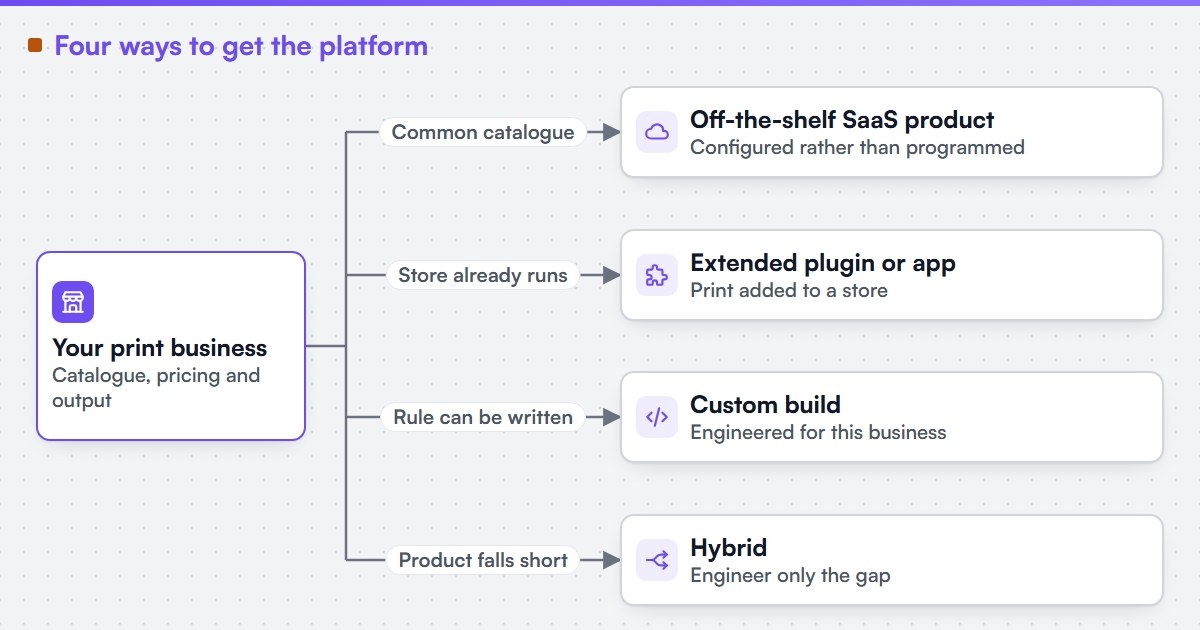 (opens the full-size diagram in a new tab)
Is SaaS web-to-print enough, or do I need a custom build?
Off-the-shelf SaaS is enough when the catalogue is common, pricing is a list with quantity breaks, the printer accepts the product's standard output, and no production system needs orders delivered automatically. A custom build is justified only when a pricing model, an output contract or a production integration is a real function of several inputs that no product can express.
How is this different from "When not to hire us"?
This page and when not to hire us answer different questions. That page asks whether a buyer is ready for a service engagement at all: is there a defined outcome, lawful access to the systems and someone who can accept the result. This page assumes the buyer wants a platform and asks which of four approaches fits. A buyer who reads this comparison and concludes that a packaged product fits should read that page next, because it explains how to limit any services work to the remaining gap.
Which criteria decide the choice?
Eight criteria decide most build-versus-buy choices in web-to-print. They are listed before the comparison so the table can be checked against them rather than read as a verdict.
- Catalogue fit. How closely the products, options and dependencies match what the approach models out of the box.
- Pricing-rule complexity. Whether the price is a list with quantity breaks, or a function of size, stock, finishing, run length and customer account.
- Output specification. Whether production needs a specific PDF target, spot colour handling, imposition or automated preflight.
- Production integration. Whether orders must reach an MIS, ERP or scheduler without being retyped, through an interface that system sanctions.
- Time to first order. How soon a customer can place a real, producible order.
- Change control. Who can change a rule, a product or an integration, and how quickly.
- Ownership and licence terms. What the buyer owns at the end, what stays under a vendor's or component owner's terms, and how the fee scales.
- Running responsibility. Who patches, monitors, upgrades and answers when an order fails.
How do the four options compare?
The table describes typical patterns as of 29 September 2026. Individual products and platforms differ, and a vendor's current terms and documentation override anything written here.
| Criterion | Off-the-shelf SaaS | Extended plugin or app | Custom build | Hybrid platform |
|---|---|---|---|---|
| Catalogue fit | Strong for common products the product already models | Good where the commerce platform's product model stretches to print options | Fits any catalogue, because it is modelled for it | Product covers the common catalogue; engineering covers the exceptions |
| Pricing-rule complexity | Limited to the rule types the product offers | Limited by the platform's cart and price hooks | Any rule the business can write down | Product prices simple lines; an external rule engine prices the rest |
| Output specification | Whatever output the product generates | Depends on the extension's PDF output | Built to the printer's written specification | Engineered output where the product's output falls short |
| Production integration | Built-in connectors, if one exists for your system | Usually custom work against the MIS interface | Custom work against the MIS interface | Custom adapter between product and MIS |
| Time to first order | Shortest for a standard catalogue | Short to medium | Longest | Medium |
| Change control | Configuration by the buyer; product changes by the vendor | Buyer or agency, within the platform's upgrade cycle | Buyer or its chosen supplier | Split: product by vendor, custom parts by buyer |
| Ownership and licence terms | Governed by the subscription terms; read how the fee scales | Platform and extension licences plus any custom code | Defined in the engagement contract | Mixed; each component keeps its own terms |
| Running responsibility | Mostly the vendor's, per its terms | The buyer or its agency | The buyer or its chosen supplier | Shared, and must be written down |
Read the table by row, not by column. A buyer whose rows all sit in the first column has a SaaS product decision to make, not an engineering one.
When is an off-the-shelf product the right answer?
An off-the-shelf web-to-print product is the right answer when the catalogue is common, the price is a list with quantity breaks, the printer accepts the product's standard output, and no production system needs orders delivered automatically. In that case a custom build spends money reproducing behaviour a product already has, and the buyer inherits running responsibility it did not need. Hiring an engineering service is not the answer here; configuring the product well is. The same holds when a business needs to be selling within weeks and can accept the product's limits for its first year.
When does extending a plugin or app make sense?
Extending a commerce plugin or app makes sense when the business already runs a store on that platform, customers already buy there, and print is a new line rather than the whole business. The platform's cart, checkout, accounts and payment stay in place, and print options, a design tool and print-ready output are added. The limit is the platform's own extension model. Commerce platforms release and retire interfaces on their own schedule: Shopify, for example, publishes a new API version every quarter and supports each stable version for at least twelve months, according to its documentation checked on 29 September 2026. Every extension has to follow those changes. The web-to-print ecommerce integration page describes that engagement shape.
When is a custom build justified?
A custom build is justified when the business's advantage is a rule that products distort: a pricing model that is a real function of many inputs, an output contract prepress enforces, an ordering path into an existing MIS, or a B2B approval structure that no product models. The test is whether the rule can be written down. If it can, it can be built and accepted against tests; if nobody can write it down, code will not settle it. A custom build also carries the longest route to the first order and a running responsibility the buyer must plan for from the first day.
Signs that a product has been outgrown, such as prices corrected by hand or orders retyped into production, are described in outgrown web-to-print SaaS.
Why is the hybrid often the honest answer?
A hybrid keeps a product or commerce platform for the parts it does well and engineers only the gap: usually an external pricing rule engine, an output pipeline, or an adapter that sends orders to the MIS through the interface that system sanctions. The CIP4 organisation maintains JDF, JMF and XJDF for exactly this kind of exchange between management systems and production. The hybrid's risk is the seam between the two halves, so its specification must say which system owns each piece of data: the product, the price, the artwork reference and the order status.
Netbase JSC, which operates Web2Print Solutions, has delivered 50+ web-to-print platforms. Netbase JSC maintains reusable web-to-print components - a browser-based online designer, rule-based print pricing templates, print-ready PDF output with CMYK conversion, bleed and trim, storefront connectors for WooCommerce, Shopify, Wix and custom stores, and a photobook and multi-page layout editor - which an engagement may reuse under their own licence terms. That is why a hybrid is often proposed here: the reusable part is not rebuilt. Client-specific deliverables, access and handover are defined in the engagement contract. Pre-existing software, products, APIs and third-party components remain subject to their respective ownership and licence terms.
Turn this into a scoped brief
If you have narrowed the choice to two approaches and cannot separate them, send a project brief with your three hardest products, how each is priced today and the system each order must reach. Those three lines usually decide the comparison.
What should a buyer do before choosing?
A buyer should write the requirements before asking any supplier or vendor which approach fits, because each will otherwise answer with its own approach. The web-to-print RFP requirements checklist lists what to write: products and options, pricing rules, artwork and preflight, integrations, roles, output files, acceptance tests, ownership and support. The shared vocabulary for those requirements is in the web-to-print glossary.
Where the buyer wants an independent answer before committing, a discovery engagement fits. We can run a paid discovery engagement that produces an architecture, an explicit pricing-rule specification, an integration inventory and a phased plan you could hand to another supplier. The output of a discovery engagement is written so that a supplier other than us can execute it. Web-to-print architecture and discovery describes the scope. A platform that is already half-built follows a different route, described under web-to-print migration and rescue.
Limitations
This comparison describes approaches, not named products, and it does not rank vendors. It publishes no prices: this site publishes no prices, rates, day rates or payment terms, so cost is discussed only as a criterion to check in each option's own terms. Platform facts are dated and sourced below and will change. Web2Print Solutions is the web-to-print engineering service of Netbase JSC. Delivery records cited on this site belong to Netbase JSC; where no delivered example of a capability is published, the page says so rather than implying a record. No build-option decision made for a client is published here.
Discuss your web-to-print project
Frequently asked questions
Often, for a standard catalogue, because the product's cost is shared across its customers. The comparison changes when the product cannot express the pricing or output rules and staff correct orders by hand. That correction work is a running cost too, and it belongs in the comparison.
Yes, and it is a reasonable plan if the move is designed for from the start. Keep product data, customer accounts, orders and artwork exportable, and write down the pricing rules as they are, so a later migration moves data rather than rediscovering it.
A hybrid has two maintenance paths: the product's upgrades and the custom parts. The seam between them needs its own tests, run after every product upgrade. Budget attention for that seam; it is where hybrids fail when nobody owns it.
The person who owns the pricing rules and the person who owns production acceptance, together. A developer or vendor can inform the decision, but the criteria on this page are business decisions first.
References (2)
- Shopify, About Shopify API versioning, accessed 2026-09-29.
- CIP4, JDF and XJDF print automation, accessed 2026-09-29.