

Web-to-print on Wix
Wix suits a small retail print or photo-gift shop that wants a product designer inside Wix Stores, within firm limits. Wix Stores allows 6 product options and 1,000 variants per product, and calculated prices need an app-side override or catalog plugin. Corporate B2B print portals are excluded, because Wix Stores has no native company buying model.
Start a project brief Explore servicesReviewed by CEO, Netbase JSC · Published 29 Sep 2026 · Updated 2 Oct 2026

Where does Wix fit a print catalogue?
Wix fits a small retail print business that already runs its website on Wix and sells a short list of personalised products: photo prints, canvas, mugs, cards, stickers and simple apparel. The owner wants customers to design on the product page and pay in the same store, without moving the site. For that shape of business, a product designer added to Wix Stores is often the smallest workable change.
Wix does not fit corporate print buying. We do not scope B2B or corporate print portals on Wix, because the ordering model those portals need, with company accounts, approval chains and purchase orders, is not part of Wix Stores. Wix's help center describes wholesale selling through a third-party app rather than a native company model, and on 29 September 2026 we found no native company accounts or purchase-order approval in Wix's documentation. A business that needs corporate ordering is better served by a platform with a B2B model, such as Magento and Adobe Commerce web-to-print.
This page is one of the platform pages in the web-to-print integration directory. Each Wix fact below was checked against Wix's help center or developer documentation on 29 September 2026.
Key takeaways
- Wix Stores allows 6 product options and 1,000 variants per product, so quantity and custom dimensions stay out of the variant model on anything but the simplest catalogue.
- A calculated print price needs an app: a catalog item override with an admin permission scope, or the Catalog service plugin that supplies item details on demand.
- Production starts when the Order Approved event fires, carrying a unique id a print adapter stores to ignore duplicates and never sending an unpaid order to production.
- Wix Stores has no native company accounts or purchase-order approval, so a corporate print portal is not scoped on Wix; a B2B platform is the better fit.
- Wix suits a small catalogue a business already runs on Wix; it is usually the first platform businesses outgrow once B2B buyers or production integration arrive.
How does print data cross a Wix store?
-
Product options
Wix Stores separates options from modifiers. Options create variants, and each variant can hold its own price, SKU and inventory. Modifiers collect information, such as free text, without creating variants; Wix's Catalog V3 documentation shows them with, at most, a fixed price add-on. For print, stock and size usually become options, while the design reference and short personalisation text become modifiers.
-
Design and artwork
A product designer embedded in the store saves the design and returns an identifier. Wix's eCommerce documentation lets an app attach its own data to a cart item through the
catalogReference.optionsobject, which persists through cart, checkout and order. The design identifier travels there, and the production file is generated after payment from the approved design. -
Price
The designer shows an estimate. The authoritative amount comes from a print pricing engine and reaches the cart by one of the mechanisms described below.
-
Order to job
An order event tells an adapter that an order is ready, and the adapter reads the order, maps each line to production codes and submits the job to the printer's production system or fulfilment partner.
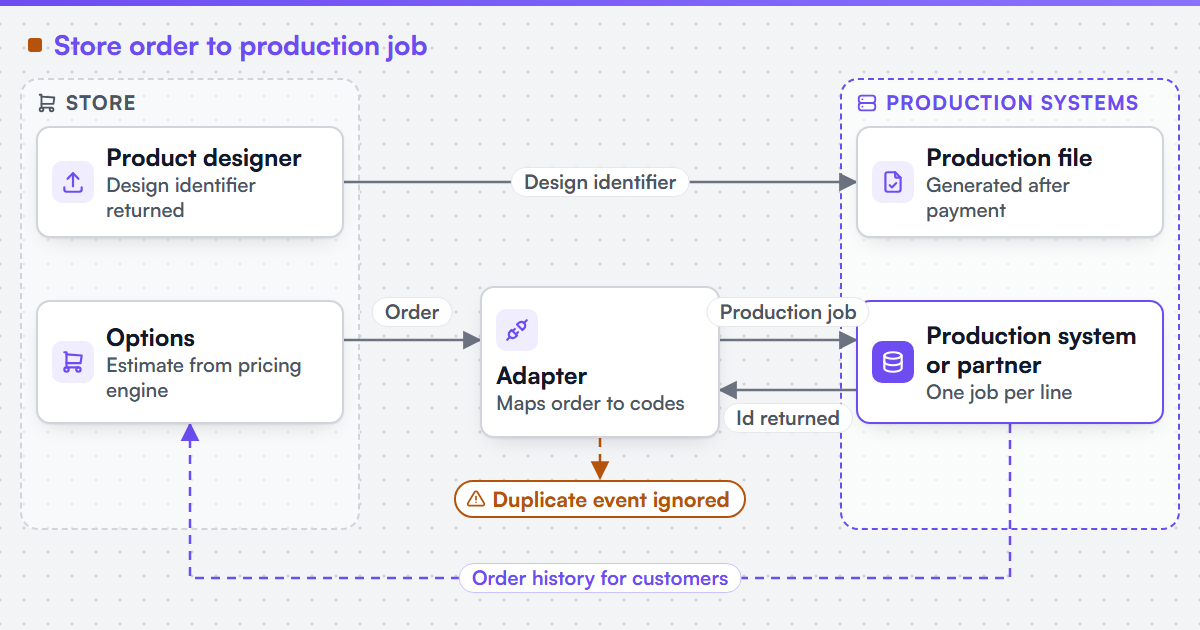 (opens the full-size diagram in a new tab)
Which Wix constraints change the design?
| Constraint | Wix's rule | Design response |
|---|---|---|
| Options and variants | Up to 6 options, 100 choices each, 1,000 variants per product; each variant created explicitly | Quantity and custom dimensions stay out of the variant model |
| Calculated price | A catalog item override (admin permission scope) or the Catalog service plugin | Price is set by server-side code, never the product page |
| Order timing | The Order Approved event fires on approval, with a unique id for ignoring duplicates | The adapter waits for approval and never sends an unpaid order to production |
| Company buying | No native company accounts or purchase-order approval | A corporate print portal is not scoped on Wix |
Six options and 1,000 variants. Five sizes, four stocks, three finishes and fifteen quantities already make 900 variants, close to the 1,000 ceiling, so a larger catalogue needs quantity and dimensions handled outside the variant model from the start.
A calculated price needs an app. Either route puts price logic on the server: the catalog item override needs the "Manage eCommerce - Admin Permissions" scope, and the Catalog service plugin is asked for item details whenever a cart, checkout or order changes.
Production starts on approval, not on checkout. The JSON Web Token on each Order Approved event is what the adapter verifies before it trusts the event, and the same event's unique id is what it stores to recognise a repeat.
No native company buying. This is a platform boundary, not a gap a plug-in reliably fills, so a corporate print portal is not scoped on Wix.
Which components and systems are involved?
A Wix print store combines Wix Stores, a product designer embedded on the product page, a pricing service reached through an app, and an adapter from order events to production. We can build custom product configurators and browser design tools that emit print-ready artwork to an agreed specification.
Netbase JSC, which operates Web2Print Solutions, has delivered 50+ web-to-print platforms. Netbase JSC maintains reusable web-to-print components, including a browser-based online designer, rule-based print pricing templates, print-ready PDF output with CMYK conversion, bleed and trim, and storefront connectors for WooCommerce, Shopify, Wix and custom stores, which an engagement may reuse under their own licence terms. Where the Wix connector and designer fit your products they are reused instead of rebuilt. Client-specific deliverables, access and handover are defined in the engagement contract. Pre-existing software, products, APIs and third-party components remain subject to their respective ownership and licence terms. No Wix partnership or app-market status is implied.
We can scope and build web-to-print integrations for Shopify, WooCommerce, Magento / Adobe Commerce, BigCommerce, Wix and headless storefronts, and we state each platform's constraints before the work is priced. The engagement that builds this is web-to-print ecommerce integration.
What must survive a move off Wix?
Many print businesses start on Wix and leave when volume, B2B customers or production integration outgrow it. Saved designs, customer accounts, order history with design identifiers, product URLs and image assets are what must survive. Moving a store off Wix is scoped as web-to-print migration and rescue, which inventories those assets before a target platform is chosen.
Check the product model against the limits first. Scope a Wix build or a move off Wix with a project brief that names your Wix plan, one product with its option counts, how its price is calculated today, and where the print job should go.
Discuss your web-to-print project
Frequently asked questions
Yes. A product designer embedded on the product page can save the design and attach its identifier to the cart item, so the production file is generated after payment from the approved design.
Not with options alone, because of the 6-option and 1,000-variant limits. A pricing service sets the price through an app, using a catalog item override or the Catalog service plugin, while the product keeps a small option set.
We do not scope one. Corporate portals need company accounts, approval chains and purchase orders, which Wix Stores does not provide natively. Magento and Adobe Commerce, or a custom storefront, are the usual alternatives.
Verify each event, store its unique event id, ignore ids already processed, and key every job on the order line. The adapter also reconciles against the order list each day, so a missed event is found rather than assumed.
References (6)
- Wix Help Center, Wix Stores: Limits and Recommended Guidelines: 6 product options, 100 choices per option, 1,000 variants per product, accessed 2026-09-29.
- Wix Developers, About Product Options and Variants (Catalog V3): options, modifiers and explicit variants, accessed 2026-09-29.
- Wix Developers, About Catalog and Custom Items: catalog item overrides, required permission scope and catalogReference.options, accessed 2026-09-29.
- Wix Developers, About the Wix eCommerce Catalog Service Plugin, accessed 2026-09-29.
- Wix Developers, Order Approved event: trigger on approval, JWT delivery and unique event id for ignoring duplicates, accessed 2026-09-29.
- Wix Help Center, selling wholesale on Wix Stores through a third-party app, accessed 2026-09-29.