

Artwork rejections and manual prepress rework
Manual prepress work piles up when a web-to-print channel accepts artwork without a preflight decision at upload. Every faulty file then surfaces after the order as a rejection, an email and a repair by hand. The fix moves checks to intake: rules from the printer's file specification, safe automatic fixes, and a clear reason the customer sees.
Start a project brief Explore servicesReviewed by CEO, Netbase JSC · Published 29 Sep 2026 · Updated 1 Oct 2026

Why is prepress still fixing web-to-print files by hand?
Prepress fixes files by hand when the web channel treats artwork as an attachment rather than as production input. The customer uploads a file, pays, and leaves. Hours later an operator opens it and finds RGB images, no bleed, a missing font or a 72 dpi logo. From that moment the order is stuck: the operator either repairs the file, which carries a quality risk, or writes to the customer and waits. Both paths cost prepress time, and the second adds days to delivery.
| Area | What you see today | What an intake decision does |
|---|---|---|
| Upload | Any file is accepted and the order is paid | The file is checked against the product's rules before checkout |
| Faults | Found in prepress, often after scheduling | Found at upload, with a reason the customer can act on |
| Repair | An operator fixes or emails, order by order | Safe fixes are automatic; unsafe ones are refused with guidance |
| Record | Emails and file names like final-v3 | One approved file version linked to the job |
Two symptoms, a high rejection rate and a prepress team that spends its day on repairs, come from the same mechanism. This page treats them together. Other failing boundaries are listed under web-to-print platform limitations.
Key takeaways
- A high rejection rate and a prepress team buried in repairs come from the same mechanism: the web channel treats artwork as an attachment instead of production input.
- Checks that run after a paid order force a choice between repairing the file, which carries a quality risk, or emailing the customer and adding days to delivery.
- A per-product file specification, written as data rather than a help page, is what the storefront, the upload check and prepress all need to read the same rules.
- Tiered rules keep checkout open: faults with a known correction are fixed and shown for approval, and only faults that would print wrongly are refused.
- A design editor that exports RGB without a colour intent is a systematic source of these faults, covered separately in the editor-exports-RGB page.
How does the rework loop form?
-
The product has no file contract
The storefront knows the size and stock but not the file rules that follow from them: trim size, bleed, safe area, colour space, minimum resolution, fonts.
-
Checks run too late
Preflight, if it exists, runs in the prepress workflow after the order is placed. By then, rejecting the file means stopping a paid order.
-
Warnings are not decisions
A preflight report lists twenty warnings. Nobody has decided which ones block the job, which can be fixed automatically and which can be ignored for this product, so an operator decides each time.
-
The customer is outside the loop
A rejection travels by email, the corrected file arrives as an attachment, and someone matches it to the right order by hand.
-
The editor itself may create the fault
When files come from a browser design tool, a whole class of faults is systematic. Your design editor exports RGB, not CMYK explains that case.
What the checks themselves are, from TrimBox to image resolution, is covered in what makes a PDF print-ready. This page is about where the decision sits and who acts on it.
What changes the outcome?
-
A file specification per product
Input: the printer's current file requirements and the product catalogue. Action: write each product's rules, such as trim, bleed, colour and resolution, as data rather than as a help page. Output: a specification that the storefront, the upload check and prepress all read. A product such as a photobook carries extra rules of its own, including spine width and a separate cover file.
-
Preflight at upload
Input: the uploaded file and the product's specification. Action: run deterministic checks before the order is placed and classify each result as pass, fix, or refuse. Output: an accepted file, an automatically corrected file shown for approval, or a refusal with a reason the customer understands.
-
Safe automatic fixes
Input: faults with a known correction, such as a missing bleed on a background that can be extended, or a TrimBox that can be set from the product size. Action: apply the fix and show the customer a proof. Output: fewer refusals without silent changes to artwork.
-
A rework queue with a single file record
Input: files that need a human. Action: route them to a named operator with the report attached, and collect the corrected file against the same order. Output: one approved file version per job, visible to production.
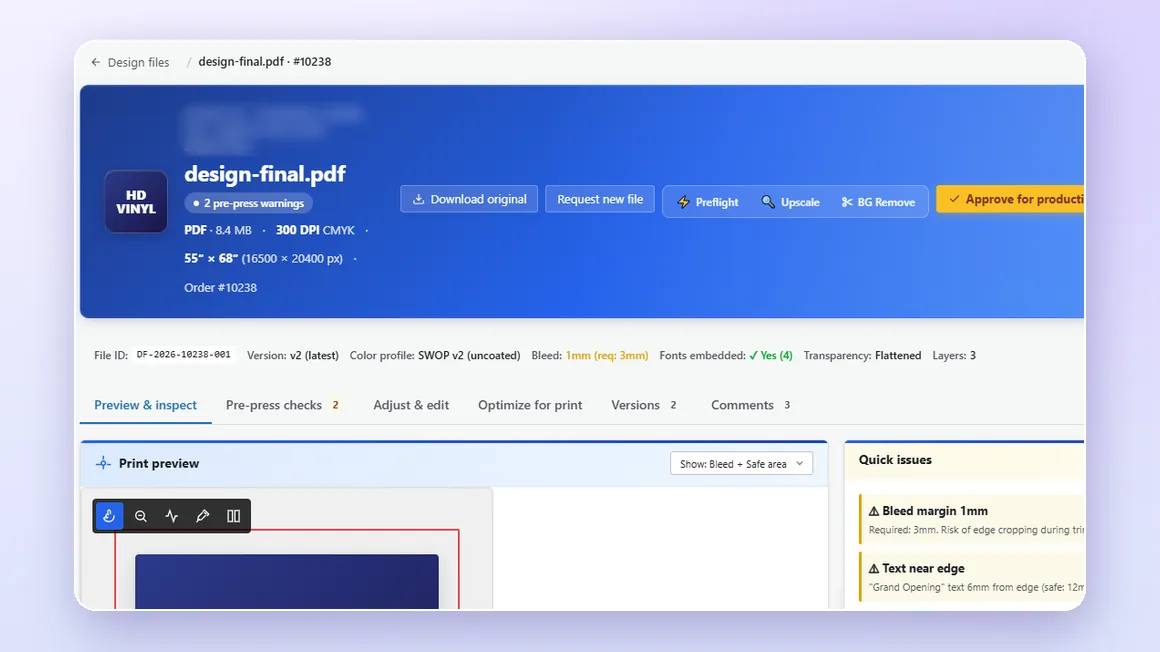
We engineer print output: PDF generation to a client-specified standard, CMYK and spot colour handling, ICC profile selection, bleed and trim geometry, imposition and automated preflight. Where a technical standard is named, it describes the output specification an engagement produces to, not a credential Web2Print Solutions holds. The service that builds this is print-ready PDF generation, which owns the scope and acceptance criteria.
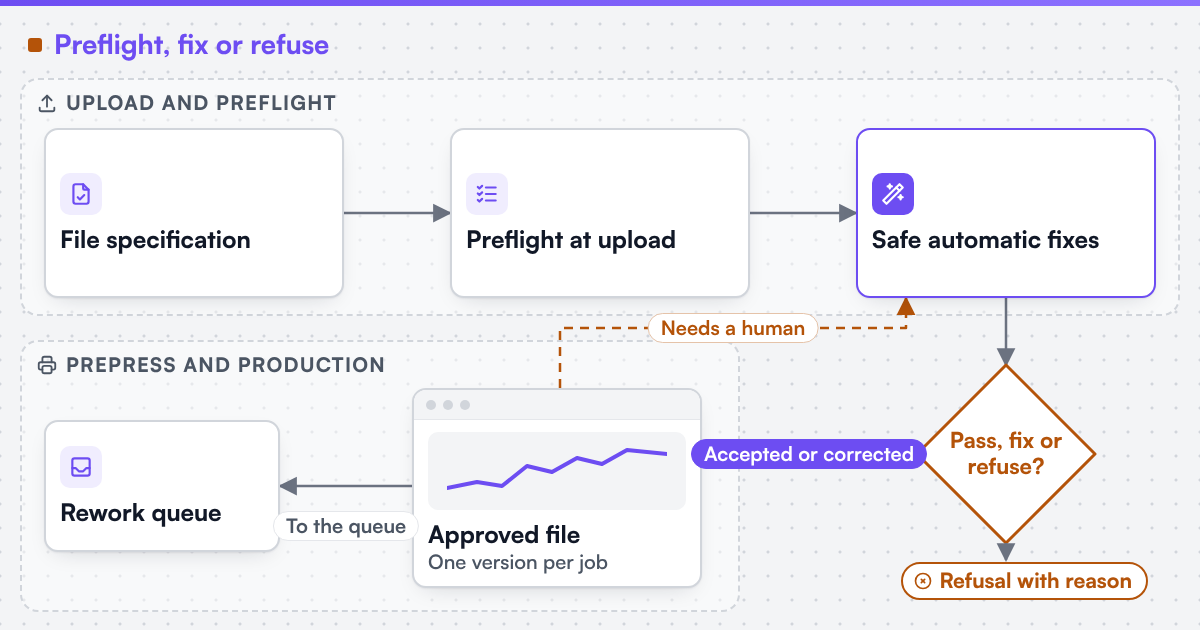 (opens the full-size diagram in a new tab)
Where can AI help?
AI can flag faults that deterministic rules miss, such as a low-quality photo that meets the resolution threshold or text placed too close to a fold. It should suggest, never decide. We can build AI-assisted steps into print workflows where a human reviews the result, with accuracy measured on the client's own data before acceptance. The pass, fix or refuse decision stays with rules and people.
Which systems are involved?
The storefront and its upload route or online designer, a preflight engine that reads PDF and image files, the prepress workflow with its hot folders or JDF job tickets, and the print MIS that holds the job. The accepted file reference should travel with the order into the job, so the file and the job are accepted together, as described in print orders retyped into the production system.
How does this differ by segment?
Commercial and trade printers use prepress vocabulary: preflight profiles, TrimBox, total area coverage, imposition. Their rework is usually concentrated in a few high-volume products. Wide-format and signage printers see resolution and scale faults most, because a file built at the wrong scale looks correct on screen. Media and publishing teams rarely upload one-off files; their faults come from templates and content revisions, so the fix is a locked template and a check on each revision. Enterprise buyers need the refusal reason to reach the person who can fix it, often a brand or marketing coordinator rather than the orderer.
What evidence stands behind this page?
Netbase JSC, which operates Web2Print Solutions, has delivered 50+ web-to-print platforms. Netbase JSC maintains reusable web-to-print components, including print-ready PDF output with CMYK conversion, bleed and trim, which an engagement may reuse under their own licence terms. No rejection-rate result is published on this site, so the intake rules are tested on your own recent rejected files. The delivery method explains how that test is set up. A related delivered store with a built-in design and upload path is published as the U-Print case study.
Check whether this boundary applies to your setup
Send a project brief with your file specification, ten recently rejected or repaired files, and the repair your team made to each one.
Frequently asked questions
It can, if every warning blocks checkout. The rules are therefore tiered: faults that can be corrected safely are fixed and shown for approval, and only faults that would print wrongly are refused, with a plain reason and a way to upload again.
No. Missing bleed on a flat background, a missing TrimBox or an RGB image can often be corrected. Low-resolution photos, missing content near the trim and wrong page sizes usually need the customer, so the check explains what to change.
Not always. Many printers already own a preflight engine. The missing part is usually the per-product rule set, the call at upload, and a record that links the approved file to the job.
Count repaired and refused files for each product before and after launch, using the same product set and period. The count comes from the rework queue, so it needs no manual log.
Yes. Web2Print Solutions delivers remote-first from Hanoi, Vietnam, and Netbase JSC has delivered web-to-print projects for clients in 80+ countries.
Send a project brief at /project-brief, email project@netbasejsc.com or message us on WhatsApp at +84 937 869 689. A senior engineer reads every brief and replies in writing.
References (3)
- Ghent Workgroup, PDF/X workflow: the GWG 2015 specification is based on the ISO PDF/X-4 standard, accessed 2026-09-30.
- Ghent Workgroup, GWG specifications for PDF preflight settings, accessed 2026-09-29.
- CIP4 Organization, What is (X)JDF: job ticket and messaging formats used between systems, accessed 2026-09-29.