What are you looking for?

Explore our services and discover how we can help you achieve your goals

Print-ready PDF and prepress automation

Print-ready PDF generation turns a web order and its artwork into the production file a prepress workflow accepts without repair. Web2Print Solutions engineers the output to the client's specification, such as PDF/X-1a or PDF/X-4, CMYK conversion with named ICC profiles, bleed and trim boxes, then preflights it and hands it to the hot folder or JDF workflow.

Start a project brief Explore services

Reviewed by CEO, Netbase JSC · Published 27 Sep 2026 · Updated 1 Oct 2026

star

At a glance

Engagement type
Build, then operate
What you provide
One real product or workflow, plus your acceptance criteria
What you receive
Web orders produce the PDF your prepress accepts, checked by preflight rules and delivered to your hot folder or JDF workflow.
Who accepts
Prepress or production, against specimen files

What you need to provide

  • One real product or workflow to scope against
  • What correct looks like for it
  • Any system that must stay in place
  • Who in your organisation confirms the result

Ready to scope this service?

Why is a web-to-print preview not a production file?

A customer approves what the browser shows: an RGB canvas at screen resolution, with fonts rendered by the browser and no bleed. Prepress needs something else entirely, a PDF with a defined trim box and bleed box, CMYK or spot colour converted through the right ICC profile, embedded fonts, images at print resolution and ink coverage the press can dry. When the web channel sends the preview's cousin instead of that file, every order becomes a repair ticket, and the repair happens after payment.

Print-ready PDF generation closes that gap. We engineer print output: PDF generation to a client-specified standard, CMYK and spot colour handling, ICC profile selection, bleed and trim geometry, imposition and automated preflight. It sits among the web-to-print engineering services as the one that owns the file production receives.

Key takeaways

  • A print-ready PDF generator rebuilds the production file from the saved design at the product's real geometry, not from a screen capture of the preview.
  • Preflight classes each rule as pass, warn or fail; the class is a business decision prepress records, not a default buried in code.
  • A rejected file names the rule, the page and the object, so the customer or operator knows exactly what to fix.
  • The PDF/X flavour follows the receiving RIP and press, not fashion: PDF/X-1a for older or blind-exchange workflows, PDF/X-4 for a modern PDF-native RIP.
  • Every production file is traceable to its order, artwork version, product rule, ICC profile and generator version, so a disputed job can be regenerated and compared.

Who is this for, and when does another route fit better?

Good fit

  • A printer whose prepress team fixes web uploads by hand every day
  • A photo, packaging or signage business whose online designer exports files production cannot use
  • A brand or publisher sending personalised items to several print partners with different specifications

Another route fits better

  • A workflow where customers only upload finished PDFs that a standard preflight tool already checks well
  • A colour problem that sits in press calibration or substrate, which needs a colour specialist on site
  • A buyer who has no written output specification yet and cannot supply accepted and rejected sample files

What outcomes is the engagement accepted against?

  • Files prepress accepts unchanged

    Specimen PDFs generated from representative orders pass your prepress team's own checks and enter the RIP without manual fixes.

  • Failures that explain themselves

    A rejected file names the rule, the page and the object, and routes to the customer or an operator with a correction path.

  • Output that can be reproduced

    Every production file is traceable to its order, artwork version, product rule, ICC profile and generator version, so a disputed job can be regenerated and compared.

What is in scope?

What is in scope?
Module Input Deliverable
Output specification Your accepted and rejected files, RIP and press requirements A written output contract: PDF/X flavour, output intent, boxes, fonts, resolution and ink limits
PDF generation Designer data or uploaded artwork, product geometry A generator that writes trim box, bleed box and marks from the product rule, not from the canvas
Colour conversion Your ICC profiles and spot colour library RGB-to-CMYK conversion with named profiles and rendering intent, spot colours preserved or mapped by rule
Preflight rules Your pass, warn and fail policy Deterministic checks for resolution at final size, missing fonts, colour mode, total area coverage and hairlines
Imposition and marks Sheet sizes and layouts that belong upstream of the RIP Step-and-repeat or n-up layouts where your workflow wants them before the RIP
Handoff Hot folder, JDF endpoint or MIS job Delivery with job identity, a machine-readable preflight report and failure routing

What is not included?

  • No press calibration or device profiling

    The pipeline uses the ICC profiles your workflow specifies; creating them is specialist work on your equipment.

  • No RIP installation or replacement

    Files are delivered to the RIP, hot folder or JDF workflow you already run.

  • No promise of identical colour everywhere

    Screen proofs, substrates and devices differ; the contract states which colour controls the pipeline owns.

Which PDF/X flavour should the web channel produce?

The choice follows your RIP and press, not fashion. PDF/X-1a (ISO 15930-1:2001, based on PDF 1.3) allows only CMYK and spot colour with no live transparency, which suits older RIPs and blind exchange with print partners. PDF/X-4 (ISO 15930-7) keeps live transparency and ICC-based colour, which suits a modern PDF-native RIP and lets conversion happen as late as possible. The Ghent Workgroup publishes application-specific settings, currently GWG 2015 and GWG 2022, that many prepress departments use as a starting point.

Where a technical standard is named, it describes the output specification an engagement produces to, not a credential Web2Print Solutions holds.

The output intent matters as much as the flavour. A file converted for coated stock and printed on uncoated stock shifts colour and can exceed the paper's total area coverage limit, so the generator selects the profile from the product's substrate rule. Rich black, overprint on black text, spot colour names and the treatment of white ink on packaging jobs are written into the contract rather than left to defaults.

How does preflight become a decision instead of a warning?

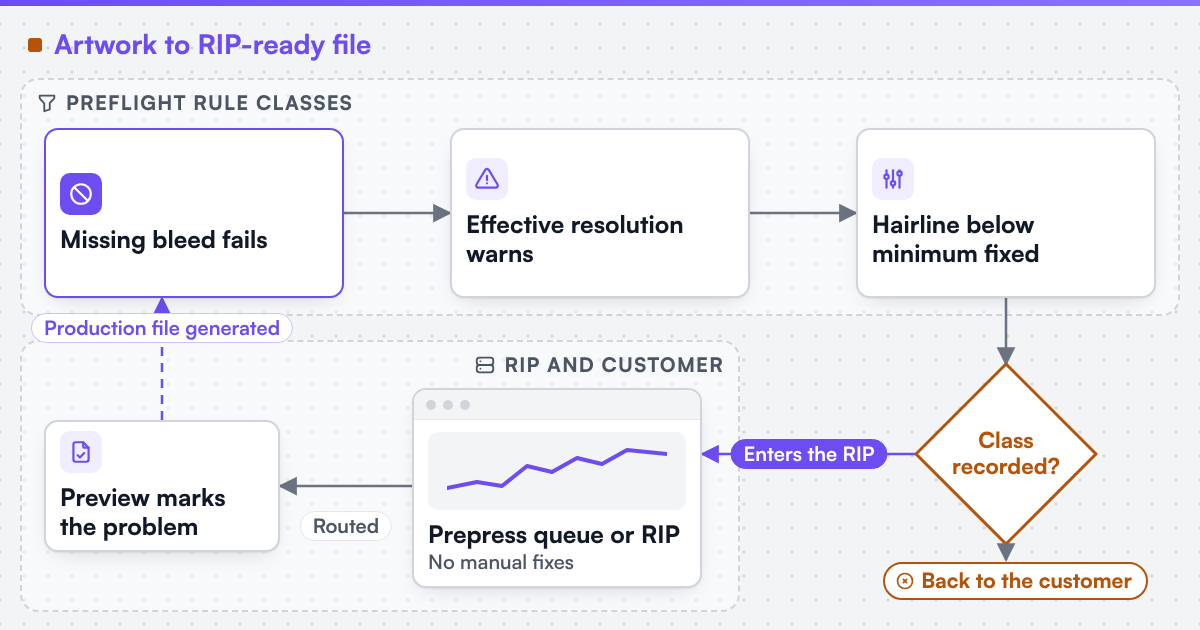
Preflight earns its place when both the operator and the ordering system can act on the result. Each rule is classed as fail, warn or fix. Missing bleed on a full-bleed product fails. An image below the agreed effective resolution at final size warns and asks the customer. A hairline below the minimum stroke may be fixed automatically if prepress agrees. The class is a business decision recorded in the rule set, so prepress can review a change without reading converter code.

The report is machine-readable and human-readable. It names the page, the object and the rule, attaches a low-resolution preview marking the problem, and routes the order: back to the customer before production, or to a prepress queue with a specific question. A generic "file invalid" message sends the customer into guesswork; a silent pass is worse.

File status shows whether the print PDF exists and whether preflight has run, so a file is held until the check has been made.

Design file status bar showing source file, print PDF, resolution and preflight states with a warning that a preflight check is needed
Diagram of a preflight pipeline: rules classed fail, warn or fix produce a business decision that enters the RIP or routes back to the customer (opens the full-size diagram in a new tab)
Diagram of a preflight pipeline

How does the file reach production?

The finished PDF and its preflight report travel with the job identifier. The simplest handoff is a hot folder per product family, where the filename carries the job number and the RIP or workflow server picks it up. Larger workflows receive JDF job tickets, the CIP4 Job Definition Format, alongside the file, or a job created in the MIS through print MIS and ERP integration. Proofs are labelled as proofs, watermarked where useful, and archived separately from the production artefact.

Upstream, the storefront and designer must hand over clean inputs. Ecommerce platform integration keeps the saved-design identifier on the order line, and platform pages such as Shopify web-to-print explain where that data can live.

How does the work run?

  1. Specification

    Collect accepted and rejected files and the prepress reasons; write the output contract

    Evidence you receive
    A signed output specification and preflight rule set
  2. Build and specimen

    Implement generation, colour conversion, preflight and handoff

    Evidence you receive
    Specimen PDFs for representative and awkward products
  3. Prepress acceptance

    Your prepress team runs the specimens through its own workflow

    Evidence you receive
    Signed acceptance per specimen, open issues listed

The default engagement is fixed-scope with written acceptance criteria and priced change control. Managed operations is a separate, opt-in agreement. How we work describes written acceptance in more detail.

What does Netbase JSC bring to print output?

Netbase JSC, which operates Web2Print Solutions, has delivered 50+ web-to-print platforms. The group maintains a print-ready PDF output component with CMYK conversion, bleed and trim, used with its online designer and photobook editor; an engagement adopts it where it meets your output contract and extends or replaces it where it does not. The Botak Sign case study shows that output component behind a storefront offering both upload and online design routes.

Client-specific deliverables, access and handover are defined in the engagement contract. Pre-existing software, products, APIs and third-party components remain subject to their respective ownership and licence terms.

Scope this work with a project brief

This site does not yet publish a prepress case study, so the useful evidence is a specimen made from your own files. Send a project brief with one file prepress accepted, one it rejected and the reason, provided you can share them lawfully.

See it live: upload and dieline steps

Live stores operated by their owners. Each link opens the store in a new tab.

Frequently asked questions

Usually. If the designer can export its layout data or a vector file, the generator rebuilds the production PDF from that data with the product's boxes, profiles and fonts. If it only exports screenshots, the designer itself needs changing first.

No. The generator can produce the flavour each destination needs, for example PDF/X-4 for your own RIP and PDF/X-1a for a partner with an older workflow. The output contract lists which product goes where.

Your prepress lead. The rule set records each check as fail, warn or fix, and the engagement implements that policy. Changing a class later is a reviewed configuration change, not new code.

No. It removes repeatable checks from their queue and routes ambiguous cases to them with a specific question, so their judgement goes where it is needed.

Yes. Web2Print Solutions delivers remote-first from Hanoi, Vietnam, and Netbase JSC has delivered web-to-print projects for clients in 80+ countries.

Send a project brief at /project-brief, email project@netbasejsc.com or message us on WhatsApp at +84 937 869 689. A senior engineer reads every brief and replies in writing.

Have a web-to-print project in mind?

Tell us about one product you want to sell online. A senior engineer reads every brief and replies in writing.

Tell us what you need to build, migrate or connect.

Start a project brief