

Your design editor exports RGB, not CMYK
A web-to-print editor exports RGB because browsers draw in RGB colour spaces. Canvas, SVG and CSS render to sRGB or Display P3 with no CMYK output, so a file saved from the screen stays RGB. The fix is a server render pipeline that converts with a named ICC profile, keeps black and spot colours, and preflights the PDF.
Start a project brief Explore servicesReviewed by CEO, Netbase JSC · Published 29 Sep 2026 · Updated 1 Oct 2026

Why does the editor export RGB?
A browser-based design tool exports RGB because the browser has no CMYK drawing surface. The HTML canvas element works in the predefined colour spaces sRGB and Display P3. CSS and SVG colours are rendered to the screen in RGB. So when an editor saves "what the customer sees", by exporting the canvas as an image or printing the page to PDF, the result is RGB by construction. The editor is not broken; it is doing what a screen tool does.
| Area | What you see today | What a print render pipeline does |
|---|---|---|
| Colour | RGB images and RGB vectors in the exported file | CMYK or a specified output intent, converted with a named ICC profile |
| Black text | Four-colour black, or text rasterised into an image | Pure black text on the black plate, kept as vectors |
| Brand colours | Spot colours flattened to an RGB approximation | Named spot colours mapped to separations where the product allows them |
| Prepress | Every file converted or rejected by hand | A preflighted PDF that the hot folder accepts |
This page owns the editor-side mechanism. What a finished print-ready file must contain is covered in what makes a PDF print-ready, and the rework it causes in prepress is covered in artwork rejections and manual prepress rework. Other failing boundaries are listed under web-to-print platform limitations.
Key takeaways
- A browser editor exports RGB because the HTML canvas and CSS colour both render to sRGB or Display P3; there is no CMYK drawing surface in a browser to export from instead.
- A late RGB-to-CMYK conversion without a named profile shifts brand colours and turns pure black text into a four-colour mix, which is worse than no conversion at all.
- The fix stores the editor's object model as a design document, not a screenshot, and renders the print file from that document on the server.
- Colour conversion needs a named ICC profile matched to the press and paper, kept black text on the black plate, and spot colours mapped to separations by name.
- A soft proof rendered from the same converted file, labelled as an approximation, lets the customer approve what will actually print.
How does the RGB file reach production?
-
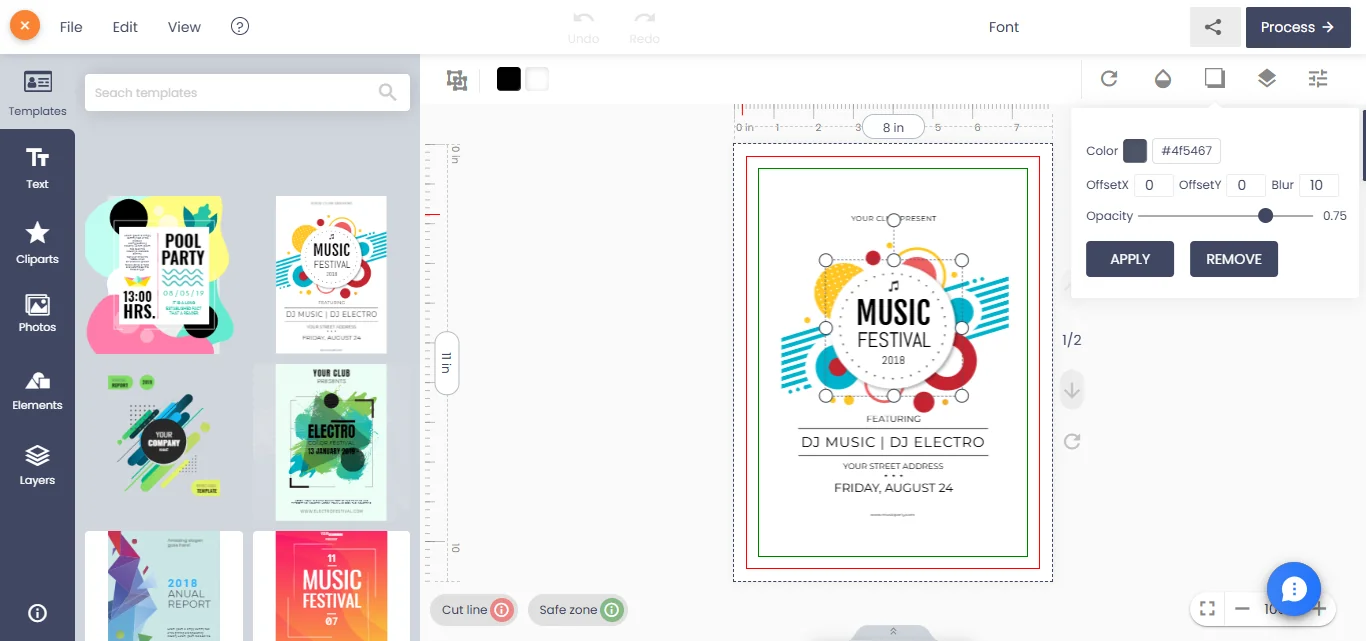
The design is edited on screen
The customer places images, text and shapes. The editor holds them as objects, often in a JSON document, and paints them to a canvas.
-
The export copies the screen
A quick implementation calls the canvas export or a client-side PDF library that embeds the canvas as a picture. Text becomes pixels, vectors become pixels, and everything is RGB.
-
A late conversion makes it worse
Someone adds an RGB-to-CMYK step at the end. Without a named profile, pure black text becomes a mix of four inks, bright RGB blues shift, and a brand colour lands on a different value each time.
-
Prepress catches it, or does not
An operator either converts each file by hand or the job prints with dull colours and soft text. Either way, the customer did not approve what was printed.
What changes the outcome?
The fix is to treat the editor as a way to capture design intent, and to produce the print file from that intent on the server.
-
A design document, not a screenshot
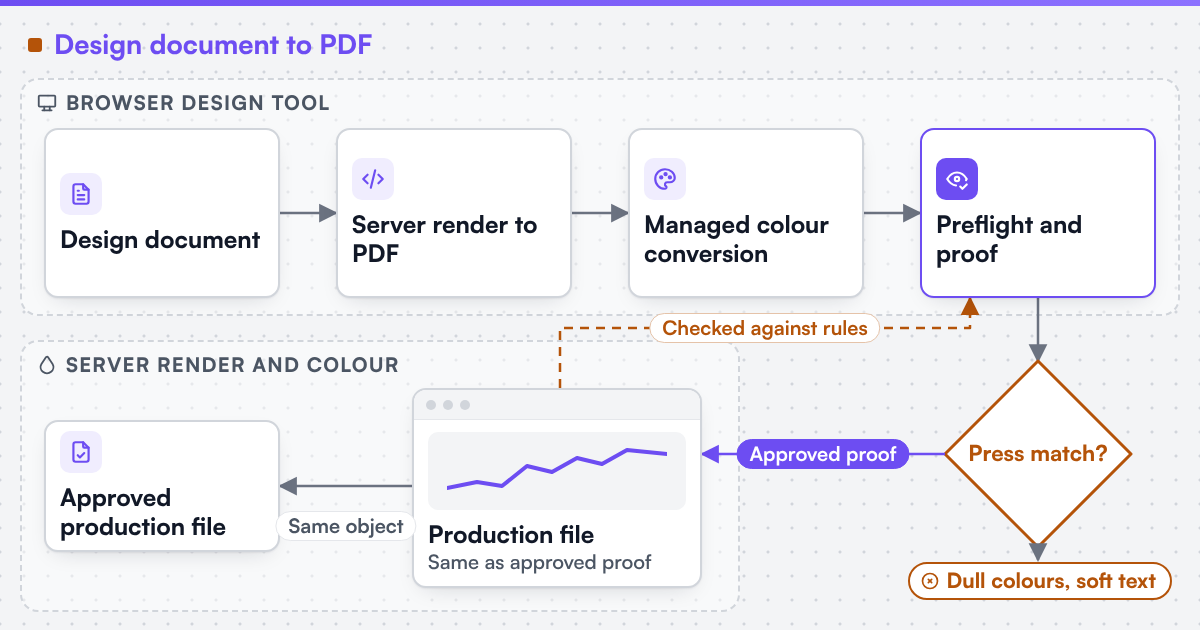
Input: the editor's object model. Action: store text as text with its font, vectors as vectors, images with their original files and a colour intent per object. Output: a document that can be rendered at print resolution.
-
A server render to PDF
Input: the design document and the product's specification. Action: render the page at trim size with bleed, embed fonts and keep vectors. Output: a PDF with correct page boxes that does not depend on the customer's screen.
-
Managed colour conversion
Input: the rendered PDF and the printer's output condition. Action: convert with named ICC profiles, keep black text on the black plate, map named colours to spot separations, and set the output intent. Output: a file that matches the press condition the printer chose.
-
Preflight and proof
Input: the converted PDF. Action: check it against the product's rules and show the customer a proof rendered from the same file. Output: the approved proof and the production file are the same object.
We engineer print output: PDF generation to a client-specified standard, CMYK and spot colour handling, ICC profile selection, bleed and trim geometry, imposition and automated preflight. Where a technical standard is named, it describes the output specification an engagement produces to, not a credential Web2Print Solutions holds. We can build custom product configurators and browser design tools that emit print-ready artwork to an agreed specification. The engagement that builds the pipeline is print-ready PDF generation.
 (opens the full-size diagram in a new tab)
Can the browser show CMYK colours accurately?
Not exactly. A screen cannot display every CMYK colour, and the browser does not simulate a press condition by default. A render pipeline can produce a soft proof: an image converted to the output profile and back, so the customer sees an approximation of the printed result before approving. The proof should be labelled as an approximation, and the approved PDF, not the screen, is what prints.
Which systems are involved?
The online designer or product configurator, a server renderer that produces PDF, a colour engine with ICC profiles, the preflight step and the prepress workflow. Open-source tools such as Ghostscript document a colour conversion strategy for PDF output, and commercial PDF libraries offer the same function; the choice depends on the licence and the volume. Where the editor is embedded in a storefront, the design document reference travels with the cart line; web-to-print on Shopify shows one example of how that data is carried.
How does this differ by segment?
Software vendors and agencies building a design tool meet this as an architecture question: where rendering happens and how the design document is stored. It is cheaper to decide early than to retrofit. Commercial and photo printers meet it as a colour complaint and a rework cost, and usually own the output profile the pipeline should use; a canvas print preview is one product where the on-screen preview and the printed colour have to agree closely. Media and enterprise teams meet it through brand colours: a corporate blue that shifts between two print runs is the complaint, and spot colour mapping per template is the fix. Editors that also generate many product combinations run into a separate problem, covered in too many variants for real print products.
What evidence stands behind this page?
Netbase JSC, which operates Web2Print Solutions, has delivered 50+ web-to-print platforms. Netbase JSC maintains reusable web-to-print components, including a browser-based online designer and print-ready PDF output with CMYK conversion, bleed and trim, which an engagement may reuse under their own licence terms. No colour-accuracy result is published on this site, so the pipeline is accepted against your own profile and reference files. A related delivered online designer that renders templates to a production file is published as the LynxDigiPrint case study. If an existing product already renders to your specification, when not to hire us explains why a rebuild is the wrong answer.
Check whether this boundary applies to your setup
Send a project brief with the editor you use, one exported file, the printer's file specification and output profile, and the colour complaint you want resolved.
Frequently asked questions
You can, but it rarely solves the problem. Text and vectors are already pixels, the conversion has no information about black text or brand colours, and the resolution is limited to what the screen export produced.
The one that matches the press and paper the printer uses, named in the printer's file specification. Coated and uncoated stocks usually need different profiles, so the product carries the profile rather than the whole site using one.
Usually not. Most editors already hold an object model. The work is to store that model in a form a server can render, and to replace the client-side export with a server render.
Yes, if the design document stores the colour by name, not only as an RGB value. The server render then writes the named colour as a separation for products that print it.
Yes. Web2Print Solutions delivers remote-first from Hanoi, Vietnam, and Netbase JSC has delivered web-to-print projects for clients in 80+ countries.
Send a project brief at /project-brief, email project@netbasejsc.com or message us on WhatsApp at +84 937 869 689. A senior engineer reads every brief and replies in writing.
References (5)
- WHATWG, HTML Living Standard, canvas element: predefined colour spaces sRGB and Display P3, accessed 2026-09-29.
- W3C, CSS Color Module Level 4: colour spaces used for rendering on screen, accessed 2026-09-29.
- International Color Consortium, ICC profile specification and registry, accessed 2026-09-29.
- Artifex, Ghostscript documentation, vector devices: ColorConversionStrategy for PDF output, accessed 2026-09-29.
- Ghent Workgroup, PDF/X workflow: the GWG 2015 specification is based on the ISO PDF/X-4 standard, accessed 2026-09-30.