

Web-to-print on Shopify
Shopify supplies the storefront and checkout for web-to-print, but not the print logic: the online designer, calculated price and print-ready file come from an app, a custom integration or an owned platform. The plan decides much of it, because Shopify allows 2048 variants per product and limits Cart Transform price overrides to Plus or development stores.
Start a project briefReviewed by CEO, Netbase JSC · Published 27 Sep 2026 · Updated 6 Nov 2026

Where does Shopify fit a print catalogue?
Shopify is a strong home for the commercial side of print: catalogue, checkout, payments, customer accounts and marketing. It fits well when the store sells a bounded set of print products, such as business cards, canvas, apparel or signage. It fits less well when every order is a custom quote, when B2B buyers need approval chains the plan does not provide, or when the price depends on a calculation the plan cannot apply at checkout.
One of the web-to-print integration platform pages, this one records Shopify facts checked against its developer documentation on 28 September 2026.
Key takeaways
- Custom sizes, finishes and quantity usually travel as line item properties, because a product holds at most 2048 variants.
- A calculated print price can override the cart line only through Cart Transform, limited to Shopify Plus or development stores.
- Checkout validation can block a line missing print data but cannot inspect artwork, so preflight runs after payment.
-
Ignore repeated
X-Shopify-Webhook-Iddeliveries and key each job on the order line, or a retry creates a second job. - The plan tier, not the app, usually decides which pricing behaviour is possible.
How does print data cross a Shopify store?
-
Product options
Stable choices such as a standard size or paper become variants. Open-ended choices, such as custom width and height or a finishing combination, travel as line item properties: name and value pairs on the cart line that Shopify carries into the order.
-
Price
The configurator shows an estimate. The authoritative amount comes from a print pricing engine or pricing rules, and must reach the cart through a mechanism the store's plan supports.
-
Artwork and design
An online designer embedded through a theme app extension saves the design and writes its identifier to a line item property. After payment, the production file is generated from that identifier to the output contract in print-ready PDF and prepress automation.
-
Order to job
An order webhook triggers the job: the adapter reads the line item properties, maps them to production codes and submits one job for each order line to the MIS, prepress hot folder or fulfilment partner.
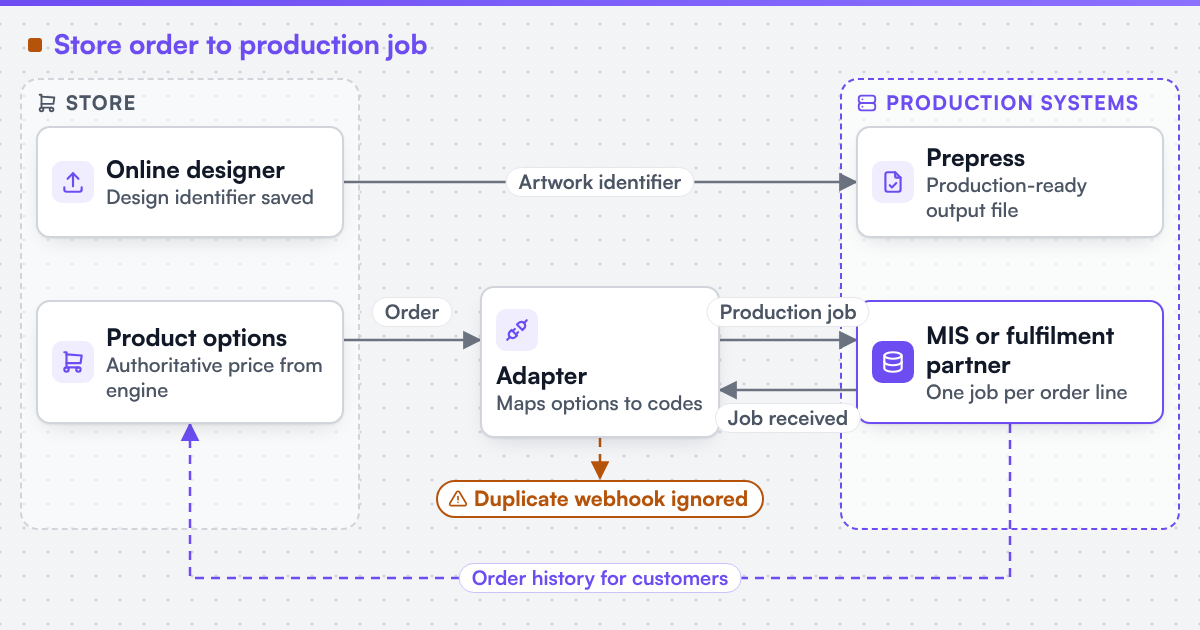 (opens the full-size diagram in a new tab)
Which route fits: a Shopify app, a custom integration or an owned platform?
Shopify provides the storefront, so the choice is where the print logic lives. The app column describes designer apps in general; check each app against the questions in the first column. The same pattern applies to BigCommerce product personalisation.
| Question | Shopify designer app | Custom integration | Owned platform (W2P Solution) |
|---|---|---|---|
| Who controls the pricing rules? | The app's own option and price model | Your rules, in a pricing service called from the cart | Rules the merchant sets per product for options, quantities and sizes |
| Is the print-ready file assured? | Depends on the app; ask for a sample file | A PDF generated to the output contract you agree | A print-ready PDF for each paid order line, with checksum and trim and bleed boxes |
| Is checkout validated? | Only what the app and plan allow | Validation functions plus server checks | Built into the store's own checkout |
| Who owns the order-to-job path? | A webhook or export you build separately | An adapter to your MIS or ERP | A production queue with statuses and the store's own emails |
| What do upgrades put at risk? | App and theme changes | Shopify API version changes, tested in your adapter | Extensions kept apart from the core and tested per store before upgrade |
| Who hosts and maintains it? | Shopify plus the app vendor | Shopify plus your integration | Netbase JSC, on Netbase JSC VPS or Netbase JSC Cloud |
When should you stay on a Shopify app?
Stay on an app while the catalogue is bounded, options are fixed, and a person can check each file before production. That is the honest threshold for most small print shops. Move to a custom integration or a platform when the price depends on a calculation the plan cannot apply at checkout, when production needs jobs pushed to an MIS, or when quoted work needs approvals. Our engineering focus is web-to-print: configurators, print pricing logic, print-ready output and integration with production systems. Software vendors can read about a print API for SaaS vendors.
Which Shopify constraints change the design?
| Constraint | Shopify's rule | Design response |
|---|---|---|
| Variant ceiling | Maximum 2048 variants per product (GraphQL Admin API, 2026-07) | Custom sizes and finishes travel as line item properties, not variants |
| Price override | Cart Transform lineUpdate works only on Shopify Plus or development stores |
Other plans use price bands, draft orders or a different surface |
| Checkout validation | A validation function can block an incomplete print line | Artwork files stay unchecked at checkout; preflight runs after payment |
| Duplicate webhooks | Retried deliveries repeat the same X-Shopify-Webhook-Id |
The adapter ignores repeats and keys each job on the order line |
Variant ceiling. Shopify's GraphQL Admin API documentation (version 2026-07) states a maximum of 2048 variants per product. Five sizes, eight stocks, four finishes and ten quantity tiers already make 1600 combinations, so custom dimensions and quantity belong in properties and price logic.
Price override eligibility. Cart Transform can override a cart line's price, title and image with a lineUpdate operation, but Shopify documents that only Shopify Plus or development stores can use apps with update operations. On other plans the design uses pre-priced variants for price bands, draft orders for quoted jobs, or a different surface. The plan is checked before the price path is promised.
Checkout validation. Validation functions run on Shopify's servers and can block checkout, for example for a print line missing its design identifier. They cannot inspect an artwork file stored elsewhere, so file checks stay in preflight.
Duplicate webhooks. Shopify's webhook documentation tells apps to ignore duplicate deliveries using the X-Shopify-Webhook-Id header. A print adapter does that and also keys the job on the order line.
Which components and systems are involved?
A Shopify web-to-print build usually combines four parts: the Shopify store and its theme, an online designer loaded through a theme app extension, a pricing service, and an adapter from order webhooks to production. We can scope and build web-to-print integrations for Shopify, WooCommerce, Magento / Adobe Commerce, BigCommerce, Wix and headless storefronts, and we state each platform's constraints before the work is priced.
Netbase JSC, which operates Web2Print Solutions, has delivered 50+ web-to-print platforms, and the group maintains a Shopify storefront connector, a browser-based online designer and print-ready PDF output with CMYK conversion, bleed and trim. Client-specific deliverables, access and handover are defined in the engagement contract. Pre-existing software, products, APIs and third-party components remain subject to their respective ownership and licence terms. No Shopify partnership is implied.
The engagement that builds this is web-to-print ecommerce integration.
What must survive a move to or from Shopify?
The same assets decide the risk in either direction: saved designs and templates, customer accounts, order history with its line item properties, product URLs and the production interface. A design identifier is only useful if the designer's data moves too. If Shopify's limits block a rule the business depends on, outgrown a web-to-print product explains how to test whether a contained component or a different platform is the smaller change.
Scope this work with a project brief that names your Shopify plan, one configurable product, how its price is calculated today, and the system that should receive the job.
Discuss your web-to-print project
Frequently asked questions
Do we need Shopify Plus for web-to-print?
Not always. Plus matters when a calculated price must override the cart line through Cart Transform. Stores on other plans can still sell print using variant price bands, properties for custom data and draft orders for quoted work, with some limits on fully dynamic pricing.
Can customers design products inside our Shopify theme?
Yes. An online designer can load on the product page through a theme app extension, save the design and write its identifier to the cart line, so the production file is generated after checkout from the approved version.
How many print options can one Shopify product have?
Up to 2048 variants per product, according to Shopify's GraphQL Admin API documentation for version 2026-07. Options beyond that are carried as line item properties and validated by your own price and configuration logic.
Will retried order webhooks create duplicate print jobs?
Not if the adapter ignores repeated X-Shopify-Webhook-Id values and keys each job on the order line. Both checks are part of acceptance testing.
References (6)
- Product object, GraphQL Admin API 2026-07: 2048 variants, accessed 2026-09-28.
- Liquid line_item object, accessed 2026-09-28.
- Cart Transform Function API, accessed 2026-09-28.
- Cart and checkout validation, accessed 2026-09-28.
- Webhooks, duplicate deliveries, accessed 2026-09-28.
- App extensions, accessed 2026-09-28.
Related
-
 Integration
Web-to-print on Wix
Integration
Web-to-print on Wix
-
 Integration
Web-to-print on WooCommerce
Integration
Web-to-print on WooCommerce
-
 Service
Ecommerce platform integration for print
Service
Ecommerce platform integration for print
-
 Industry
Web-to-print for corporate in-plant print
Industry
Web-to-print for corporate in-plant print
-
 Industry
Web-to-print for franchise and multi-location brands
Industry
Web-to-print for franchise and multi-location brands
-
 Industry
Web-to-print for media and marketing production
Industry
Web-to-print for media and marketing production