

What makes a PDF print-ready, and why yours was rejected
A PDF is print-ready when production can run it without repair: the page is the trimmed size plus bleed, trim and bleed boxes are defined, colour is CMYK or named spot colour for the printing condition, fonts are embedded, images are sharp at final size and ink coverage stays under the press limit.
Start a project brief Explore servicesReviewed by CEO, Netbase JSC · Published 28 Sep 2026 · Updated 3 Oct 2026 · 10 min read

Why is my PDF not print-ready?
A PDF is rejected by a printer when production cannot run it without changing it. Most rejections come from a short list of causes: no bleed, a page size that does not match the trimmed product, RGB images, fonts that are not embedded, images too coarse at their final size, or ink coverage above what the press and paper can dry. Each is a property of the file, not a matter of taste, so each can be checked by software before a person looks at it.
This guide explains the seven checks that decide whether a file is print-ready, as of September 2026, and why files produced by a web-to-print design tool fail them more often than files built in desktop layout software. It is written for print buyers who keep getting files sent back and for print businesses writing the specification their web channel must meet. Where a technical standard is named, it describes the output specification an engagement produces to, not a credential Web2Print Solutions holds.
What are the seven checks?
-
Page geometry
- What production expects
- Page size equals trimmed size plus bleed on every side; TrimBox and BleedBox defined
- Common failure
- Page exported at trim size with no bleed, or boxes missing
-
Bleed
- What production expects
- Background art extends past the trim line, often by 3 mm, as the printer specifies
- Common failure
- Artwork stops exactly at the edge, leaving white slivers after cutting
-
Safe area
- What production expects
- Text and logos sit inside a margin within the trim
- Common failure
- Text placed near the edge is cut or looks crooked
-
Colour
- What production expects
- CMYK or named spot colours for a stated printing condition, with an output intent
- Common failure
- RGB images and brand colours typed as screen values
-
Fonts
- What production expects
- All fonts embedded, or text converted to outlines
- Common failure
- Fonts referenced but not embedded, so the printer substitutes them
-
Resolution
- What production expects
- Images sharp at final printed size, commonly around 300 ppi for close-viewed offset work
- Common failure
- Web images scaled up, looking sharp on screen and soft on paper
-
Ink coverage
- What production expects
- Total area coverage under the limit of the paper and press profile
- Common failure
- Rich black or dark photos exceeding the limit, causing set-off or slow drying
The printer's own specification overrides any general value in this table. A large-format banner viewed from several metres needs far less image resolution than a business card, and uncoated paper tolerates less ink than coated paper.
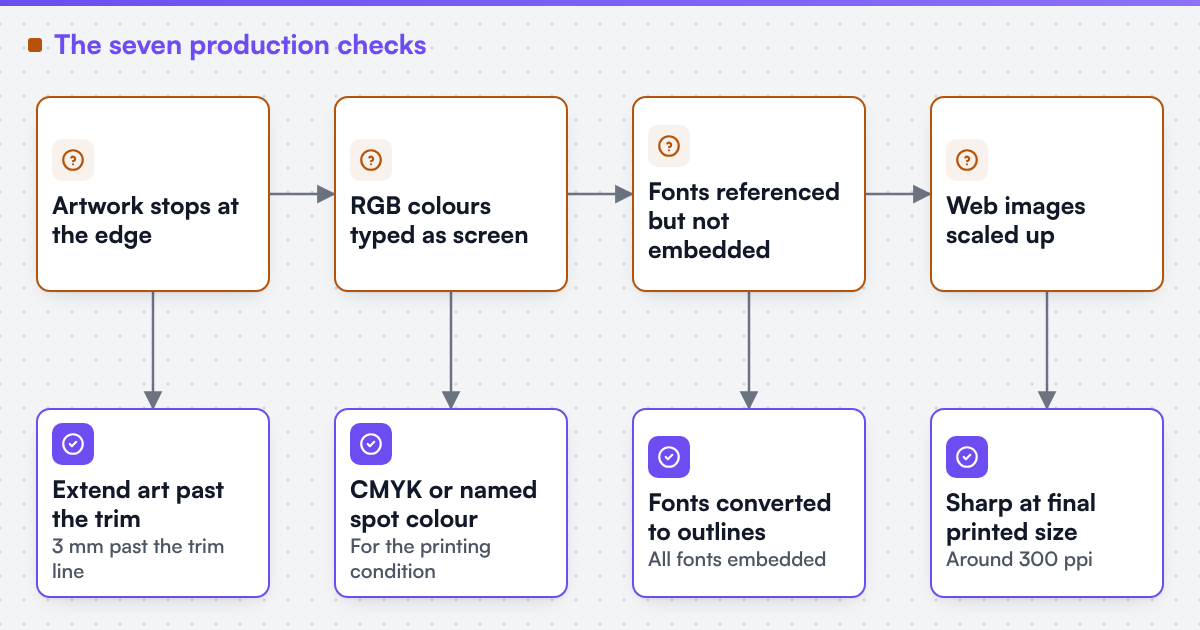 (opens the full-size diagram in a new tab)
What do TrimBox and BleedBox mean?
A PDF page carries several boxes. The MediaBox is the whole page. The TrimBox marks the finished size after cutting. The BleedBox marks how far artwork extends beyond the trim, so a slightly imprecise cut still leaves colour to the edge. Prepress software, imposition and preflight read these boxes rather than guessing from the page size.
A file without a TrimBox forces someone to decide where the product edge is. A file whose TrimBox is right but whose artwork stops at the trim has no usable bleed. Both look fine on screen and fail in production, which is why bleed problems are the most frequent reason a file is returned.
Why does colour cause so many rejections?
Screens mix red, green and blue light. Presses lay down cyan, magenta, yellow and black ink, sometimes with spot inks. The range of colours the two can show differs, so every RGB image has to be converted to CMYK through an ICC profile that describes the printing condition: the press, paper and ink. If the customer's file is converted with the wrong profile, or not converted at all, bright blues and greens shift and dark areas can exceed the ink limit.
Spot colours add a second layer. A brand colour named as a spot colour should keep that name through the whole chain, so production can print it with the matching ink or convert it deliberately. A spot colour renamed by a design tool, or converted silently to CMYK, produces a colour nobody approved. Overprint settings matter too: black text usually overprints the background, while a white element set to overprint can disappear.
What does PDF/X add?
PDF/X is a family of ISO standards that restricts PDF to what print production needs. PDF/X-1a expects CMYK and spot colour only, with transparency flattened and fonts embedded. PDF/X-4 allows live transparency and ICC-based colour, which suits modern workflows that convert late. Both require an output intent that names the printing condition, and both require the trim or art box. The Ghent Workgroup publishes practical specifications built on PDF/X for particular print segments.
Naming PDF/X in a specification does not make a file correct by itself. A file can be valid PDF/X and still carry low-resolution images or text too close to the trim. Web2Print Solutions claims no certification, accreditation, audit result or named compliance standard as a held credential. PDF/X appears here as an output target a printer may require.
Why do files from web design tools fail more often?
A browser-based design tool is built for the customer's screen. By default it works in RGB, uses web fonts, previews at screen resolution and exports what the customer sees. Unless it was engineered for print, it has no idea of trim, bleed, safe area or ink limits. The customer approves a preview that looks perfect, pays, and prepress then discovers the export is a screenshot-quality file.
Upload settings set which file types are accepted and how large a file may be.
The same tool can produce a print-ready PDF if the rules production depends on are built into it: a canvas sized to trim plus bleed with visible guides, a minimum effective resolution checked at final size, only fonts that may be embedded, colour conversion to the agreed profile at export, and preflight before the order is accepted. We engineer print output: PDF generation to a client-specified standard, CMYK and spot colour handling, ICC profile selection, bleed and trim geometry, imposition and automated preflight. The work is described in print-ready PDF and prepress automation.
Netbase JSC also maintains reusable web-to-print components, including a browser-based online designer and print-ready PDF output with CMYK conversion, bleed and trim, which an engagement may reuse under their own licence terms. Client-specific deliverables, access and handover are defined in the engagement contract. Pre-existing software, products, APIs and third-party components remain subject to their respective ownership and licence terms.
Turn this into a scoped brief
If your web channel keeps producing files that prepress repairs, send a project brief with your written output specification, one file production accepted and one it rejected. Those two files usually show which of the seven checks the channel misses.
How should a print business write its file specification?
Start from the press, not the software. List the printing conditions you run: press, paper class and ICC profile for each, with the ink limit that profile implies.
Set geometry per product. Trim size, bleed, safe area and any dieline, with the dieline on its own named spot layer set to overprint, so it guides cutting without printing.
Choose the PDF target. State whether production wants PDF/X-1a, PDF/X-4 or another agreed profile, and whether transparency may stay live.
Define the pass and fail rules. Minimum effective resolution by product type, font embedding, allowed colour spaces, maximum ink coverage and hairline width. Decide which failures block the order and which only warn.
Attach evidence. Keep one accepted and one rejected sample per product family. A developer building or fixing a web channel tests against those files, and so can any supplier you compare. Where the channel runs on a commerce platform, the integration must carry the artwork reference and specification through the order; web-to-print ecommerce integration and the WooCommerce web-to-print page describe that handoff. If an unwritten specification has already delayed a build, why web-to-print projects stall explains the pattern.
Limitations
This guide describes common requirements, not any one printer's specification. Values such as a 3 mm bleed or around 300 ppi are typical, not universal, and the printer's written requirements always take precedence. It does not cover variable data printing, packaging structural design or colour proofing contracts, which each need their own treatment. Web2Print Solutions is the web-to-print engineering service of Netbase JSC. Delivery records cited on this site belong to Netbase JSC; where no delivered example of a capability is published, the page says so rather than implying a record. No output pipeline delivered by this property is published here.
Discuss your web-to-print project
Frequently asked questions
Many printers ask for 3 mm on each side, and some ask for more on large formats or products that are folded or wrapped. The requirement belongs to the printer, so the web channel should read the bleed from the product specification rather than apply one value to everything.
Embedding is usually enough and keeps text searchable and editable in prepress. Outlining avoids licence and substitution problems when a font may not be embedded, but it makes late text corrections harder. The file specification should state which the printer prefers.
Yes. Preflight software reads the boxes, colour spaces, fonts, image resolution and ink coverage and reports each failure against a rule set. The rule set has to come from the printer's specification; automation only applies it consistently.
References (3)
- Ghent Workgroup, PDF/X workflow: the GWG 2015 specification is based on the ISO PDF/X-4 standard, accessed 2026-09-30.
- Ghent Workgroup, GWG specifications, accessed 2026-09-28.
- International Color Consortium, accessed 2026-09-28.