

Web-to-print for media and marketing production
Media and marketing production teams use web-to-print to turn approved brand assets into many print versions without rebuilding each one by hand. A marketing asset portal holds locked templates, lets campaign teams create market, language and personalised versions, routes each version through its approval chain, and sends the approved print-ready file to the printer.
Start a project brief Explore servicesReviewed by CEO, Netbase JSC · Published 29 Sep 2026 · Updated 3 Oct 2026

How do media and marketing teams produce print?
Publishers, agencies and in-house marketing departments produce print as one output of a campaign. The work starts with a brief and a set of brand assets: logos, photography, typefaces, copy and layout rules. A designer builds the master artwork. Then the volume arrives: the same flyer in twelve markets, the same poster in four languages and three sizes, a direct mail piece personalised for each recipient, a catalogue with regional pages. Each version goes through an approval chain, often brand, legal and the market owner, before a print-ready file goes to one or more printers.

Web-to-print changes the versioning and approval steps. Instead of a designer rebuilding each version in a desktop layout tool, the master becomes a locked template. Campaign teams edit only the fields the brand allows, the portal records who approved which version, and the approved file is what the printer receives.
This page is about the team that owns the content. A printing business that produces work for these teams is described on the commercial print page, in a printer's vocabulary.
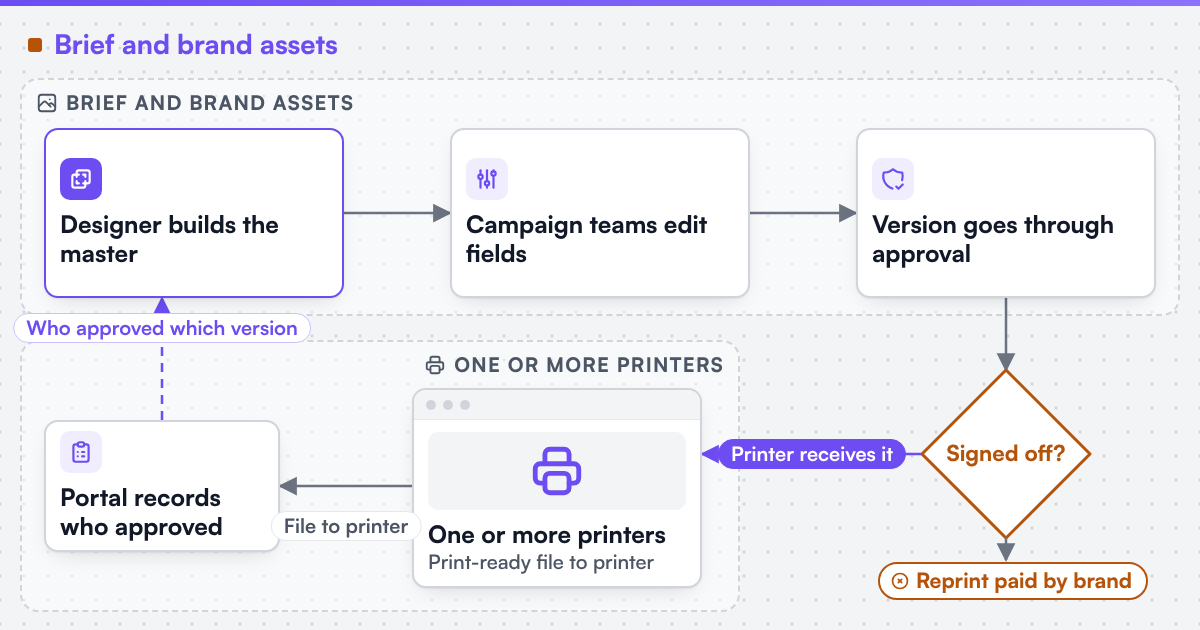 (opens the full-size diagram in a new tab)
Key takeaways
- A locked master becomes many market, language and personalised versions, each routed through its own approval chain before a print-ready file reaches the printer.
- A version approved in an email reply thread leaves no record of which file was signed off, and the reprint is paid by the brand.
- Rights properties defined by the IPTC Photo Metadata Standard can travel inside an image file, so a portal can block a use its licence does not cover.
- PDF/VT (ISO 16612-2:2010) exists for variable and transactional work, replacing thousands of separate per-recipient files with one checkable output.
- A printer retyping an approved file's specification by hand is the same handoff symptom as orders retyped into the production system.
Where does the marketing production workflow break?
-
Every version rebuilt by hand
One change to the master means reopening every version; the last one in the queue is most likely to carry the old text.
-
Approval lives in email
A different file reaches the printer than the one signed off in the reply thread, and nobody can show which was approved.
-
Asset rights invisible at the point of use
A photograph licensed for one market or period is reused elsewhere because the licence lives in a spreadsheet, not with the image.
-
Personalised print as thousands of files
Variable data work is sent as one PDF per recipient, slow to produce and hard for the printer to check.
-
The printer retypes the job
The approved file arrives by email and the specification is typed again at the supplier.
Where does AI help, and where do people stay in control?
AI can draft a translated headline, suggest a crop for a new format or flag an image whose rights metadata is missing. We can build AI-assisted steps into print workflows where a human reviews the result, with accuracy measured on the client's own data before acceptance. AI tools assist our own engineering work. A named human engineer reviews and remains accountable for everything we deliver, and no generated output ships unreviewed. The approval chain itself stays human: an AI suggestion is a draft version, never an approved one.
Which routes can a media or marketing team take?
Web2Print Solutions provides scoped services for new web-to-print setup, upgrades, migration and software integration for media organisations, print businesses and enterprise teams.
-
New portal
Discovery defines the template model, versioning rules, approval chain and printer handoff before anything is built.
-
Templates and personalisation
We can build custom product configurators and browser design tools that emit print-ready artwork to an agreed specification.
-
Governance
We can build B2B and corporate print storefronts with account hierarchies, permission models, approval workflows and brand-locked template systems.
-
Output
Print-ready files, including variable data output, are scoped in print-ready PDF and prepress automation. Where a technical standard is named, it describes the output specification an engagement produces to, not a credential Web2Print Solutions holds.
Who is this not for?
A team that produces a few print pieces a year, each designed from scratch, gains little from templates and approval routing. A team whose real gap is asset storage and search needs a digital asset management system first; a print portal reads from it rather than replacing it. The marketing side of print ordering is also discussed in online printing and digital marketing.
Which systems does a marketing production team run?
A digital asset management system for brand assets and their rights; desktop layout tools where masters are designed; a project or marketing resource tool that holds briefs and deadlines; a data source for personalisation, often a CRM export; single sign-on for staff and agencies; and one or more print suppliers, each with its own order intake. The portal sits between them: it reads approved assets, produces versions, records approvals and hands jobs to printers.
What evidence exists for media and marketing production?
Netbase JSC, which operates Web2Print Solutions, has delivered 50+ web-to-print platforms. Netbase JSC maintains reusable web-to-print components - a browser-based online designer, rule-based print pricing templates, print-ready PDF output with CMYK conversion, bleed and trim, storefront connectors for WooCommerce, Shopify, Wix and custom stores, and a photobook and multi-page layout editor - which an engagement may reuse under their own licence terms. The live web-to-print store examples show those editors in use on stores operated by their owners, where Netbase JSC delivered the designer or print-option components. Those stores sell to consumers and print buyers; no media-organisation or agency portal is published as a case on this site.
How does an engagement start?
An engagement starts with one real campaign. The most useful inputs are the master artwork for one piece, the list of versions it produced last time, the approval chain with the roles involved, where the assets and their licences live, and how files reach the printer today. Send them with a project brief; a campaign that went wrong is as useful as one that went well.
Frequently asked questions
Yes. The template locks logos, typefaces, colours and layout, and exposes only the fields the brand owner allows, such as a headline, an offer or a local image chosen from approved assets.
Usually, if that system has an API. The portal reads approved assets and their rights metadata from it and does not become a second place where assets are stored.
A data file supplies the variable fields, the template produces the versions, and the output is a print-ready file the printer's workflow accepts, which can be PDF/VT when the printer supports it.
Yes. Each printer is a destination with its own specification and order intake, and the portal records which approved version went to which printer.
References (2)
- IPTC, Photo Metadata Standard, version 2025.1: rights properties carried in image metadata, accessed 2026-09-29.
- Ghent Workgroup, PDF/VT (ISO 16612-2:2010) for variable data and transactional printing, accessed 2026-09-29.