

Web-to-print on WooCommerce
WooCommerce can run a web-to-print store with custom print pricing, because its cart hooks let code recalculate a line price on the server. The deciding constraints are elsewhere: block checkout runs through the Store API, High-Performance Order Storage changes where order data lives, and production still needs a defined print-ready file for each order line.
Start a project brief Explore servicesReviewed by CEO, Netbase JSC · Published 28 Sep 2026 · Updated 14 Oct 2026

Where does WooCommerce fit a print catalogue?
WooCommerce suits print businesses that want to own their store code and hosting, sell a mix of standard and configurable products, and keep WordPress for content. Because it is open source and runs on the business's own server, there is no plan tier that switches price overrides on or off. It fits less well when the team cannot maintain a WordPress stack, or when B2B buyers need company accounts, shared catalogues and approval chains that WooCommerce provides only through extensions.
This page is one of the platform pages in the web-to-print integration directory. It records the WooCommerce facts that change the engineering, checked against WooCommerce documentation on 28 September 2026.
Is there a web-to-print plugin for WordPress?
No single packaged plugin covers web-to-print on WordPress. WooCommerce product add-ons handle simple, fixed options, but a configurable price, an online designer and a print-ready output pipeline are engineered for the store, using cart hooks such as woocommerce_before_calculate_totals, not installed as one plugin. Web2Print Solutions builds and scopes that engineering work on a buyer's own WooCommerce store.
Key takeaways
- WooCommerce has no documented variant ceiling, so the engineering question is a clean output contract and a codebase that survives upgrades, not a workaround for a platform limit.
-
woocommerce_before_calculate_totalslets server code recalculate the line price from a pricing engine on every totals pass, so the browser's estimate is never the price charged. - Block checkout talks to the server through the Store API, and cart item data must be exposed to it, or custom print fields disappear from the newer checkout.
- High-Performance Order Storage moves orders into dedicated tables; print data written as raw post meta silently disappears once HPOS is enabled.
- Order status changes or webhooks trigger the adapter, which must submit exactly one job for every order line even when WooCommerce or a plugin update changes a hook's behaviour.
How does print data cross a WooCommerce store?
-
Product options
Simple fixed choices can be attributes and variations. Open-ended print choices such as custom width and height, stock, finishing and quantity are stored as cart item data. Product add-on extensions can add option fields with fixed or percentage surcharges, which suits simple cases but not a calculation that depends on sheet yield or finishing sequence.
-
Price
The hook
woocommerce_add_cart_item_dataattaches the configuration to the cart line, andwoocommerce_before_calculate_totalslets server code recalculate the line price from a print pricing engine each time totals are calculated. The browser's estimate is never trusted. -
Artwork and design
An online designer on the product page saves the design and adds its identifier to the cart item data. After payment, the production PDF is generated from that identifier to the contract in print-ready PDF and prepress automation.
-
Order to job
In the classic checkout,
woocommerce_checkout_create_order_line_itempersists configuration on the order line. An order status change or webhook then triggers the adapter that submits one job for each order line to the MIS, hot folder or fulfilment partner.
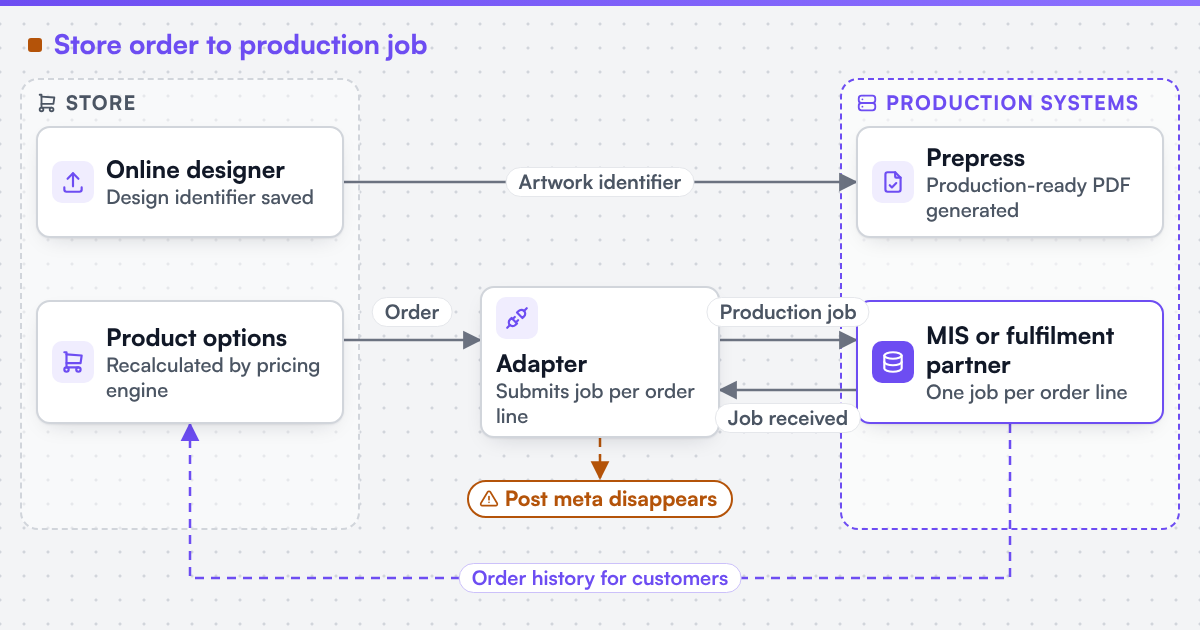 (opens the full-size diagram in a new tab)
Which WooCommerce constraints change the design?
| Constraint | What changes | Design response |
|---|---|---|
| Block checkout | Cart and Checkout blocks talk to the server through the Store API | Cart item data is exposed to the Store API, and the integration is tested on block checkout, not only the classic shortcode |
| High-Performance Order Storage | Orders live in dedicated tables, not as WordPress posts | Print data is read and written through WooCommerce's order objects, never raw post meta |
| Plugin load and upgrades | A page builder, designer, add-ons and payment plugins all run together | Print logic stays in one plugin with automated tests for the cart, checkout and order path |
Block checkout runs through the Store API. WooCommerce's block-based Cart and Checkout talk to the server through the Store API, with its own cart tokens and extension points. An integration written only for the classic shortcode checkout must be tested against the block checkout too, and cart item data must be exposed to the Store API if the blocks are to display it.
High-Performance Order Storage. With HPOS, orders are kept in dedicated order tables rather than as WordPress posts. Print data must be read and written through WooCommerce's order objects, not raw post meta, or it silently disappears when HPOS is enabled.
Plugin load and upgrades. A print store often runs a page builder, a designer, add-ons and payment plugins at once. Each WooCommerce or WordPress update can change a hook's behaviour, so the integration keeps its logic in one plugin with automated tests for the cart, checkout and order path.
WooCommerce has no documented variant ceiling of the kind Shopify publishes, so the argument here is less about workarounds and more about a clean output contract and a codebase that survives upgrades.
Which components and systems are involved?
A WooCommerce web-to-print build combines the store and theme, an online designer, a pricing service, and an adapter from orders to production. We can scope and build web-to-print integrations for Shopify, WooCommerce, Magento / Adobe Commerce, BigCommerce, Wix and headless storefronts, and we state each platform's constraints before the work is priced. We engineer print output: PDF generation to a client-specified standard, CMYK and spot colour handling, ICC profile selection, bleed and trim geometry, imposition and automated preflight.
Netbase JSC, which operates Web2Print Solutions, has delivered 50+ web-to-print platforms, and the group maintains a WooCommerce storefront connector, an online designer and print-ready PDF output that can be reused where they fit. Client-specific deliverables, access and handover are defined in the engagement contract. Pre-existing software, products, APIs and third-party components remain subject to their respective ownership and licence terms.
The engagement that builds this is web-to-print ecommerce integration.
What must survive a move to or from WooCommerce?
Saved designs and templates, customer accounts, order history with its cart item data, product and category URLs, and the production interface. Orders migrated into an HPOS store must land in the order tables, not as posts. Moving between platforms is scoped as a print platform migration with parity tests on real orders.
Scope this work with a project brief that names your WooCommerce version, checkout type, one configurable product and the system that should receive the job.
See it live
Live stores operated by their owners. Each link opens the store in a new tab.

Bestelprint
What it shows
A photo-on-canvas product page with a path to design the print online instead of uploading a finished file.
Live store using web-to-print components delivered by Netbase JSC, which operates Web2Print Solutions.

Discomaton
What it shows
A 'create a vinyl' personalisation entry point on a personalised gift storefront.
Live store using web-to-print components delivered by Netbase JSC, which operates Web2Print Solutions.

BannerKoenig
What it shows
A browser designer opened from a roll-up banner product page, with guided tips beside the canvas.
Live store using web-to-print components delivered by Netbase JSC, which operates Web2Print Solutions.
Discuss your web-to-print project
Frequently asked questions
For fixed options with simple surcharges, often yes. When the price depends on size, sheet yield, finishing sequence or customer terms, a server-side pricing calculation hooked into the cart is needed instead.
No, but the integration should state which checkout it supports and be tested on that one. New stores increasingly start on block checkout, so supporting the Store API avoids a later rewrite.
Only if the code writes order data as post meta. Integrations that use WooCommerce's order objects keep working whether HPOS is on or off.
References (4)
- WooCommerce Code Reference, hooks list (woocommerce_add_cart_item_data, woocommerce_before_calculate_totals, woocommerce_checkout_create_order_line_item), accessed 2026-09-28.
- WooCommerce developer docs, WooCommerce Store API, accessed 2026-09-28.
- WooCommerce developer docs, High Performance Order Storage, accessed 2026-09-28.
- WooCommerce, Product Add-Ons documentation, accessed 2026-09-28.