

B2B and corporate print storefronts
A corporate print storefront is a closed ordering portal where an organisation's locations and teams order print on brand without routing every job through one print manager. Web2Print Solutions builds the account hierarchy, permission model, brand-locked templates, approval workflow and cost-centre handling, and accepts the storefront against a tested permission matrix.
Start a project brief Explore servicesReviewed by CEO, Netbase JSC · Published 29 Sep 2026 · Updated 3 Oct 2026

At a glance
- Engagement type
- Build and launch
- What you provide
- One real product or workflow, plus your acceptance criteria
- What you receive
- A closed print portal where locations and teams order on-brand print through roles, locked templates, approvals and cost-centre budgets.
- Who accepts
- The business owner, against real products and orders
What you need to provide
- One real product or workflow to scope against
- What correct looks like for it
- Any system that must stay in place
- Who in your organisation confirms the result
Ready to scope this service?
What is a corporate print storefront?
A corporate print storefront, also called a B2B print portal, is a closed site where branch managers, franchisees, sales staff and marketing coordinators, not print buyers, order branded print for their own location and see only the products, templates, prices and budgets that apply to them.
Without a portal, the same work runs through email, shared files and one print manager who becomes the bottleneck: off-brand artwork gets through, and nobody can say what a region spent. Among the web-to-print engineering services, this one owns control: who may order what, which parts of a design may change, who approves, and which budget pays.
We can build B2B and corporate print storefronts with account hierarchies, permission models, approval workflows and brand-locked template systems.
Key takeaways
- A corporate print storefront is accepted against a tested permission matrix, not a demo: every role, location and product combination agreed must behave exactly as specified.
- Brand control lives in the template, not a reviewer's judgement: locked regions and validated editable fields block an off-brand result before an order is created.
- Approval and budget rules decide who may order and who pays before an order releases, and each decision is logged with its user, time and rule.
- Single sign-on and punchout are common entry points, but the account hierarchy and permission model, not the login method, decide whether the portal holds.
- Wix is excluded: its account and permission model cannot support company hierarchies and approval routing, and saying so before scoping avoids a costly discovery mid-build.
Who is this for, and when does another route fit better?
Good fit
- A brand, franchisor or multi-site business whose locations order recurring print from approved templates
- An in-plant or central marketing team that approves every job by hand today
- A printer that runs portals for several corporate customers and needs one set of rules per account
Another route fits better
- A consumer print shop selling to the public, better served by an open ecommerce integration
- An organisation still disagreeing internally on who may order and approve, settled first by architecture discovery
- A team needing only a digital asset library, with no ordering, pricing or production step
What outcomes is the engagement accepted against?
-
A permission matrix that holds
Every role, location and product combination in the agreed matrix is tested, so a user sees, edits, approves and orders exactly what it allows, nothing else.
-
Templates that cannot go off brand
Locked regions stay locked, editable fields accept only the agreed input, and the brand owner signs off each template's output.
-
Approvals and budgets that route correctly
Orders over a limit reach the right approver, delegation works during absence, and each order carries the cost centre charged.
-
Orders that reach production complete
An approved order arrives at prepress or the production system with the final artwork version and the delivery split intact.
What is in scope?
| Module | Input | Deliverable |
|---|---|---|
| Account hierarchy | Organisation, regions, locations, teams and users | A documented hierarchy with inheritance rules and admin screens |
| Roles and permissions | Who may view, personalise, approve and order each product | A permission model and a test suite covering the full matrix |
| Brand-locked templates | Brand guidelines, master artwork and the editable fields | Templates with locked and editable regions, font, colour and image constraints |
| Approval workflow | Approval chains, limits, exceptions and delegation | Routing rules with an audit trail for every order |
| Budgets and cost centres | Allowances, cost centres and charge-back rules | Budget checks at checkout and spend reports by location and period |
| Contract catalogue | Products and price lists per account | Account-specific catalogues and prices from the agreed pricing source |
| Distribution and reorder | Kits, stock items and multi-address delivery | Split delivery, repeat programmes and one-click reorder |
| Identity | The organisation's identity provider | Single sign-on and user provisioning where required |
What is not included?
-
No brand or template design
The engagement implements the brand owner's approved artwork, not guidelines or template design.
-
No procurement of print
Web2Print Solutions does not act as a print broker, does not buy print on a client's behalf and does not hold client funds.
-
No directory management
The portal integrates with the identity provider but does not administer the user directory.
-
No adoption promise
The portal can make the right path easy; whether staff use it is a rollout decision the organisation owns.
How does a brand-locked template work?
A brand-locked template separates what the organisation fixes from what a location may change: logo, colours, grid and legal lines stay locked, while name, address, opening hours or an offer line sit in editable fields ruled by a character limit, a pick list, a validated phone format or an approved image set. Because the rules live in the template, an off-brand result is blocked when the order is created, not caught later by a reviewer.
Variable data extends the same idea to volume: a regional marketer uploads a list of locations and gets one personalised, rule-checked version per row, built by the same print product configurator editor that generates the proof a user approves and the file prepress receives.
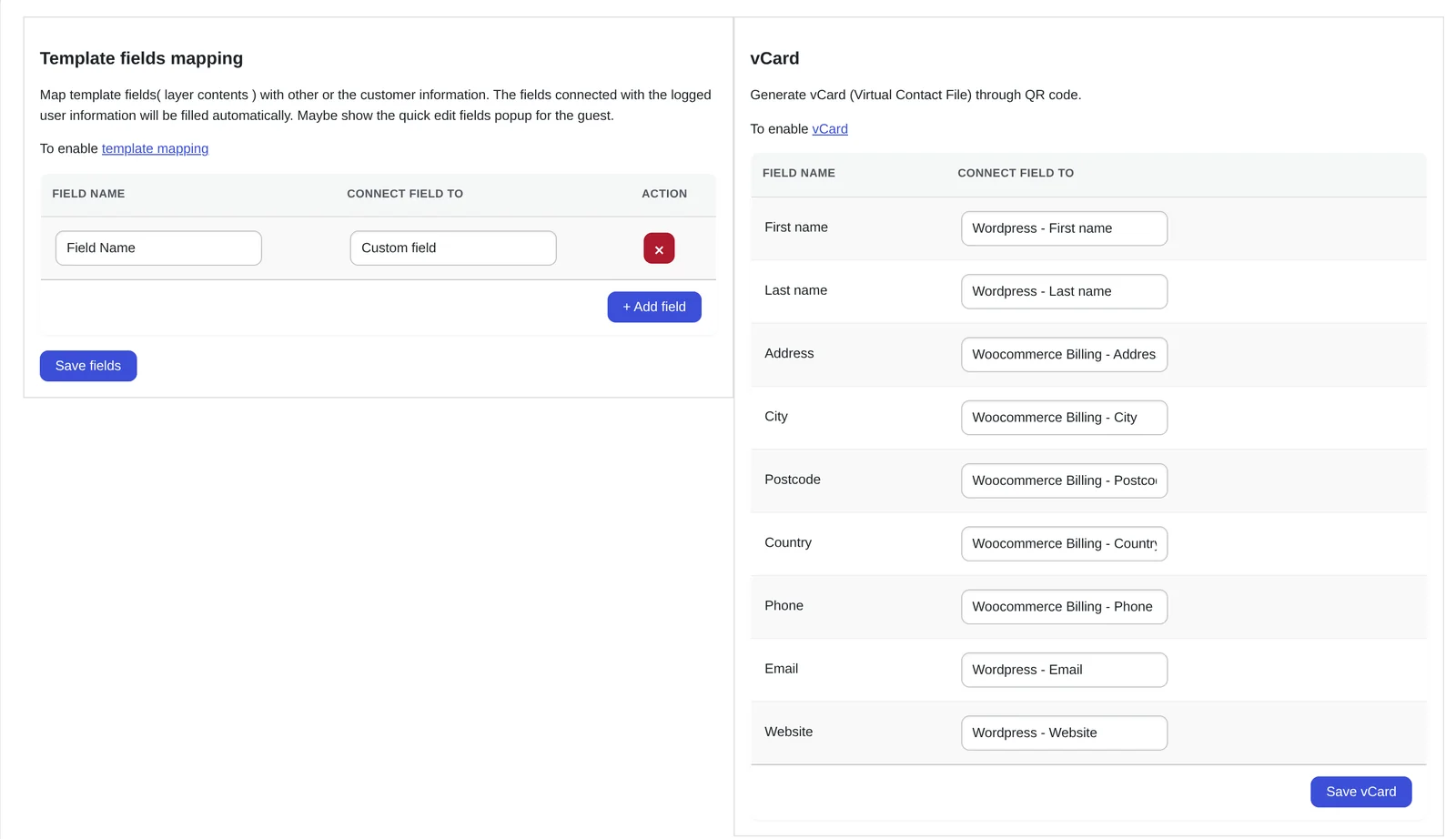
Template fields are mapped to account details such as name and address, so personalised items fill themselves from the logged-in user.
How do approvals, budgets and punchout fit together?
Approval rules decide who must say yes; budget rules decide whether the money exists; the portal checks both before release, approving orders under a location's allowance automatically, routing larger or non-standard orders to a manager or the brand team, and logging each decision's user, time and rule.
Some organisations buy through a procurement system instead of a portal login. cXML.org (accessed 29 September 2026) lists version 1.2.071, updated 14 August 2026, as current, and names PunchOut among its features: the buyer builds a cart in procurement, sends it to the print catalogue, and returns it for internal approval before the order comes back. Single sign-on is the other common entry point, reading the user's organisation, location or role from an OpenID Connect 1.0 identity token.
How does the work run?
-
Permission model
Agree the hierarchy, roles, approval chains and budget rules in writing
- Evidence you receive
- A signed permission matrix and template-lock specification
-
Build
Implement accounts, templates, approvals, budgets and the order handoff
- Evidence you receive
- A staging portal loaded with real templates and test users
-
Acceptance
Run the full permission matrix, template output checks and approval scenarios
- Evidence you receive
- Signed results per test group and an administrator guide for brand managers
The permission model comes first because it is the part organisations most often disagree about internally. The default engagement is fixed-scope with written acceptance criteria and priced change control. Managed operations is a separate, opt-in agreement.
Which platforms can carry a corporate storefront?
We can scope and build web-to-print integrations for Shopify, WooCommerce, Magento / Adobe Commerce, BigCommerce, Wix and headless storefronts, stating each platform's constraints before pricing the work. For a corporate portal, the account and permission model decides the fit: Adobe Commerce B2B offers company accounts, shared catalogs with company-specific prices, requisition lists and purchase order approvals (accessed 29 September 2026), detailed on the Magento web-to-print page. On WooCommerce, Shopify and BigCommerce, the store plan's own B2B features are checked first, and the rest is built alongside the store.
Wix is excluded: its account and permission model is not a credible base for company hierarchies and approval routing, and saying so before scoping beats discovering it mid-build. Approved orders reach production through print MIS and ERP integration.
What does Netbase JSC bring to a corporate storefront?
Netbase JSC, which operates Web2Print Solutions, has delivered 50+ web-to-print platforms, and maintains reusable components, an online designer, pricing templates, print-ready PDF output and storefront connectors, an engagement may adopt under their own licence terms. The live web-to-print stores page shows owner-operated stores using the designer or print-option components.
Web2Print Solutions has not yet published a delivered corporate portal under its own name, so this page describes the permission model and its acceptance test rather than a case study.
Client-specific deliverables, access and handover are defined in the engagement contract. Pre-existing software, products, APIs and third-party components remain subject to their respective ownership and licence terms.
Scope this work with a project brief
Send a project brief with the number of locations and roles, two or three templates to lock, your approval chain and its exceptions, how budgets or cost centres work today, and the identity provider staff already use.
Frequently asked questions
Yes. Catalogue visibility, price lists and budgets attach to the account hierarchy, so a location inherits what its region allows and sees nothing else.
Not when the organisation has an identity provider: the portal accepts single sign-on, reads the user's organisation, location and role from the token, and leavers lose access the moment the directory removes them.
Yes. Each customer becomes an organisation in the hierarchy with its own templates, catalogue, approval rules and reports; one needing its own branded domain and full data separation points toward a multi-tenant platform instead, settled first by discovery.
The brand team does: administrator screens let a brand manager add a template, change an editable field or retire an old version without engineering help.
Yes. Web2Print Solutions delivers remote-first from Hanoi, Vietnam, and Netbase JSC has delivered web-to-print projects for clients in 80+ countries.
Send a project brief at /project-brief, email project@netbasejsc.com or message us on WhatsApp at +84 937 869 689. A senior engineer reads every brief and replies in writing.
References (3)
- cXML.org, cXML overview: current specification version 1.2.071, updated 14 August 2026; PunchOut listed among application-integration features, accessed 2026-09-29.
- OpenID Foundation, OpenID Connect Core 1.0: identity layer on top of OAuth 2.0; ID token claims, accessed 2026-09-29.
- Adobe Experience League, Adobe Commerce B2B introduction: company accounts, shared catalogs, requisition lists, negotiable quotes and purchase order approvals, accessed 2026-09-29.