

Replace the storefront and keep the print MIS
A print business can replace a web-to-print storefront without replacing its print MIS when the MIS exposes a supported interface for jobs and status. Web2Print Solutions' new ordering layer maps options, prices and artwork into the MIS job model, submits each order with a stable key, handles rejections and retries, and proves one order becomes one correct job.
Start a project briefReviewed by CEO, Netbase JSC · Published 27 Sep 2026 · Updated 1 Nov 2026

Why keep the MIS when the storefront has to go?
An ageing storefront frustrates customers while the print MIS still runs estimates, jobs, schedules, costing and production history correctly. Replacing both at once changes the buying journey and the production system on the same day, and breaks identifiers and routines operators use every hour. The narrower, safer question is whether a new ordering layer can submit a complete job to the existing MIS and receive reliable status back.
Works with
Which MIS and ERP systems can a web-to-print store connect to?
Print businesses run jobs, stock and invoicing in systems like these. The Netbase team connects your web-to-print store to the one you already run, through its API or a sanctioned file exchange, so orders, prices and job status move without anyone retyping them.






Product names and logos belong to their owners and are shown only to identify the systems; no partnership or endorsement is implied.
| Area | Current state | Target state |
|---|---|---|
| Ordering | An old storefront customers avoid and staff patch | A new storefront built for the products and accounts you sell today |
| Job entry | Web orders printed and retyped into the MIS | Orders submitted to the MIS as complete jobs with a stable key |
| Status | Customers told "processing" until someone emails them | Production states from the MIS shown to customers and support |
The page on web-to-print platform limitations lists the other boundaries that can fail.
Key takeaways
- Replacing a storefront and a print MIS on the same day changes the buying journey and the production system at once, and breaks identifiers operators use every hour.
- The narrower question is whether the MIS exposes a supported interface, such as an API, JDF/JMF or a monitored import folder, that a new ordering layer can submit a complete job to.
- An idempotent adapter keyed on the order's external id is what turns a retried or duplicated webhook into one job instead of two.
- "Order placed" at checkout and "job accepted" in production are different events, and the buyer should see the difference, not a single "processing" status.
- When the MIS has no usable interface, the plan changes to a vendor-supported route, a different boundary, or a wider migration, with the old storefront still able to take orders during the switch.
How does the order cross the boundary?
-
The customer configures and pays
The storefront collects product, quantity, stock, finishing, delivery and artwork or a saved-design reference, and validates the price on the server.
-
The adapter submits a job
A mapping translates storefront values into MIS product codes, units and routes, attaches a durable artwork reference, and sends the job with the order's external key.
-
The MIS answers
An acknowledgement or rejection comes back with a reason; accepted jobs report production states, and rejected ones land in a queue with a named owner.
The map decides which system owns each value. If the MIS owns stock codes, the storefront uses them or a documented translation. If an option changes production routing, a free-text note is not enough. "Order placed" at checkout and "job accepted" in production are different events, and customers should see the difference.

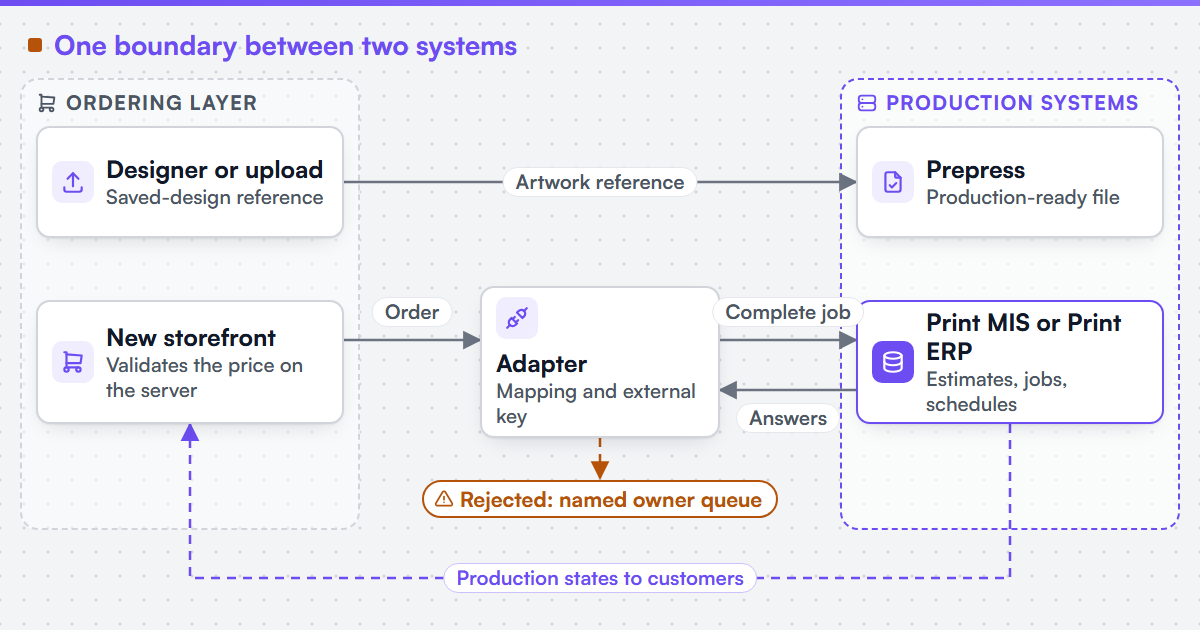 (opens the full-size diagram in a new tab)
What changes the outcome?
-
A supported interface
Input: the MIS vendor's API, JDF and JMF endpoint, or monitored import folder under your licence. Action: prove one complete job, one invalid job and one retry through it. Output: evidence that the interface carries the fields production needs.
-
An idempotent adapter
Input: storefront orders with stable external keys. Action: look up before retrying, and treat corrections as revisions with rules by production state. Output: one job for each order, even after timeouts and duplicate webhooks.
-
Daily reconciliation
Input: order and job lists from both systems. Action: compare them automatically. Output: a short list of orders without jobs and jobs without orders, each with an owner.
We can integrate a web-to-print front end with an existing MIS, ERP or production scheduler where that system exposes a sanctioned interface. The service that builds it is web-to-print MIS integration.
Which systems are involved?
Four systems meet at this boundary: the new storefront, the online designer or upload route, the print MIS or Print ERP, and prepress. Ecommerce platform integration builds the storefront side, and print-ready PDF and prepress automation makes sure the file the job points to is production-ready. JDF and JMF, the CIP4 formats for job definition and job messaging, are one interface option where the MIS supports them; a REST API or a watched import folder are others. A direct database write is not an interface, however well it works in a test.
How does this differ by segment?
Commercial and trade printers care most about estimating parity: the web price must match what the MIS would cost, and jobs must land with the right press route. Media and publishing teams need the approved content version and campaign reference on the job, so a late revision does not print the wrong edition. Enterprise buyers add approvals, cost centres and procurement references that must travel with the job while the MIS or ERP stays authoritative for the fields it owns.
What if the MIS has no usable interface?
Then the plan changes. The options are a vendor-supported route, often an add-on module or a file import, a different boundary such as manual release of machine-readable job tickets, or a wider migration. An assessment compares those paths, including the rollback route while the old storefront can still take orders. Once new jobs are in production, reversal needs reconciliation rather than a DNS switch. We can assess a stalled, inherited or failing web-to-print build and report plainly whether it should be completed, replaced, migrated or stopped; print platform migration owns that assessment and the cutover.
What evidence stands behind this page?
Netbase JSC, which operates Web2Print Solutions, has delivered 50+ web-to-print platforms, and that group experience shapes the tests on this page. No case study for this specific storefront-and-MIS pattern is published on this site yet, so the mechanism here is tested against your own MIS and orders rather than taken on trust. A related record of a custom storefront rebuild that kept its own back-end systems of record, separating fast catalogue ordering from a quote route for complex jobs, is published as the Print It of South Florida case study.
Check whether this boundary applies to your setup
Send a project brief naming your MIS and edition, the interface you are licensed for, the current storefront, and one order that production has to repair or retype.
Frequently asked questions
You need whatever licence or module the vendor requires for its API or import route, and access to a test company or sandbox. The integration uses only interfaces the vendor supports.
They move with the storefront, not the MIS. The migration plan checks which accounts, designs and reorder histories can be exported and how customers will reorder after cutover.
Yes, for a period. Both can submit jobs if each uses its own external keys, and reconciliation shows which channel created which job until the old one is switched off.
Acceptance inspects the job record the MIS created, not the HTTP response. A representative order with non-trivial finishing and an artwork reference is compared field by field with what production expects.
Yes. Web2Print Solutions delivers remote-first from Hanoi, Vietnam, and Netbase JSC has delivered web-to-print projects for clients in 80+ countries.
Send a project brief at /project-brief, email project@netbasejsc.com or message us on WhatsApp at +84 937 869 689. A senior engineer reads every brief and replies in writing.