

Print product configurator engineering
A print product configurator is the part of a web-to-print store that turns a product's options, constraints and artwork into one valid, producible order. Web2Print Solutions models the option rules, builds the configurator and online design tool, and accepts them only when every tested combination is valid and emits a print-ready file.
Start a project brief Explore servicesReviewed by CEO, Netbase JSC · Published 29 Sep 2026 · Updated 1 Oct 2026

At a glance
- Engagement type
- Assessment, then build
- What you provide
- One real product or workflow, plus your acceptance criteria
- What you receive
- A configurator and online design tool that allow only producible option combinations and emit artwork your prepress team accepts.
- Who accepts
- The person who owns the specification or price list
What you need to provide
- One real product or workflow to scope against
- What correct looks like for it
- Any system that must stay in place
- Who in your organisation confirms the result
Ready to scope this service?
What does a print product configurator have to do?
A print product configurator has three jobs. It lets a customer choose only combinations the shop can produce. It shows the product clearly enough that the customer knows what they are buying. And it hands production an order and a file that need no manual repair. A configurator that does only the first job is a form; one that skips the third moves the work into prepress, where nobody sees the cost.
Print products make this hard because options depend on each other. A stock may allow only some finishes. A fold may need a minimum size. A die-cut shape changes the safe area, and a multi-page item has a cover and a body with different rules. Among the web-to-print engineering services, this one owns product rules and the design step.
We can build custom product configurators and browser design tools that emit print-ready artwork to an agreed specification.
Key takeaways
- A configurator has three jobs: block combinations the shop cannot produce, show the product clearly, and hand production a file that needs no manual repair.
- Print options are rule-validated configuration data, not native ecommerce variants, because catalogues like business cards exceed typical platform variant limits quickly.
- The configurator decides which combinations are valid; a separate pricing engine decides what a valid combination costs.
- The production file generates from the saved design version at approval time, not a capture of the browser canvas.
- A trained administrator adds new products and templates from data once the rule schema exists, with no engineering help needed.
Who is this for, and when does another route fit better?
Good fit
- A printer whose products carry conditional options, custom sizes or multi-part structure that the current configurator cannot express
- A business whose prepress team repairs customer files that the storefront accepted
- A brand or publisher that needs templates customers can personalise without breaking the layout
Another route fits better
- A small catalogue of fixed products, where standard product options already do the job
- A team whose only problem is that prices are wrong, where a print pricing engine is the right commission
- A buyer who cannot yet write down the product rules, where architecture discovery captures them first
What outcomes is the engagement accepted against?
-
Only producible combinations
Every combination in the agreed test set is either accepted with the right options or blocked with a clear reason. No invalid combination reaches the cart.
-
Files that pass prepress
Output from representative designs, including awkward ones, passes the agreed preflight profile and is signed off by the client's prepress lead.
-
Designs that survive reorder
A saved design reopens as the same version, with the same fonts and images, when a customer or staff member reorders it.
-
Products an administrator can add
A trained administrator adds a new product and template from the documentation without engineering help.
What is in scope?
| Module | Input | Deliverable |
|---|---|---|
| Product rule model | Options, dependencies, exclusions and the exceptions estimators apply informally | A documented rule schema with minimum and maximum values and blocked combinations |
| Configurator interface | Product pages and option groups | Option selection with live validation, clear error messages and mobile behaviour |
| Online design tool | Templates, fonts, image rules and safe, bleed and trim guides | A browser editor with locked regions, resolution warnings and a proof image |
| Artwork upload | Accepted formats and quality thresholds | Upload validation with format, size and resolution checks before checkout |
| Multi-page products | Cover and body rules, page counts and spreads | Page management with the correct structure for each part |
| Output | The print-ready specification prepress accepts | One production file for each order line, generated from the saved design version |
| Test suite | Representative products and difficult artwork | Automated tests for the rule engine and output generation |
What is not included?
-
No artwork creation
The engagement builds the tool; it does not design customers' artwork or the client's templates.
-
No font or image licensing
Fonts, stock images and colour profiles must be licensed by the client for use in the editor.
-
No 3D rendering by default
Photographic mock-ups and 3D previews are separate scope when the product needs them.
-
No silent artwork correction
Files are checked against the agreed preflight rules; anything outside them is reported, not changed without notice.
Why do print options not fit ordinary product variants?
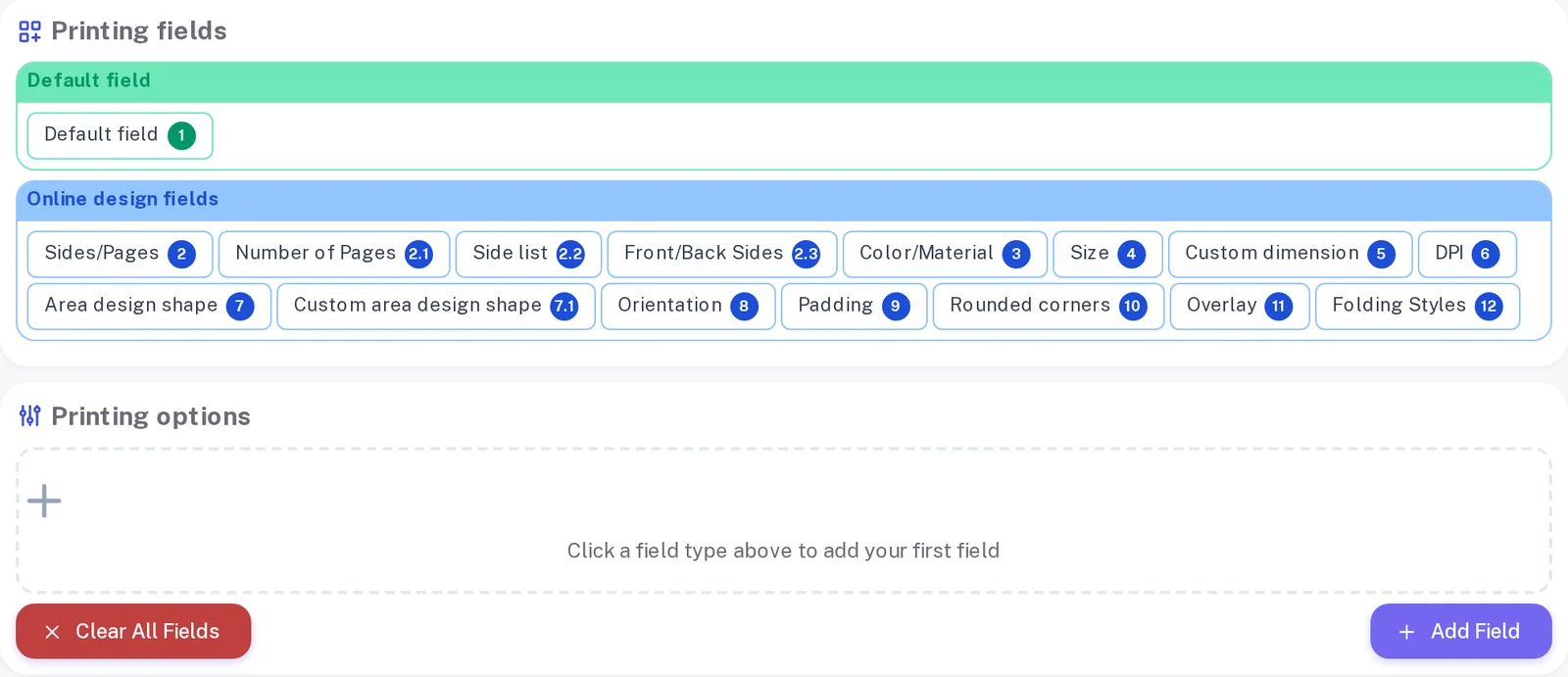
Ecommerce platforms model a product as a short list of options that multiply into variants: Shopify's help centre (accessed 29 September 2026) caps a product at three options and 2,048 variants. A business card with five stocks, four finishes, three corner styles and ten quantities already needs four options and 600 variants, before any custom size, so most print catalogues keep a small set of real variants and carry the rest as configuration data the configurator validates.
That design choice has consequences. The configuration must travel with the cart line, the server must re-check it at checkout, and the order must carry it to production unchanged. The Shopify web-to-print page covers how that works on one platform; the same pattern applies elsewhere with different extension points.
Print options are built as rules, not multiplied into variants.
Where does the configurator end and the pricing engine begin?
The configurator decides which combinations are valid and what file the product produces; the print pricing engine decides what a valid combination costs. Keeping them apart matters: price rules inside the configurator turn every price change into an interface release, and the storefront and estimator prices drift apart. The configurator sends the validated selection to the pricing service, and the same call runs again on the server at checkout.
How is artwork turned into a print-ready file?
The editor works in the product's real geometry: trim size, bleed, safe area, fold lines and die lines. When the customer approves, the production file is generated from the saved design, not captured from the screen. We engineer print output: PDF generation to a client-specified standard, CMYK and spot colour handling, ICC profile selection, bleed and trim geometry, imposition and automated preflight.
Where a technical standard is named, it describes the output specification an engagement produces to, not a credential Web2Print Solutions holds. The target is usually a PDF/X profile agreed with prepress. The print-ready PDF and prepress automation service owns that output contract, and the print-ready PDF requirements article explains what prepress checks and why.
How does the work run?
-
Rule capture
Write down every product rule, including the exceptions staff apply by habit
- Evidence you receive
- A product rule schema signed by the person who owns the catalogue
-
Build
Implement the configurator, editor, upload checks and output
- Evidence you receive
- A staging store with real products and templates
-
Acceptance
Run the combination tests and prepress output checks on representative designs
- Evidence you receive
- Signed results per product family and an administrator guide
The rule model has to exist in writing before a fixed scope is honest. The default engagement is fixed-scope with written acceptance criteria and priced change control. Managed operations is a separate, opt-in agreement.
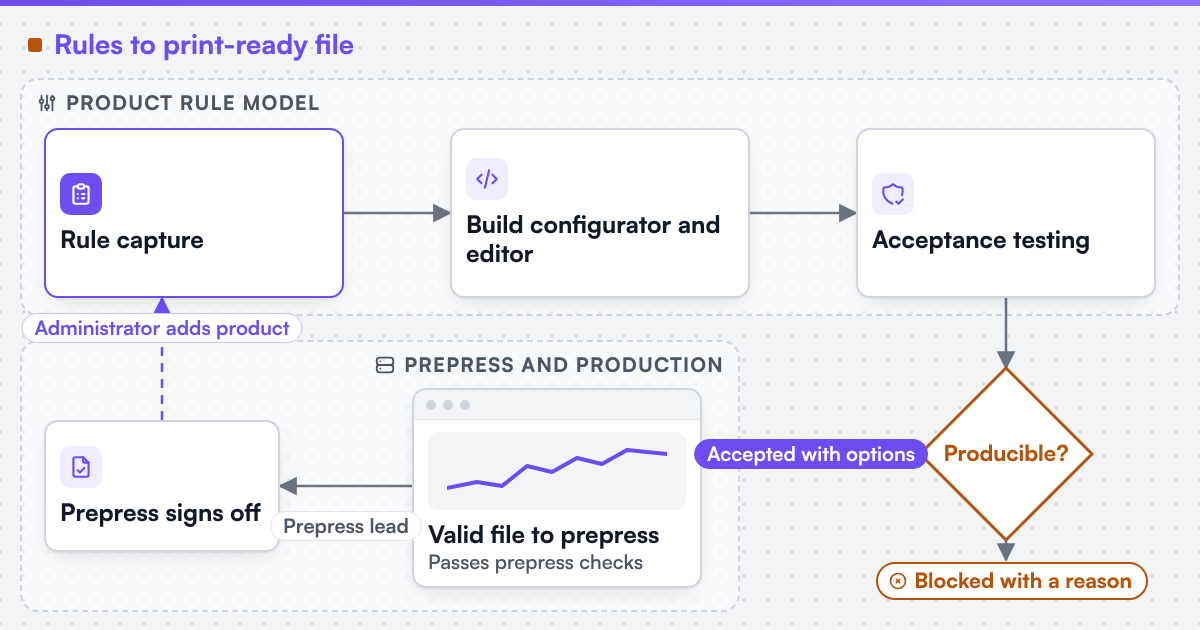 (opens the full-size diagram in a new tab)
What does Netbase JSC bring to configurator work?
Netbase JSC, which operates Web2Print Solutions, has delivered 50+ web-to-print platforms. The group maintains reusable components an engagement may adopt under their own licence terms: a browser-based online designer, rule-based print pricing templates, print-ready PDF output with CMYK conversion, bleed and trim, storefront connectors for WooCommerce, Shopify, Wix and custom stores, and a photobook and multi-page layout editor. Where a component fits the product rules, the scope says so; where it does not, the configurator is built for the product. A multi-page product's cover, body and spine rules are one example worked through in detail on the photobook editor page.
The live web-to-print stores page lists owner-operated stores where Netbase JSC delivered the web-to-print designer or print-option components they use, including the LynxDigiPrint case study, where free online design from templates is the main ordering route. Web2Print Solutions has not yet published a configurator case study under its own name.
Client-specific deliverables, access and handover are defined in the engagement contract. Pre-existing software, products, APIs and third-party components remain subject to their respective ownership and licence terms.
Scope this work with a project brief
Send a project brief with two or three of your hardest products, the options and exceptions each one has, a sample of customer artwork that prepress had to fix, and the storefront the configurator must run on.
Frequently asked questions
In most cases, yes. The configurator and editor load on the product page, save the selection and design to the cart line, and generate the production file after checkout. The integration work is making that data survive cart edits, checkout and reorders on your platform.
Yes. Upload and online design are two routes to the same order line. Uploaded files are checked for format, size and resolution before checkout, and the order carries the same production data whichever route the customer chose.
Through the administrator screens. Options, rules and templates are data, not code, so a trained administrator can add a product family, and the rule tests confirm that the new product blocks the combinations it should.
The editor warns the customer before they approve the proof, using the resolution threshold agreed with prepress. Whether a warning blocks the order or only records the customer's acceptance is a business rule set in phase 1.
Yes. Web2Print Solutions delivers remote-first from Hanoi, Vietnam, and Netbase JSC has delivered web-to-print projects for clients in 80+ countries.
Send a project brief at /project-brief, email project@netbasejsc.com or message us on WhatsApp at +84 937 869 689. A senior engineer reads every brief and replies in writing.