

A go-live checklist for a web-to-print storefront launch
A web-to-print storefront should pass ten go-live checks before launch: products and options behave as specified, prices match real quotes, artwork upload and file checks work, proofs and approvals route correctly, payment and tax calculate correctly, orders reach production, notifications fire, accounts and permissions hold, old URLs redirect, and a named owner runs support from day one.
Start a project brief Explore servicesReviewed by CEO, Netbase JSC · Published 29 Sep 2026 · Updated 3 Oct 2026 · 11 min read

What has to be true before a web-to-print storefront goes live?
A build can look finished and still fail on its first real order. The screens render, the demo works, and the team is ready to announce it - but a launch is a business event, not a deployment event. It succeeds when a real customer can order a real product, pay for it, see the artwork checked, and have the job reach production without someone quietly fixing it by hand.
The ten checks below are written as go-live readiness, not as a requirements document. They assume the platform is built and answer a narrower question: is it safe to point real customers and real orders at it today? Where a check surfaces a gap in what was specified, what to put in a web-to-print RFP covers the requirements side; the web-to-print implementation service and architecture and discovery service cover the build and design work itself. This page is the last mile: the checks a business runs in the days before it lets go of the old system.
Which check tests what?
-
Products and options
Disallowed option combinations are actually blocked
-
Prices
The live price matches the business's own known-good quote
-
Artwork and files
The accepted file is stored intact; the rejected file stops with a message a customer can act on
-
Proofs and approvals
The proof reaches the right person, and a non-response does not leave the order silently stuck
-
Payment, tax, shipping
The charged amount matches the order screen, and a failed payment is visible to staff
-
Production hand-off
The order reaches the MIS or ERP with no retyping and no duplicate job on a retry
-
Notifications
Every customer and internal notification fires from the live property, not a staging placeholder
-
Accounts and permissions
Each account type sees, edits and approves only what it should
-
Redirects and search
The highest-value old URLs resolve to their new destination
-
Analytics, consent, accessibility
The production analytics account is live, consent works, and the keyboard path through checkout succeeds
1. Products and options behave as specified
Open the storefront as a customer would and order every product family, not just the easy ones. Test the option combinations that are supposed to be disallowed - a stock unavailable in a size, a finish that needs a minimum quantity, a fold that changes the page count - and confirm the configurator actually blocks them rather than silently accepting an order production cannot make. A product that looks correct in a screenshot can still allow a combination nobody meant to sell.
A material option is a choice a tester should select and check against the product specification.

2. Prices match real quotes
Take the known-good quotes the business already uses to check a pricing engine and run them through the live storefront. Compare the result to the expected price, not to a plausible-looking number. Check quantity breaks, customer-tier pricing, setup charges and any rule that changes with volume. A pricing mismatch found after launch becomes a customer complaint or a silent loss; found before launch, it is a configuration fix.
3. Artwork upload and file checks work
Upload the file the business already knows is acceptable, and the file it already knows should be rejected, for each product family. Confirm the accepted file reaches storage intact and the rejected file is stopped with a message a customer can act on, not a generic error. Where a technical file specification matters, print-ready PDF requirements sets out the checks a production-ready file needs to pass.
4. Proofs and approvals route to the right person
If the workflow includes a digital proof or an approval step, send a real order through it and confirm the proof reaches the person who is meant to see it, at the address or account they actually use. Confirm an approval or rejection updates the order status correctly, and that a customer who never responds does not leave the order silently stuck. A proof that nobody can find is the same as no proof at all.
5. Payment, tax and shipping calculate correctly
Run a live payment through the configured gateway using its own test mode and confirm the amount charged, the tax applied and the shipping cost all match what the order screen showed the customer. Confirm a failed or declined payment leaves the order in a state staff can find and resolve, rather than a half-created order nobody notices. Payment handling should follow the card industry's own security guidance rather than a custom approach improvised for launch.
6. Orders reach production and the MIS or ERP without manual entry
Place a real order and follow it into whatever system runs production: an MIS, an ERP, a hot folder or a job-ticket format. Confirm the order arrives with the correct product, options, artwork reference and price, and that a duplicate submission or a retry does not create two jobs. If staff are still retyping an order into the production system after go-live, the integration is not ready, whatever the storefront itself shows.
7. Notifications fire for every party who needs one
Check the notification a customer receives on order confirmation, on proof request, on payment failure and on shipment, and check the internal notification a production or customer-service team receives when a new order needs attention. A launch often reveals that one of these was configured in a test environment and never carried over. Confirm the sender address, the reply-to address and the content are all correct for the live property, not a staging placeholder.
8. Customer accounts and B2B permissions hold
If the storefront serves trade accounts, corporate buyers or internal teams, test the account types that matter for the business: a retail customer, an approver, a brand administrator, a buyer with a spending limit. Confirm each sees only what it should order, edit and approve, and that an approval step actually blocks an order rather than only warning about it. A permission gap here is usually invisible until the wrong person places or approves an order that should have been stopped.
9. Redirects and search carry over from an old store
Where a storefront replaces an existing one, the old product and category URLs need a plan, not a hope that search engines will notice the change themselves. Map the highest-value old URLs to their new destination, verify each redirect resolves correctly, and confirm the new site's search and navigation surface the same products a returning customer expects to find. Google's own guidance on site moves sets out what a search engine needs to preserve ranking signals through a URL change; skipping this step is one of the most common causes of a launch-week traffic drop that has nothing to do with the platform itself.
10. Analytics, consent and accessibility are configured for the live site
Confirm the analytics account attached to the storefront is the production account, not a test property, and that a consent banner is present and functions correctly for the regions the business serves before any non-essential tracking fires. If accessibility matters to the business's buyers, check the checkout and configurator against a named target such as WCAG 2.2 level AA rather than assuming the underlying platform handles it automatically. A launch is also a reasonable point to confirm the basic keyboard and screen-reader path through checkout actually works, since this is the step most often skipped under launch-week time pressure.
Who owns the storefront in the first week after go-live?
A launch needs a person, not a project plan, responsible for the first week. Write down who is paged when a payment fails, who fixes a wrong price, who escalates a stuck order to production, and what each of those people is allowed to do without further sign-off. A runbook does not need to be long; it needs to name a person and an action for the failure modes above, so the first real incident is a known procedure rather than an improvised one.
Why launch with real orders before announcing it?
The last check is to run the launch itself as a soft launch: a small number of real orders, from real or trusted customers, before the storefront is announced widely. Watch each order through every step above - configuration, price, artwork, payment, production hand-off and notification - before increasing volume. A soft launch turns the checklist from a one-time audit into a short period of direct observation, which catches the interactions between systems that no single check finds on its own.
We can run a paid discovery engagement that produces an architecture, an explicit pricing-rule specification, an integration inventory and a phased plan you could hand to another supplier, which is useful when a launch readiness review surfaces gaps larger than a configuration fix. Our engineering focus is web-to-print: product configurators, print pricing logic, print-ready output pipelines and integration with print production systems, which is the same set of systems this checklist tests. If your launch checklist raises a question about scope, a project brief is the way to start that conversation. Stores already live with checks like these in production are listed on the live web-to-print stores evidence page.
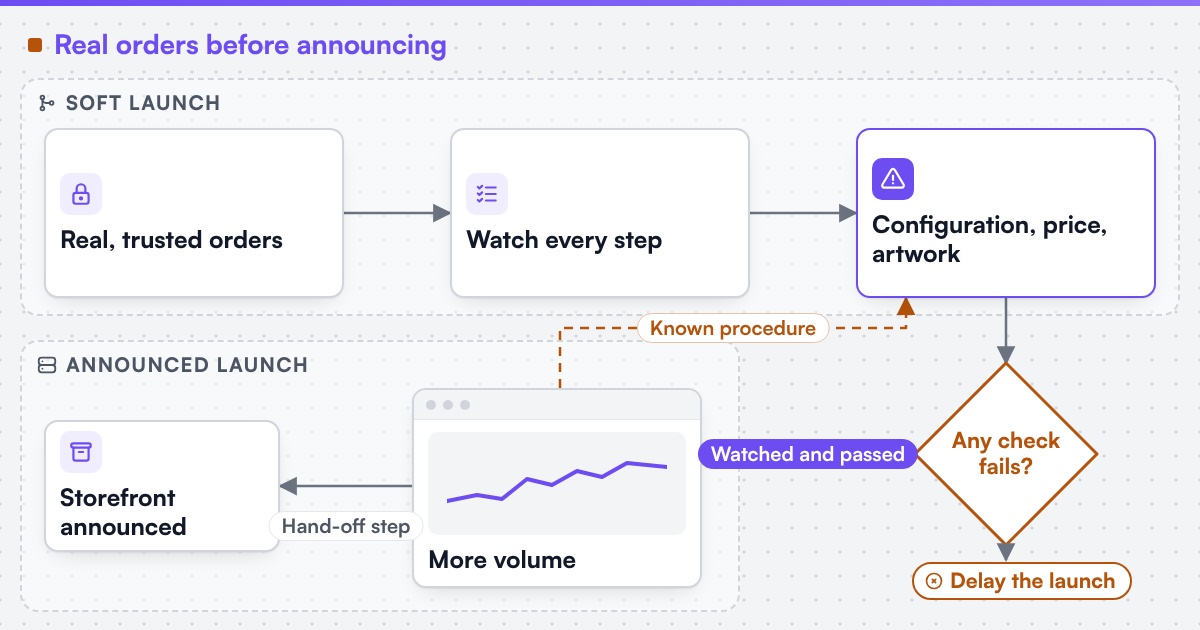 (opens the full-size diagram in a new tab)
Limitations
This checklist assumes the storefront and its integrations are already built; it is a readiness review, not a build plan or a requirements document. A regulated buyer, a multi-country rollout or a platform with unusual payment or tax rules will need checks beyond these ten. Web2Print Solutions is the web-to-print engineering service of Netbase JSC. Delivery records cited on this site belong to Netbase JSC; where no delivered example of a capability is published, the page says so rather than implying a record.
Discuss your web-to-print project
Frequently asked questions
Run it once the build is feature-complete, with enough time left to fix what it finds - typically the two weeks before go-live, with the soft launch itself in the final days. Running it earlier only tests a platform that will still change.
The people who will own the result if it fails: an estimator for pricing, a prepress operator for artwork, and a production planner for order hand-off. A single tester working alone tends to test the interface, not the business rules behind it.
Delay the announcement, not the fix. An order that reaches customers with a wrong price, a rejected file that should have passed, or a job that never reaches production costs more to unwind than a short delay costs in momentum.
Yes, with one addition: reconcile in-flight orders from the old system and confirm the old store is fully decommissioned or redirected once the new one is live, so customers and search engines are not left pointing at two versions at once.
References (4)
- Google Search Central, site moves with URL changes, accessed 2026-09-29.
- W3C Web Accessibility Initiative, WCAG standards and guidelines, accessed 2026-09-29.
- PCI Security Standards Council, accessed 2026-09-29.
- Google, consent mode for tag platforms, accessed 2026-09-29.