

Quantity break and run-length pricing rules
Quantity break pricing prices a print product in bands - 1 to 24, 25 to 99, and so on - with the unit price falling as volume rises, rather than computing every quantity from a single formula. The bands should amortise fixed setup cost, round consistently, respect a margin floor, and be tested against known quotes before release.
Start a project brief Explore servicesReviewed by CEO, Netbase JSC · Published 30 Sep 2026 · Updated 30 Sep 2026 · 9 min read

Why use a break table instead of a single formula?
A smooth pricing formula — unit price equals some function of quantity — looks elegant, but it rarely matches how print production cost actually behaves. Setup cost (plate-making, press make-ready, a digital job's first-sheet calibration) is close to fixed regardless of run length, so the true unit cost drops in steps as that fixed cost spreads across more units, then flattens out once setup stops being a meaningful share of the total. A break table — a fixed unit price for each of a small number of quantity bands, such as 1-24, 25-99, 100-249 and 250 or more — models that stepped reality directly. A continuous formula can be built to approximate the same curve, but a table is easier for a print business to review, easier to test against known quotes line by line, and easier to explain to a customer who asks why 26 units costs less per piece than 24.
The trade-off is coarseness: within a band, unit price is flat, so a customer ordering the first unit of a band pays the same per-unit rate as one ordering the last unit of it. A formula avoids that step but is harder to reason about and harder to keep aligned with a printer's actual cost structure as volumes change. Most print pricing engines that hold up under scrutiny use bands for exactly this reason, sometimes with a formula operating inside each band for large-format or area-based products where a table alone would need too many rows.
How should setup cost be amortised across a break?
Setup cost belongs in the calculation once, spread across the units in a way that keeps every band internally consistent with the others. Two approaches are common. The first divides the setup cost evenly across the band's minimum quantity, so the unit price at the low end of a band reflects the true fixed-cost burden at that volume; the second smooths setup cost across the band's expected or average order size instead. Whichever approach a rule set picks, it needs to hold across every band consistently — mixing amortisation methods between bands is a common source of a price table that looks reasonable band by band but produces a visible, unexplainable jump at a boundary.
A second, related decision is what happens to setup cost when a customer reorders an identical job. A rule set that charges full setup again on every repeat order is leaving a straightforward pricing lever unused; one that never re-checks whether the job is truly identical risks under-pricing a job that has quietly changed size, stock or finishing since the last run.
How should prices round at each band?
Rounding sounds trivial until a specific quantity sits exactly on a boundary or a calculated unit price carries several decimal places. Two things matter: which direction a rule rounds, and how consistently it does so. Rounding a unit price down at every band, for instance, is simple but erodes margin steadily as volumes grow; rounding to the nearest value can undercharge or overcharge unpredictably depending on where a specific quantity falls. A defensible default is to round consistently in the direction that protects margin — typically up, to the smallest unit the storefront actually charges in — and to apply that same rule at every band rather than switching behaviour case by case. The IEEE 754 floating-point standard is the reason this needs stating explicitly at all: standard binary floating-point arithmetic does not represent most decimal fractions exactly, so a pricing engine that rounds naively on raw floating-point values can produce a different result for the same logical price on two different runs. A pricing engine should round decimal currency-equivalent values using a decimal-safe method, not raw binary floating-point comparison, and it should do so the same way every time.
What margin guardrails keep a rule set safe?
A break table is a business decision as much as an arithmetic one, and the arithmetic, which a pricing engine runs, needs a floor under it. A margin guardrail is a minimum acceptable unit price, or minimum acceptable margin over cost, that no band — however aggressive the volume discount — is allowed to price below. Without a guardrail, a table built to look competitive at high volumes can quietly cross into pricing a large order below cost, especially once amortised setup cost, rounding and any additional discount logic stack together. Enforcing the guardrail deterministically, as a check the pricing engine runs on every calculated price rather than a rule a person is trusted to remember while building the table, is what keeps an aggressive-looking break table from becoming an unprofitable one in practice.
How do you test a pricing rule set against known quotes?
A break table cannot be judged correct by inspection alone; it needs to be checked against real cases. The standard technique for this is the same one used to check that a change to any system has not altered previously correct behaviour elsewhere: a fixed set of known-good inputs and outputs, run again every time the rule set changes, with any unexpected difference treated as a signal to investigate before release rather than after a customer complains. Applied to pricing, that means keeping a set of quantities and their previously agreed, correct prices, and re-running every one of them whenever a band, a rounding rule or a guardrail changes.
Worked example: adding a new quantity band
A print business selling a folded product currently prices it in three bands: 1-24, 25-99 and 100-249, and wants to add a 250-or-more band for a customer asking about a larger run. Before the new band ships, the rule set is checked against the existing regression suite of known quotes to confirm the three existing bands are unchanged, the new band's unit price is calculated using the same amortisation and rounding rules as the others, the new band's price sits below the 100-249 band's price at every quantity where the two could be compared, and the new band's price does not fall below the margin guardrail at its lowest qualifying quantity. Only once all four checks pass does the new band go live.
Table: illustrative break table (symbolic units)
-
1 - 24
- Unit price
- 3.00u
- What is driving the step
- Setup cost amortised across a small run
-
25 - 99
- Unit price
- 2.40u
- What is driving the step
- Setup cost spread thinner; margin guardrail still clears
-
100 - 249
- Unit price
- 2.00u
- What is driving the step
- Approaching the run length where setup stops dominating cost
-
250+
- Unit price
- 1.70u
- What is driving the step
- Marginal cost dominates; guardrail is the binding constraint
These figures are illustrative ratios only, expressed in symbolic units, not a published price for any product; print pricing engine covers the underlying rule-engine work, and this site publishes no prices, rates or payment terms anywhere.
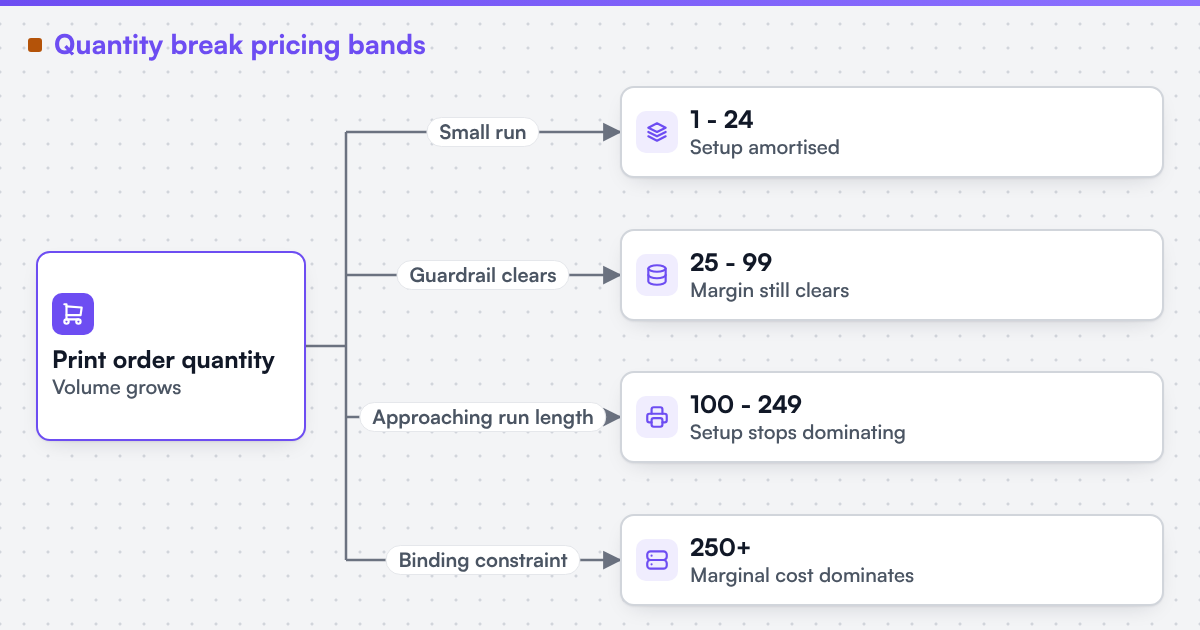 (opens the full-size diagram in a new tab)
Table vs formula, side by side
| Factor | Break table option | Continuous formula option |
|---|---|---|
| Matches stepped real-world cost | Directly | Only by approximation |
| Easy to test line by line | Yes, a fixed set of rows | Harder; needs many sample points |
| Easy to explain to a customer | Yes | Sometimes not |
| Handles unusual or custom sizes | Poorly, without many rows | Often better, especially for area-based pricing |
| Common use | Discrete run-length products | Custom-size or area-based products |
Products priced by custom dimensions rather than a fixed catalogue size often need a formula for the size axis and a break table for the quantity axis at the same time; why you cannot price a custom size online covers that specific combination.
Turn this into a scoped brief
If your current break table produces a price you cannot explain at some quantity, send a project brief describing your existing bands, your setup-cost assumptions, and two or three known-good quotes you trust. That is enough to show whether the fault is in amortisation, rounding, or a missing guardrail.
Discuss your web-to-print project
Frequently asked questions
For products sold in a fixed set of catalogue quantities, generally yes. For products priced by custom dimensions, a formula usually handles the size axis better, often combined with a break table for quantity.
Yes. Applying different rounding behaviour at different bands is one of the more common causes of an unexplainable price jump at a boundary.
Enough to cover every band at least once, plus the edge cases that matter most: the lowest quantity in each band, the highest, and any quantity right at a boundary.
Only as a deliberate, recorded business decision for a specific case, never as a silent side effect of amortisation or rounding interacting badly.
References (3)
- ISTQB Glossary, regression testing, accessed 2026-09-30.
- ISO, ISO 80000-1:2022 - Quantities and units - Part 1: General (Annex B covers rounding of numbers), accessed 2026-09-30.
- IEEE, IEEE Std 754-2019 - IEEE Standard for Floating-Point Arithmetic, accessed 2026-09-30.