Ready-made platform
Run it on W2P Solution
A white-label print store with a built-in designer, print pricing rules and a production queue, set up and hosted by the Netbase team on a yearly plan.


A t-shirt designer places artwork inside defined print areas per garment and size, then outputs a different file depending on whether the shop prints direct-to-garment, screen, or direct-to-film. Web2Print Solutions engineers the placement rules, the colour-count and file differences between the three methods, the customer mockup, and the print-ready output each method needs.
Start a project brief Try the live demoReviewed by CEO, Netbase JSC · Published 30 Sep 2026 · Updated 30 Sep 2026

Placing a logo on a garment mockup is the easy part of an apparel designer. The hard part is that a t-shirt is not one flat surface: it has a front, a back and sleeves, each with its own usable print area, and that area changes size with the garment size a customer picks, since a full front print area on an adult XXL is genuinely larger than on a youth small. A designer that lets a customer place artwork freely on a fixed-size canvas, without tying it to the garment and size selected, will happily approve a placement that runs off the edge of a small or looks lost in the middle of an XXL. This page is one of the print-specific product pages in the web-to-print by print product family, and it sits next to the general design editor build choice between an embedded SDK and a hosted customizer.
Each garment style defines named print areas - full front, left chest, full back, and one or two sleeve areas - and each has a maximum width and height. Those maximums scale with garment size, since the fabric's flat width itself scales.
| Garment size | Full front area (illustrative) | Left chest area (illustrative) |
|---|---|---|
| Youth S/M | 200 mm × 250 mm | 80 mm × 80 mm |
| Adult S/M | 280 mm × 350 mm | 90 mm × 90 mm |
| Adult L/XL | 300 mm × 400 mm | 90 mm × 90 mm |
| Adult 2XL/3XL | 330 mm × 430 mm | 100 mm × 100 mm |
The designer should place artwork relative to a fixed reference point - commonly a set distance below the collar seam - and scale the maximum bounding box to the selected size, rather than letting a customer resize freely on a canvas that ignores the garment underneath it. A customer who changes the size dropdown should see their placement re-validated against the new area, not silently kept at a scale that no longer fits.
The three common decoration methods each need a structurally different output file, since they lay ink down differently.
| Method | How it prints | Colour handling | File the designer must output |
|---|---|---|---|
| DTG (direct-to-garment) | Inkjet sprays ink directly into the fabric | Full-colour raster, gradients supported, ink mixed like a photo printer | Raster CMYK at print resolution, transparent background, white underbase on dark garments |
| Screen printing | Ink pushed through a mesh stencil, one screen per colour | A fixed number of flat, named ink colours; no gradients without extra screens | One separated spot-colour file per screen, in exact print order, plus a combined proof |
| DTF (direct-to-film) | Design printed onto film with adhesive powder, then heat-pressed onto the garment | Full-colour raster like DTG, with its own underbase baked into the film print | Raster CMYK at print resolution, transparent background, underbase generated with the film output |
DTG and DTF both accept a photographic, full-colour design without extra cost for colour count, since the process already prints in continuous colour. Screen printing does not: every additional flat colour is an additional screen, setup step and press pass, which is why colour count changes a screen-printed job's economics in a way it does not for DTG or DTF.
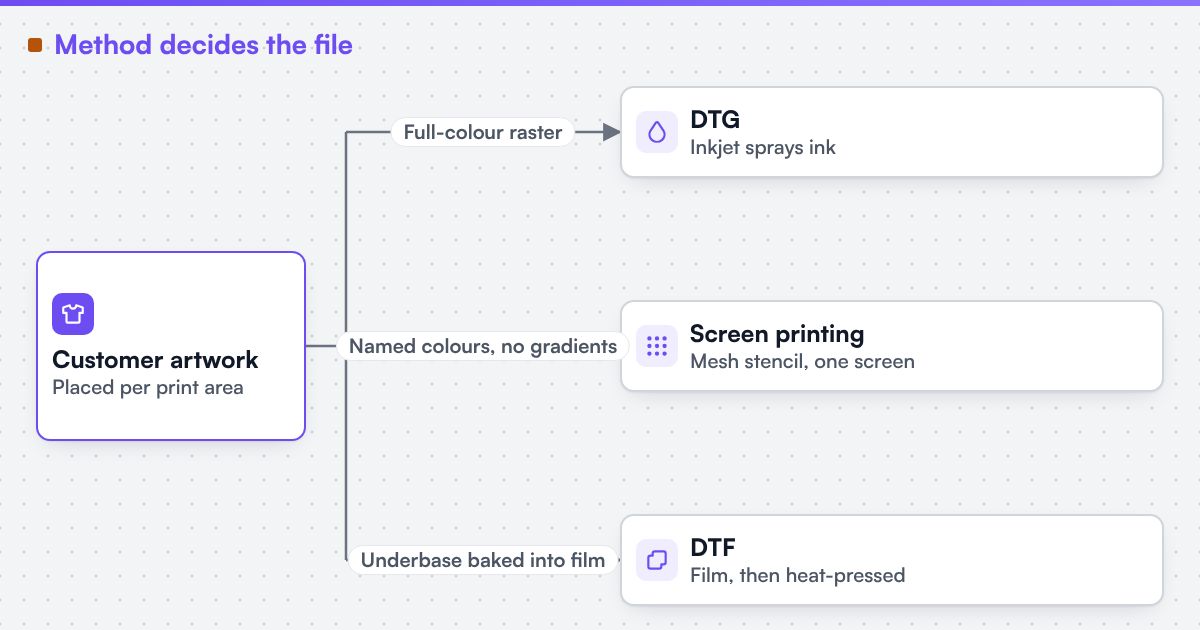 (opens the full-size diagram in a new tab)
For a screen-printed job, the designer counts the distinct flat colours in the artwork, since that count maps directly to the number of screens needed. A photographic image or a design with smooth gradients has to be posterized - reduced to flat colour bands - before it can be screen printed, or the job moves to DTG or DTF instead. A practical configurator flow separates artwork automatically where it can and flags artwork that cannot be cleanly separated - a photograph, a gradient, more colours than the shop's press supports - so the customer or shop can simplify the design or switch method before the order is placed, not after the screens are burned.
A garment mockup renders the customer's placed artwork onto a photorealistic image of the garment in the chosen colour, at the chosen size's print area, so the customer approves the product rather than a flat proof of the artwork alone. The mockup is explicitly a preview, not the production file: it can use a lower-resolution garment photo and a screen colour space, since its job is to communicate placement and scale. Where a design must be separated into named ink colours for screen printing, showing a mockup using those flattened colours avoids approving a look the press cannot reproduce.
The editor shows the artwork on the garment inside its print area and keeps a document palette at hand for colour control.
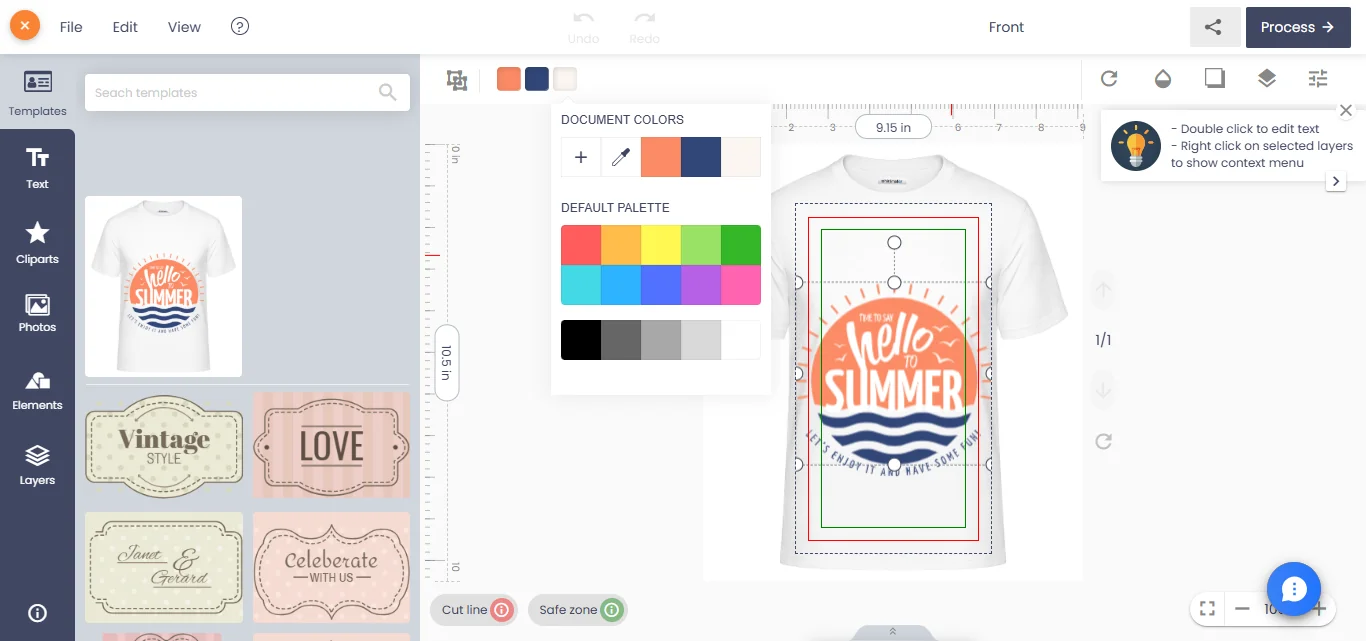
We can build custom product configurators and browser design tools that emit print-ready artwork to an agreed specification. The output branches by method rather than following one universal file: DTG and DTF both need a raster file at true print size and resolution (commonly 300 dots per inch) with a clean alpha channel for the transparent background and underbase generation; screen printing needs a vector or high-resolution spot-colour-separated file, one layer per ink, in the shop's registration order, with photographic content flagged rather than silently rasterised into a single screen. As with other browser-based design tools, the exported file needs a server-side render step rather than a client-side export of the on-screen canvas, since the canvas draws in RGB and the true output needs a named colour conversion for the chosen method. Where a technical output specification is named, it describes the file target an engagement is built to produce, not a credential Web2Print Solutions holds. The configurator and placement logic is print product configurator engineering, and web-to-print on Shopify covers how a garment product's options and price reach a cart when the catalogue sells through Shopify. Netbase JSC, which operates Web2Print Solutions, has delivered 50+ web-to-print platforms, and reusable garment designer components with print-area placement are available under their own licence terms.
Scope an apparel build in a project brief: the garment styles you stock, which of DTG, screen printing or DTF your shop runs, and your current colour-count limit.
Not usually. A photographic or gradient-heavy design suits DTG or DTF directly; the same design has to be simplified into flat, named colours to be screen printed - a deliberate routing step, not an automatic conversion.
Yes. A youth garment is physically smaller, so its print areas are set from its own flat measurements, not copied from the adult chart.
There is no fixed number; it depends on press capacity, order quantity and per-colour setup cost. A configurator should show the colour count and let the shop's pricing rules decide the threshold.
Ready-made platform
A white-label print store with a built-in designer, print pricing rules and a production queue, set up and hosted by the Netbase team on a yearly plan.
Commissioned build
When the workflow needs rules, integrations or a configurator a standard edition does not cover, the Netbase engineering team scopes and builds it.
Tell us about one product you want to sell online. A senior engineer reads every brief and replies in writing.
Tell us what you need to build, migrate or connect.
Start a project brief