

Photobook editor and print-ready book output
A photobook editor turns a customer's page count and layout choices into a print-ready book. Web2Print Solutions engineers the page-count steps, a spine width calculated from page count and paper caliper, a cover that wraps around that spine with a hinge, image resolution warnings, and separate book-block and cover PDFs a bindery can produce without manual repair.
Start a project brief Explore servicesReviewed by CEO, Netbase JSC · Published 30 Sep 2026 · Updated 30 Sep 2026

What does a photobook editor have to do?
A photobook is a variable-length object whose cover depends on its interior. Every page a customer adds or removes changes how thick the finished book is, and the cover has to wrap around that thickness or the spine text sits crooked, the hinge creases fall wrong, or the cover overhangs the block. Most suppliers treat spine width as a dropdown of fixed sizes chosen at checkout - fine until a customer changes the page count after laying out their spreads, at which point the stored spine value is wrong and nobody notices until the cover comes back gaping open or too tight to close.
A photobook editor that gets this right drives the page-count and layout experience, recalculates the cover geometry live as the page count changes, and produces two separate print-ready PDFs - interior block and cover - each built to the bindery's own specification. This page is one of the print-specific product pages in the web-to-print by print product family. We can build custom product configurators and browser design tools that emit print-ready artwork to an agreed specification.
How do page-count steps work?
A book block is built from sheets, and most digital and lay-flat binding methods only accept even page counts, because each printed sheet becomes two pages, or, for lay-flat construction, two single-sided prints glued back to back into one leaf. A configurator that lets a customer land on an odd count either adds a blank page silently or rejects the count with a reason. Steps are small at the low end - 20, 24, 28 pages - and move in multiples of 2 or 4 further up, matching a bindery's imposition and cover-stock tables. The editor should show the spine width next to the page count at every step, not only at checkout, so a customer adding spreads sees the book get thicker as they work.
How is spine width calculated?
Spine width has three inputs: leaf count, printed leaf thickness, and the extra thickness the cover adds at the spine. The general form is:
Spine width = (page count ÷ 2) × paper caliper + cover allowance
- Page count ÷ 2 gives the number of leaves, since two pages make one printed leaf.
- Paper caliper is one printed leaf's thickness in millimetres, supplied by the paper mill or measured on a press proof - never assumed from gsm alone, since two stocks at the same gsm can press to different thicknesses once printed and laminated.
- Cover allowance covers the board or wrap material's own contribution at the spine, plus manufacturing tolerance.
Worked example (illustrative only). A 40-page book, 0.40 mm caliper per leaf, 4 mm cover allowance. Leaves = 40 ÷ 2 = 20. Spine width = 20 × 0.40 mm + 4 mm = 8 mm + 4 mm = 12 mm. The caliper and allowance here are assumed for illustration; a real configurator reads them from the bindery's own measured stock and cover tables and recalculates on every page-count change, not only at checkout.
| Page count | Leaves (pages ÷ 2) | Spine at 0.40 mm caliper + 4 mm allowance |
|---|---|---|
| 20 | 10 | 4 mm + 4 mm = 8 mm |
| 40 | 20 | 8 mm + 4 mm = 12 mm |
| 80 | 40 | 16 mm + 4 mm = 20 mm |
| 120 | 60 | 24 mm + 4 mm = 28 mm |
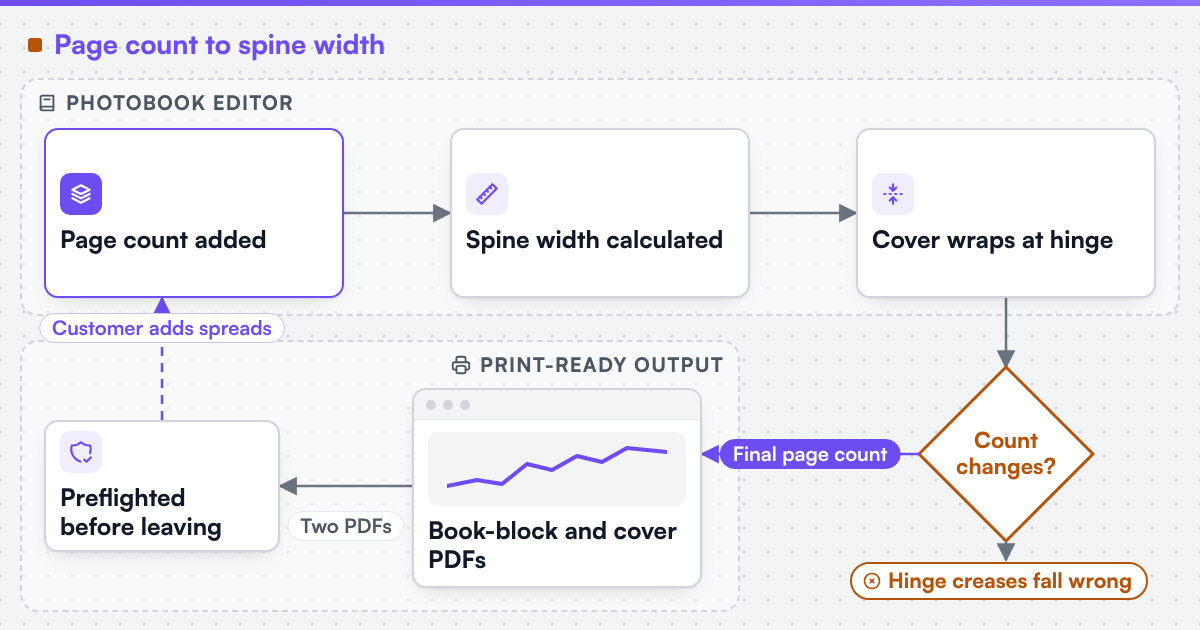 (opens the full-size diagram in a new tab)
What happens at the cover wrap and hinge?
The cover is one continuous piece: back panel, spine panel, front panel, joined by two hinge creases where the cover folds against the block. Because the spine panel's width changes with every page-count change, the two hinge creases move too - not fixed offsets from the cover's edges. A cover template built as a static image with the spine "in the middle" breaks once the page count moves away from its design count. The editor instead fixes the front and back panels to the outer edges and lets the spine panel and its two creases grow or shrink between them. Where the cover wraps around board (case-bound rather than a paper wrap), that wrap allowance is separate from the spine's cover allowance.
How do layouts, templates and image-resolution warnings keep a book printable?
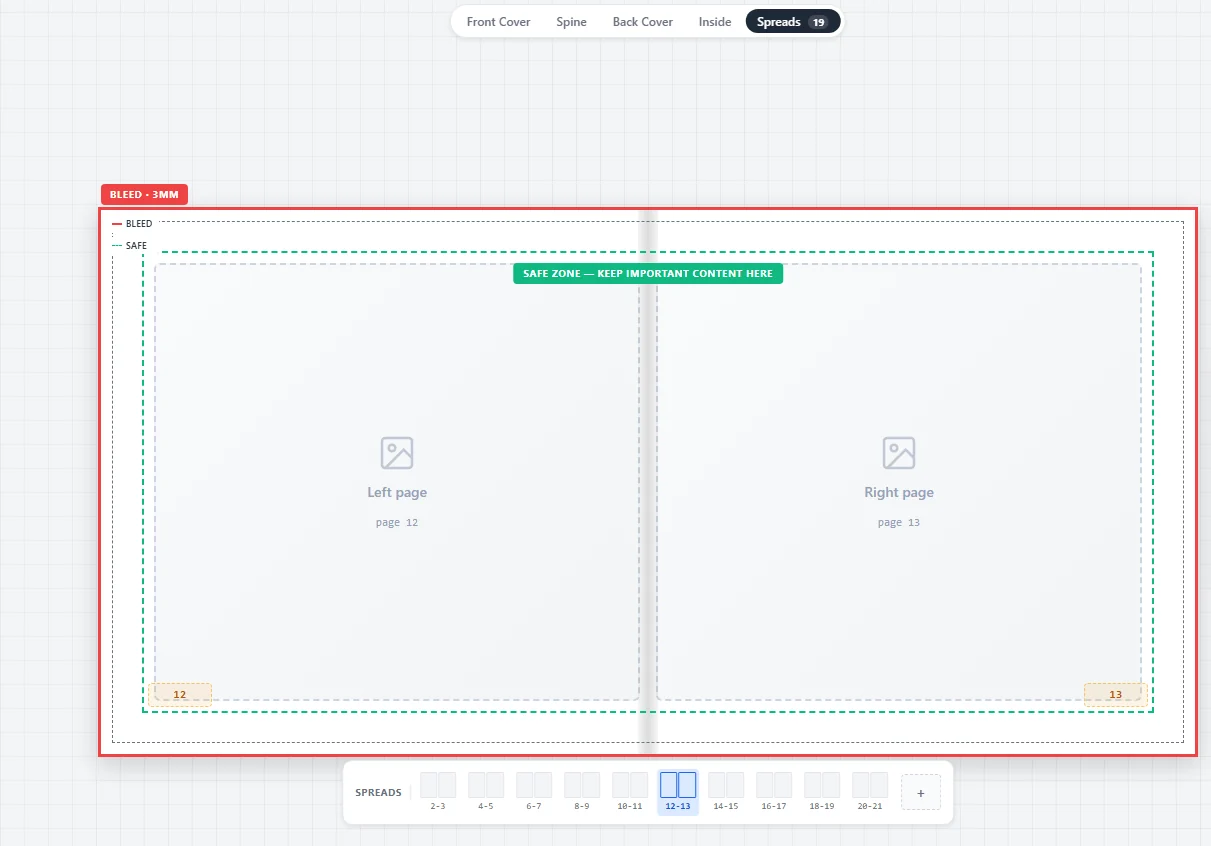
Layout templates place image and text boxes on a page grid, and a usable set covers single, double and multi-image spreads plus a title and closing page, with margins accounting for the gutter - the area nearest the spine, harder to see once bound and needing its own safe margin distinct from the outer bleed. A resolution warning compares each placed image's pixel dimensions against print size at the target resolution (commonly 300 PPI) and flags images below a threshold, for example 150 effective PPI, since a thumbnail that looks sharp on screen can print visibly soft once enlarged to fill a spread. The warning should name the image and the shortfall, not just block silently.
A spread view with the bleed edge and safe zone drawn on the page, and a strip for moving through the book.
What print-ready files does the editor need to produce?
The interior and the cover are separate jobs with separate rules, so the editor generates two PDFs, not one:
| Output | Contains | Key rules |
|---|---|---|
| Book-block PDF | Every interior page, in order | CMYK or the bindery's colour space, outer bleed, gutter-safe margins, embedded fonts |
| Cover PDF | Back, spine and front panel as one artwork | Spine width recalculated for the final page count, wrap allowance if wrapped, spine text centred on the current width |
Both files are preflighted before they leave the platform: page count is checked against the spine width baked into the cover PDF, image resolution is re-checked at final placement, and colour is converted with a named ICC profile rather than left as the browser's RGB. We engineer print output: PDF generation to a client-specified standard, CMYK and spot colour handling, ICC profile selection, bleed and trim geometry, imposition and automated preflight. Where a technical output specification such as PDF/X is named, it describes the file target an engagement is built to produce, not a credential Web2Print Solutions holds. The engagement that builds this pipeline is print-ready PDF and prepress automation; the option and page-count logic is print product configurator engineering, and price is set by a print pricing engine. Netbase JSC, which operates Web2Print Solutions, has delivered 50+ web-to-print platforms, and reusable photobook engine components from that work are available under their own licence terms.
Scope a photobook build in a project brief: the trim sizes and page-count range you sell, the cover construction, and the bindery's own caliper and allowance figures.
Key takeaways
- Spine width follows page count ÷ 2 × paper caliper + cover allowance, and must recalculate on every page-count change, not only at checkout.
- Paper caliper is measured per stock, never inferred from gsm alone, since printed thickness varies by process and lamination.
- The book-block and cover are separate PDFs with separate colour, bleed and margin rules; the cover's spine width must match the final page count.
- An image-resolution warning compares pixel dimensions against print size at the target PPI and names the offending image, not just blocks silently.
- A photobook's main risk is a geometry mismatch at the spine, not just image softness.
Discuss your web-to-print project
Frequently asked questions
The leaves-times-caliper part stays the same; the cover allowance is usually larger than for a paper wrap, since it accounts for board thickness. The exact allowance is set per bindery, not assumed.
The editor flags the image and the size it can safely print at, and lets the customer replace it, shrink its placement, or accept a result labelled reduced-sharpness - never print silently.
The cover prints on different stock, at a size that includes the spine and wrap, often on a different device. Combining them forces the bindery to split the file by hand - the exact manual step this pipeline removes.
References (4)
- Ghent Workgroup, PDF/X workflow, accessed 2026-09-30.
- Ghent Workgroup, GWG specifications, accessed 2026-09-30.
- International Color Consortium, ICC profiles, accessed 2026-09-30.
- CIP4, Job Definition Format (JDF) for print production automation, accessed 2026-09-30.