

Franchisees are not using the brand templates
Franchisees drift off brand on print when the ordering system does not enforce four controls together: templates locked to the approved design, a named list of fields a location may edit, an approval rule for anything unusual, and a permission model that matches head office, regional and location roles. Missing any one control reopens the gap.
Start a project briefReviewed by CEO, Netbase JSC · Published 30 Sep 2026 · Updated 30 Sep 2026

Why do franchisees keep going off-brand on print?
Head office designs a template once, approves it, and expects every location to use it. In practice a manager resizes a logo to fit a banner, swaps a colour to match a local promotion, or drops the template entirely and asks a local print shop to "make something like our other stores." None of that is malice. It happens because the ordering system, not the person, failed to make the on-brand path the only path.
The thesis of this page is that off-brand print is a control gap, not a discipline problem. Four controls close the gap, and they only work together: a template locked to the approved design so nothing structural can move, a stated list of fields a location may still edit, an approval rule for anything outside the standard set, and a permission model that gives a location exactly the access its role needs and no more. Remove any one of the four and a location finds the gap the missing control would have closed.
We can build B2B and corporate print storefronts with account hierarchies, permission models, approval workflows and brand-locked template systems. This page names the mechanism behind each control; the buyer-facing view of who needs this and how an engagement starts is covered in web-to-print for franchise and multi-location brands.
Key takeaways
- Off-brand print usually traces to one of four missing controls: locked templates, editable-field limits, approval rules or location permissions.
- A locked template still lets a location personalise it; the control is over which fields move, not whether any field can.
- An approval rule needs a condition, a named approver and a default of "held" rather than "printed" when no rule matches.
- Location, regional and head-office roles should map to different actions, not just different views of the same screen.
- Reporting that rolls up by location or region is what lets head office see drift before it becomes a pattern, rather than after a customer notices.
How do the four controls work together?
| Control | What it locks down | What still moves |
|---|---|---|
| Locked template | Logo position, size, colour values, layout, legally required copy | Nothing structural; the design file itself cannot be edited by a location |
| Editable fields | Which fields exist on the template at all | Address, phone number, manager name, a local offer date, or whatever the brand names |
| Approval rule | Orders that fall outside the standard case | A named approver decides; the order does not print on its own |
| Location permission | What a role may view, edit, approve or spend | Head office, regional and location roles each get a different, narrower slice |
A location that hits all four controls in sequence experiences an ordinary ordering flow: pick the template, fill in the local fields, submit, and either it prints immediately because it matched every rule, or it waits for a named person to look at it. Nothing about that flow requires the location to understand brand guidelines, because the guidelines are built into what the screen will let them do.
What does a permission model look like in practice?
Role separation follows the same least-privilege principle used in general access-control practice: give an account only the access its role requires, expressed as clearly named permissions rather than one shared login shared across a region. A practical role set for a franchise portal usually looks like this.
| Role | Can edit | Can approve | Can see |
|---|---|---|---|
| Location | Named local fields only | Nothing | Its own orders and spend |
| Regional | Local fields across its locations, plus seasonal template variants | Non-standard orders from its locations, up to a set value | All orders and spend across its region |
| Head office | Templates, field rules, approval thresholds, the role list itself | Anything referred up from regional | Every order, every location, brand-wide totals |
The same structure maps onto role-based access control as formalised in general computing practice: roles are defined once, permissions are attached to the role rather than the person, and a location's account inherits exactly the permissions its role carries. A franchise portal built this way can answer "who was allowed to approve this order" from the role list alone, without reconstructing intent after the fact.
What happens when an order falls outside the standard case?
An approval rule needs three parts to be useful: a condition that can be evaluated automatically, a named approver, and a stated default when no rule matches. "Any order over a set value needs regional approval" is a usable rule. "Check with someone if it looks wrong" is not, because it has no named approver and no default.
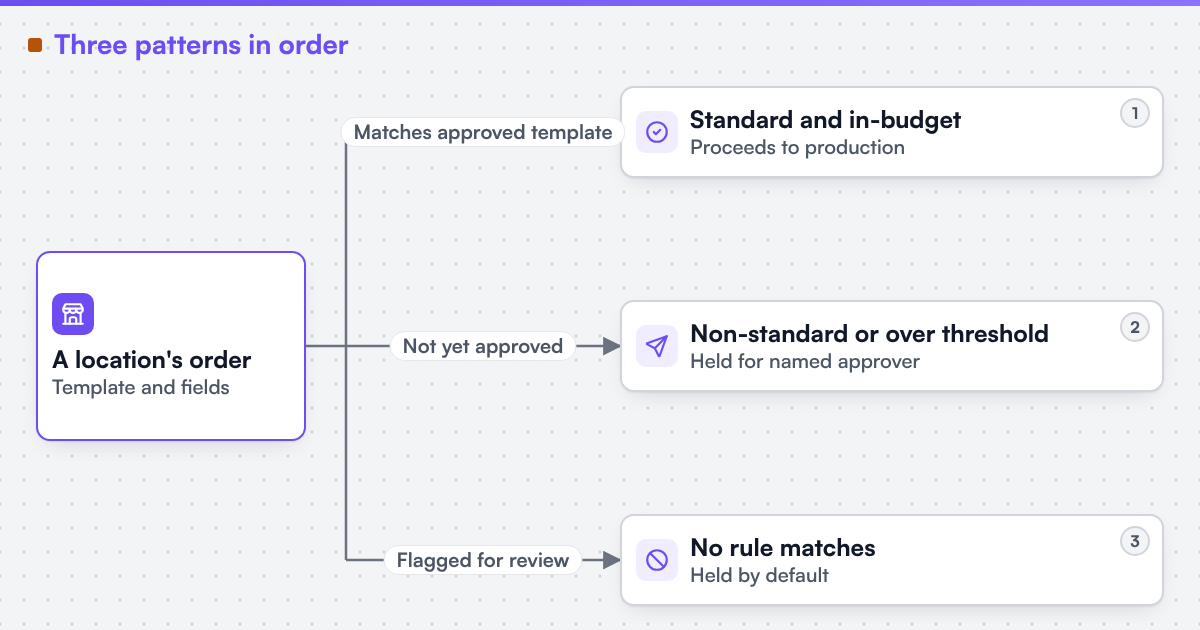
Three patterns cover most franchise ordering:
-
Standard and in-budget
The order matches an approved template with only permitted fields changed, and it is within the location's budget. It proceeds to production without a person in the loop.
-
Non-standard or over threshold
A template variant that is not yet approved, a field edit outside the permitted list, or spend above what the role allows routes to the named approver for that condition, and stays held until they act.
-
No rule matches
The order is held by default and flagged for review, never printed on a silent default. A franchise portal that guesses instead of holding is the fastest way to reintroduce the drift the controls were built to remove.
 (opens the full-size diagram in a new tab)
Which businesses hit this hardest?
Retail and food franchises with hundreds of locations feel the drift first, because volume makes manual review impossible and small deviations compound across many storefronts before anyone notices. Regional multi-location brands with a smaller location count often skip formal permissioning early and then have to retrofit it once a second or third region is added and head office can no longer track every location by memory. Corporate brands with owned and franchised locations side by side need the permission model to express that distinction directly, since an owned location and a franchisee may need different approval thresholds even when they order from the same templates.
What evidence stands behind this page?
Netbase JSC, which operates Web2Print Solutions, has delivered 50+ web-to-print platforms. Web2Print Solutions is the web-to-print engineering service of Netbase JSC. Delivery records cited on this site belong to Netbase JSC; where no delivered example of a capability is published, the page says so rather than implying a record. No franchise or multi-location print portal delivered under the Web2Print Solutions name is published as a case on this site.
Check whether your franchise ordering has this gap
Send a project brief with the current template set, which fields a location is allowed to change today, the approval rule you apply now (even if it is informal), and one recent order that went off-brand despite it. That is enough to show which of the four controls is missing and where a B2B and corporate print storefront engagement should start.
Frequently asked questions
No. A locked template still exposes the fields the brand names as editable, such as an address or a local offer date. The lock is on the design structure, not on every field.
The brand does, usually marketing or a franchise operations lead, and it is written into the rule set rather than left to an approver's judgement each time. The rule is the same for every location in the same role.
Only if its role permits it. A standard location role sees its own orders and spend; a regional or head-office role can see a wider rollup, following the same least-privilege principle that shapes every other permission in the model.
It stays held rather than printing on a timeout. The rule set can escalate a held order to a second approver after a set period, but it never defaults to production without a decision.
Yes. Web2Print Solutions delivers remote-first from Hanoi, Vietnam, and Netbase JSC has delivered web-to-print projects for clients in 80+ countries.
Send a project brief at /project-brief, email project@netbasejsc.com or message us on WhatsApp at +84 937 869 689. A senior engineer reads every brief and replies in writing.
References (3)
- Federal Trade Commission, Franchise Rule Compliance Guide, accessed 2026-09-30.
- NIST, Role Based Access Control project, accessed 2026-09-30.
- OWASP, Access Control Cheat Sheet, accessed 2026-09-30.