Ready-made platform
Run it on W2P Solution
A white-label print store with a built-in designer, print pricing rules and a production queue, set up and hosted by the Netbase team on a yearly plan.


Print pricing is a function of size, quantity, substrate, finishing, turnaround and waste, not a static price list. A spreadsheet matrix tries to pre-compute every combination and breaks as variables multiply. The fix is to model pricing as a tested function with named inputs, checked against known-good quotes before it ships.
Reviewed by CEO, Netbase JSC · Published 3 Oct 2026 · Updated 3 Oct 2026 · 11 min read

A print price is the output of a calculation, not an entry in a table. Size sets the base cost from sheet yield and imposition. Substrate changes that base cost and sometimes the press. Finishing adds its own cost or moves the job to a different route entirely. Quantity changes the unit price in steps, not smoothly. Turnaround adds a surcharge path. Waste, the offcut and spoilage a run produces, changes what the job actually costs to run at a given size and substrate. Six variables, each changing the others' effect, is a function: price equals some calculation over size, quantity, substrate, finishing, turnaround and waste. It is not a fact to be looked up.
Most web-to-print storefronts that struggle with pricing did not choose a function. They chose a matrix: a spreadsheet or option grid with a cell for every combination a product might need. This article sets out why that choice breaks as the product grows, and how to model and test the calculation as a function instead. Businesses that would rather adopt a packaged engine than build one can see this calculation already running in W2P Solution's print price calculator.
Each row depends on at least one other row. That is the property a flat price list cannot express: a size change alters the waste calculation, a substrate change alters which finishing options exist, and a quantity change alters which cost dominates the unit price.
A matrix tries to list an answer for every combination in advance. With five sizes, six quantity bands, four substrates and three finishing options, that is already three hundred and sixty cells, before turnaround or waste are considered. Add one more size and the matrix grows by seventy-two cells; add one more finishing option and every size, substrate and quantity combination needs a new column. The matrix does not fail gracefully. A missing cell returns no price at all, or the nearest cell's price by mistake, and nobody notices until a customer disputes an order.
This is a known shape of problem outside pricing, too: testing every combination of inputs to a system grows combinatorially, which is why software testing practice measures and bounds combination counts rather than attempting to enumerate them all. A pricing matrix is the same problem wearing a spreadsheet: the business is trying to enumerate a space that should instead be calculated on demand, for the one combination an order actually needs.
The matrix also goes stale in a specific way a function does not. When a substrate cost changes, every cell that uses that substrate needs updating by hand, across every size, finishing and quantity column it appears in. A function changes the substrate cost once, in one place, and every price that depends on it is correct the next time it runs.
A pricing function does not look up a price; it resolves one, variable by variable, in a fixed order, carrying a trace forward at each step. Size is read first and sets the base cost from sheet yield and imposition. Substrate is read next and adjusts that base cost for material and, where it applies, routes the job to the press the substrate requires. Finishing is applied last among the production variables, adding its own line item or, where a combination is invalid, returning a review state instead of a guess. The quantity band and any turnaround surcharge are then applied to the finished unit cost, and the function returns a price together with the trace of every value it used.
Nothing here is instant lookup. Each step depends on the step before it, which is exactly the property a flat table cannot hold: a substrate decision changes what finishing options are even valid, and a size decision changes what the substrate decision costs.
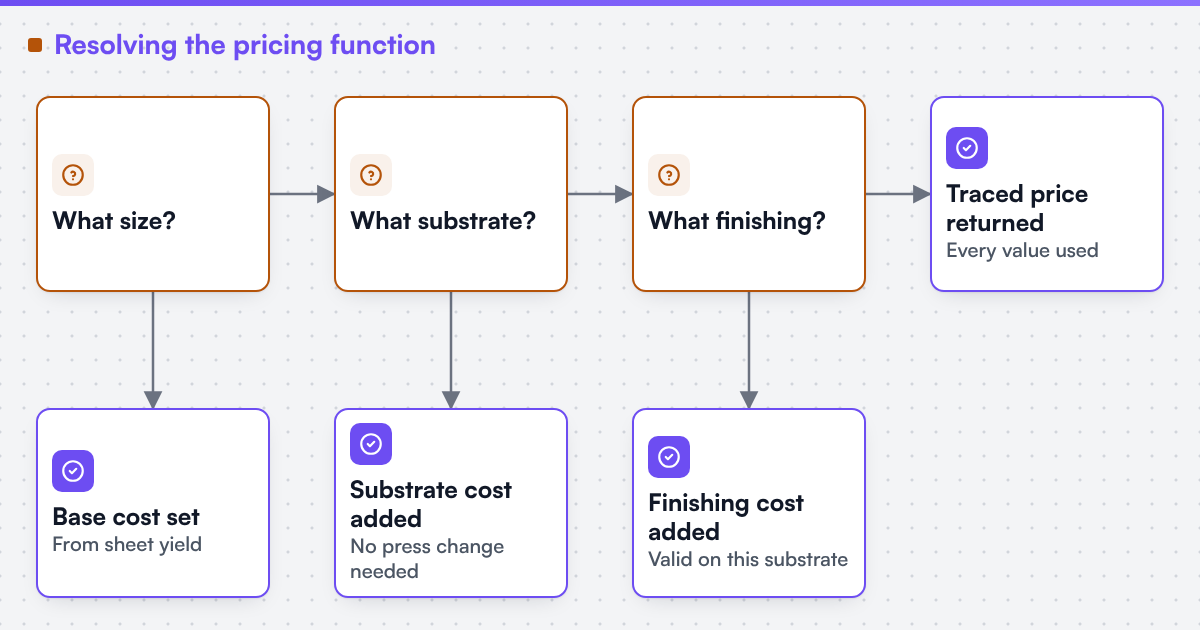 (opens the full-size diagram in a new tab)
A function is not trustworthy because it looks reasonable; it is trustworthy because it reproduces prices the business already trusts. The standard technique is a regression suite: a fixed set of known inputs and their agreed, correct outputs, re-run every time a rule changes, with any unexpected difference treated as a signal to investigate before release. Applied to a pricing function, that means keeping ten or twenty real quotes the business already stands behind, including at least one boundary case per variable, and re-running every one of them whenever a size table, a substrate cost or a finishing rule changes.
Print pricing engine is the engagement that builds this kind of function and accepts it against exactly this regression suite. Where the quantity axis specifically is concerned, quantity break and run-length pricing rules sets out how the bands amortise setup cost and round consistently; this article is about the variables around quantity, not a restatement of that mechanism.
The numbers below are illustrative only, in symbolic units, to show how the variables combine. They are not a published price for any product.
A storefront sells a laminated postcard. The function resolves an order for 250 units, A6, 350gsm card, gloss lamination, standard turnaround:
Base cost 1.20u per unit from sheet yield at this size
Adds 0.30u per unit; no press change needed at this weight
Adds 0.25u per unit; valid on this substrate and size
Applies the 100-249 band factor from the quantity-break rule set
No surcharge at standard turnaround
Change one input and only the steps after it recalculate: choosing a heavier 400gsm card at step 2 changes the base cost and the waste behind it, but the lamination rule at step 3 and the quantity band at step 4 are unaffected. A price list would need a new cell for every such change; the function needs only the one changed input.
| Factor | Price matrix option | Pricing function option |
|---|---|---|
| Grows with each new variable | By multiplying every existing cell | By adding one calculation step |
| Behaviour on a missing combination | Returns nothing, or the wrong cell | Returns a review state naming the missing input |
| Cost of a rate change | Manual edit of every affected cell | One change, applied everywhere it is used |
| Testable line by line | Only by sampling cells | Yes, against a regression suite of known quotes |
| Keeps a trace per quote | Rarely | Yes, by design |
Yes, inside a step. A quantity band is itself a small table the function consults at step four, and a size-to-yield lookup can be a table the base-cost step reads. The difference is scope: a table confined to one variable, consulted by a function that resolves the others, stays small and reviewable. A table trying to hold the combination of all six variables at once is the one that breaks.
Two or more "no" answers to the first four questions, or a "yes" to the last one, usually means the price list has already outgrown what a table can hold safely.
Web2Print Solutions is the web-to-print engineering service of Netbase JSC. Delivery records cited on this site belong to Netbase JSC; where no delivered example of a capability is published, the page says so rather than implying a record. Netbase JSC, which operates Web2Print Solutions, has delivered 50+ web-to-print platforms; that group engineering experience, formalising estimating rules into callable engines, is the background to the pattern described here. No accuracy figure or delivered example under this property's own name is claimed.
If your current price list has a cell for every combination your products might need, send a project brief describing the variables it holds, one combination it gets wrong today, and two or three quotes your team already trusts. That is enough to show whether the fix is a new column or a different kind of calculation entirely.
Usually less, once more than two or three variables are involved. A spreadsheet's apparent simplicity is the number of cells it hides, not the number of rules it took to fill them in.
Yes, for a single variable at a time, such as a quantity band or a size-to-yield table. The function calls that table as one step; it does not try to make the table hold every variable at once.
No. Quantity break and run-length pricing rules covers how the quantity axis specifically should amortise setup cost and round consistently; this article is about the variables around it, size, substrate, finishing, turnaround and waste, and why they cannot share one flat table with quantity either.
A function can accept a continuous size input and calculate yield directly; a table cannot hold every size without an impractical number of rows. Why you cannot price a custom size online covers that case specifically.
Ready-made platform
A white-label print store with a built-in designer, print pricing rules and a production queue, set up and hosted by the Netbase team on a yearly plan.
Commissioned build
When the workflow needs rules, integrations or a configurator a standard edition does not cover, the Netbase engineering team scopes and builds it.
Tell us about one product you want to sell online. A senior engineer reads every brief and replies in writing.
Tell us what you need to build, migrate or connect.
Start a project brief