

cXML punchout for print catalogues
cXML punchout opens a print catalogue inside a buyer's procurement session: a PunchOutSetupRequest starts it, the buyer configures items in a browser session on the catalogue, a PunchOutOrderMessage returns the priced cart, the buyer's system runs its own approval, and an OrderRequest confirms the order for production.
Start a project briefReviewed by CEO, Netbase JSC · Published 4 Oct 2026 · Updated 4 Oct 2026

Where does cXML punchout fit a print catalogue?
cXML punchout lets a buyer configure and price print products inside the supplier's own catalogue without leaving procurement. The procurement system opens the catalogue in a browser session, the user configures and prices items there, and the catalogue hands the resulting cart back as a single cXML document the procurement system routes through its own approval and coding rules.
It fits organisations that already run a procurement system and want print line items to enter its existing approval and coding rules without manual re-entry. It fits poorly when the buyer only wants a branded login; a B2B corporate print storefront is the smaller build then, and single sign-on with SAML or OpenID Connect is more common for a buyer without cXML. A buyer needing only accounts and approvals can start instead on the b2b print portal edition of W2P Solution.
This page is one of the platform pages in the web-to-print integration directory. It owns the cXML protocol itself: SAP Ariba, Coupa and Jaggaer are named only as systems that exchange cXML, not as partners. SAP OCI punchout is a separate, non-XML form-post protocol some SAP buyers use instead. The facts below are checked against cXML.org's own specification, current on 4 October 2026.
Key takeaways
- cXML punchout opens the print catalogue inside the buyer's procurement session, so product configuration and pricing happen on the catalogue, not inside the procurement system's own screens.
- A PunchOutSetupRequest starts the session and a PunchOutOrderMessage returns the configured cart; the procurement system's own approval and coding rules apply once that cart lands.
- cXML.org lists version 1.2.071 as current, last updated 14 August 2026, and names PunchOut among the features the protocol defines alongside purchase order and invoicing documents.
- SAP Ariba, Coupa and Jaggaer each read and write cXML for punchout; naming a system here records a protocol fact, never a partnership.
- SAP's own procurement systems more often use OCI, a simpler form-post protocol with no XML envelope, which is covered on its own page rather than folded into this one.
How does a punchout session move from procurement to a confirmed order?
PunchOutSetupRequest. The buyer selects the print catalogue from their procurement system's supplier list. The procurement system builds a PunchOutSetupRequest, names the buyer, and assigns a BuyerCookie the catalogue must echo back unchanged on every later document; it posts the request to the catalogue's setup URL, usually through an e-commerce hub both systems already trust.
Browser session. The catalogue answers with a PunchOutSetupResponse naming a URL for the buyer's browser, and the procurement system redirects the user there. The user then configures and prices print products, such as a stock, finish or quantity break, inside the catalogue's own session rather than the procurement system's screens.
Cart returned. When the user finishes, the catalogue packs the configured line items, each with its price, quantity and print-specific fields, into a PunchOutOrderMessage. The message is written as hidden fields on an HTML form and posted back to the BrowserFormPost URL the setup request supplied, carrying the same BuyerCookie so the procurement system can match the cart to its session.
Approval. The procurement system turns the returned cart into a requisition and runs it through whatever approval chain the buyer's organisation has configured. cXML punchout does not define that chain; it only hands over the configured items in a shape the procurement system already understands.
OrderRequest. Once the requisition clears approval, the procurement system, or the hub acting for it, sends an OrderRequest confirming the items, quantities and prices from the returned cart. The catalogue's OrderResponse acknowledges that the OrderRequest parsed; it is not a production status update, so a separate job feed is still needed to know when the order ships.
| Message | Direction | What it carries |
|---|---|---|
| PunchOutSetupRequest | Procurement to catalogue | Buyer identity, BuyerCookie, requested operation |
| PunchOutSetupResponse | Catalogue to procurement | The browser URL for the shopping session |
| PunchOutOrderMessage | Catalogue to procurement, via the browser | Configured line items, prices and the BuyerCookie |
| OrderRequest | Procurement to catalogue | Approved items, quantities and prices to confirm |
| OrderResponse | Catalogue to procurement | Acknowledgement that the OrderRequest parsed |
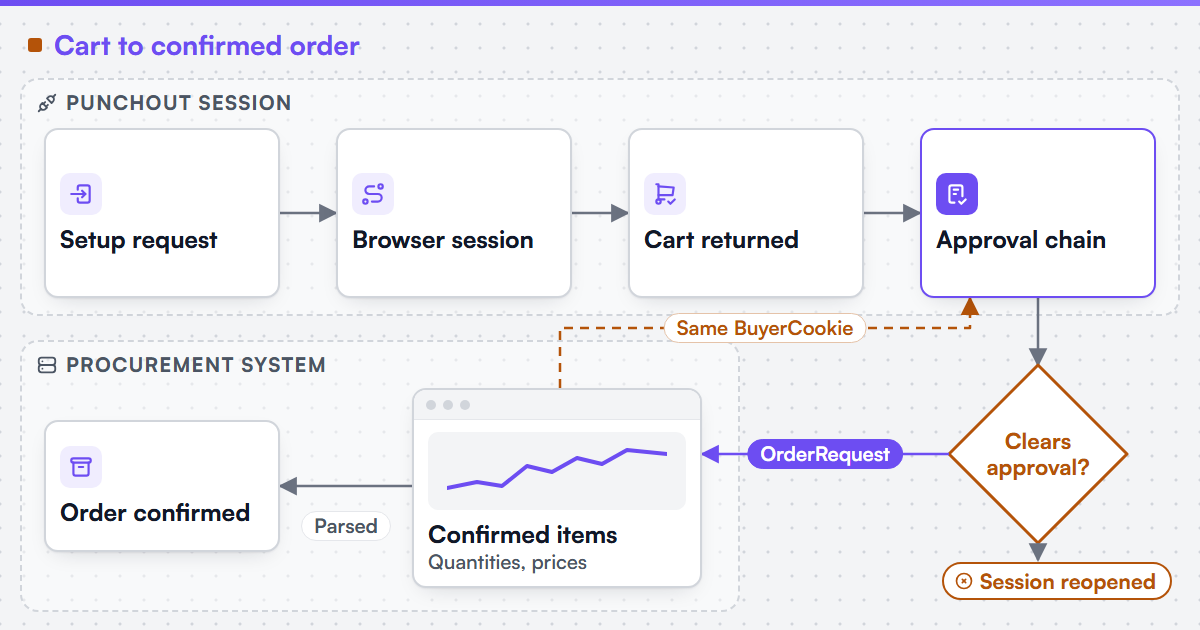 (opens the full-size diagram in a new tab)
Which constraints does cXML punchout add to a print configurator?
-
The cart is a snapshot, not a live session
A PunchOutOrderMessage freezes the configuration at checkout. If pricing rules change before the OrderRequest arrives, the configurator must hold the quoted price for a stated window or re-validate and flag the difference; silently repricing an approved requisition breaks the buyer's audit trail.
-
Every document needs the BuyerCookie
The procurement system matches a returned cart, and later an OrderRequest, to its own session only by the BuyerCookie value it issued. A catalogue that drops or rewrites that value orphans the session, and the buyer sees a punchout that silently fails.
-
Resubmission must not duplicate a cart
RFC 9110 defines GET, HEAD, PUT and DELETE as idempotent and does not extend that guarantee to POST, which is how both documents travel. A browser retry or a hub replay can resend the same form post, so the catalogue needs its own key, not just the BuyerCookie, to recognise a repeat.
-
Configured items must resolve to flat line items
CXML carries a priced, named line per item, with no concept of an in-progress design. A saved artwork identifier or a finishing combination is resolved to its final price and description before the PunchOutOrderMessage is built, not deferred to the procurement system.
Which components and systems are involved?
A cXML punchout build combines the catalogue's own storefront, a pricing service that produces the final per-line price, a PunchOutOrderMessage generator that packs the configured cart, and whatever hub or direct connection the procurement system expects. We can scope and build web-to-print integrations for Shopify, WooCommerce, Magento / Adobe Commerce, BigCommerce, Wix and headless storefronts, and we state each platform's constraints before the work is priced. We can build B2B and corporate print storefronts with account hierarchies, permission models, approval workflows and brand-locked template systems, the same storefront a punchout session opens into.
Netbase JSC, which operates Web2Print Solutions, has delivered 50+ web-to-print platforms. Web2Print Solutions is the web-to-print engineering service of Netbase JSC. Delivery records cited on this site belong to Netbase JSC; where no delivered example of a capability is published, the page says so rather than implying a record. No cXML punchout delivery is published as a case on this site. Client-specific deliverables, access and handover are defined in the engagement contract. Pre-existing software, products, APIs and third-party components remain subject to their respective ownership and licence terms.
The engagement that scopes and builds this is web-to-print ecommerce integration, and the production handoff once an order is confirmed is web-to-print MIS integration.
What must survive a renewed or re-pointed punchout setup?
The setup URL, the BuyerCookie handling, the per-buyer credential the hub issued, and the mapping from the procurement system's supplier record to the right catalogue instance. A hub migration or procurement system upgrade commonly changes the setup URL and reissues credentials, so the catalogue side needs a named owner who re-tests the full round trip before the old setup is retired.
Scope this work with a project brief that names the procurement system or hub in use, the cXML version it sends, one print product whose options need to resolve to a priced line item, and the system that should receive the confirmed order.
Discuss your web-to-print project
Frequently asked questions
No. cXML is an open protocol those systems implement; a catalogue that speaks cXML correctly can exchange documents with any of them without a commercial relationship to the vendor.
Nothing on the catalogue side changes automatically. The procurement system's own approval chain decides; the catalogue only hears about it if the buyer reopens the session or never sends an OrderRequest.
Yes. The two are separate entry points into the same storefront and pricing logic; a buyer with a procurement system uses punchout, and one without signs in directly or through single sign-on.
OCI posts named HTML form fields directly, with no XML document and no BuyerCookie matching; SAP OCI punchout covers that round trip.
References (4)
- cXML.org, current cXML version and feature list. Version 1.2.071, last updated 14 August 2026, accessed 2026-10-04.
- cXML.org, cXML Reference Guide: PunchOutSetupRequest, BrowserFormPost and PunchOutOrderMessage, accessed 2026-10-04.
- cXML.org, cXML User's Guide: required PunchOut transactions and BuyerCookie handling, accessed 2026-10-04.
- IETF, RFC 9110 HTTP Semantics, June 2022, section 9.2.2 Idempotent Methods, accessed 2026-10-04.