

SAP OCI punchout for print catalogues
SAP's Open Catalog Interface opens a print catalogue from an SAP screen through a call-up URL, lets the buyer configure items there, and returns the cart as named HTML form fields posted to the HOOK_URL address SAP supplied. It carries no XML document and no BuyerCookie; cXML systems use a separate protocol, covered on its own page.
Start a project briefReviewed by CEO, Netbase JSC · Published 4 Oct 2026 · Updated 4 Oct 2026

Where does SAP OCI punchout fit a print catalogue?
SAP's Open Catalog Interface, OCI, lets a buyer running SAP's own procurement, such as SAP SRM, S/4HANA sourcing or an MM-based shopping cart, call up an external print catalogue from inside an SAP transaction, configure and price items there, and bring the result back as a populated cart without retyping it. SAP's own S/4HANA documentation describes OCI as the interface that "ensures the trouble-free communication between an SAP system and an external catalog," used to call up a catalogue from an order or task list and copy its items back into SAP.
This is a different buyer from the one on cXML punchout for print catalogues: that page covers SAP Ariba, Coupa and Jaggaer, each of which exchanges XML-based cXML documents over an e-commerce hub. A buyer on SAP's own ERP, SRM or S/4HANA sourcing stack more often speaks OCI instead, a protocol SAP alone defined, with no XML envelope and no hub in the middle. The two protocols are not interchangeable, and a catalogue that only implements one of them cannot serve a buyer who expects the other. This SAP buyer often sits inside a corporate in-plant print operation or behind a B2B corporate print storefront, where OCI is one of several entry points into the same account and approval structure. A buyer who does not need SAP punchout yet can use the b2b print portal edition instead.
Key takeaways
- OCI is a browser form-post protocol: SAP calls the catalogue with a URL, and the catalogue answers with an HTML form, not an XML document.
- The call-up URL carries a HOOK_URL parameter, the address the catalogue must post the completed cart back to; SAP's own specification says its value must be stored and replayed exactly as received, never reconstructed.
- Configured items return as named form fields, commonly NEW_ITEM-DESCRIPTION, NEW_ITEM-QUANTITY, NEW_ITEM-UNIT, NEW_ITEM-PRICE and NEW_ITEM-VENDORMAT, one indexed set per line, rather than as a single cXML document.
- OCI defines no OrderRequest or OrderResponse step; once the form posts, SAP's own purchasing workflow owns everything that happens to the cart next.
- SAP Ariba, Coupa and Jaggaer speak cXML, not OCI; a catalogue built for one protocol needs separate work to support the other, and that work is covered on the cXML punchout page.
How does an OCI round trip move configured items from SAP to a cart?
Call-up URL. From a shopping cart, a maintenance order or a sourcing screen, SAP builds a URL to the catalogue and opens it in the buyer's browser. The URL carries parameters the catalogue reads at start-up, among them the HOOK_URL address and, where configuration asks for it, the name that address should be submitted under. SAP's own guidance is explicit that the catalogue must never assume a particular format for this value, because the string is SAP's to generate and the catalogue's only to echo back.
Catalogue session. The catalogue authenticates the call, commonly from a token carried in the same URL, and the buyer configures print items inside the catalogue's own pages: stock, size, finishing and quantity, the same configuration a storefront would offer a buyer who signed in directly.
Form posted to HOOK_URL. When the buyer transfers the configured items, the catalogue writes each line as named, indexed form fields, the NEW_ITEM group above among them, and renders an HTML form whose ACTION attribute is set to the HOOK_URL value it received. The browser submits that form automatically, posting the fields into the SAP session that started the call.
Cart populated. SAP reads the posted fields directly into its own cart or requisition, with no separate acknowledgement document. From there the item follows whatever approval and sourcing rules the organisation already runs; OCI's job ends at the form post.
-
HOOK_URL
The return address for the completed form; stored and replayed exactly as received
-
NEW_ITEM-DESCRIPTION
The item description shown in SAP's cart
-
NEW_ITEM-QUANTITY
The configured quantity
-
NEW_ITEM-UNIT
The unit of measure
-
NEW_ITEM-PRICE
The unit price for the configured item
-
NEW_ITEM-VENDORMAT
The vendor's own material number for the item
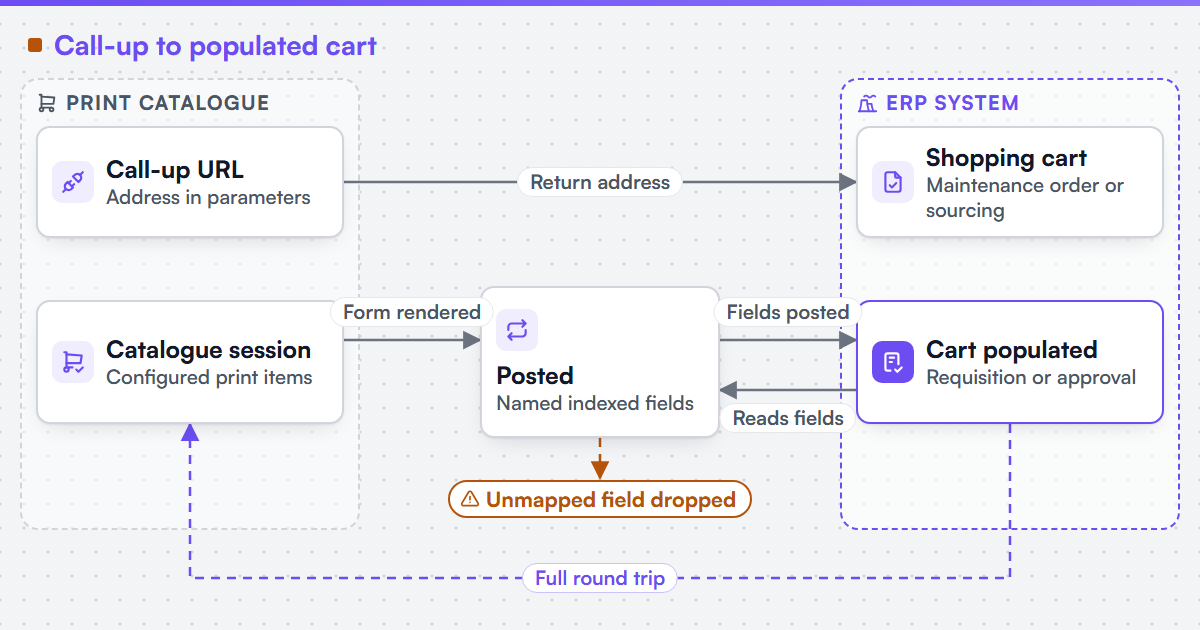 (opens the full-size diagram in a new tab)
How is OCI different from cXML punchout?
OCI carries no XML document at any stage; cXML wraps the same information, a setup request and a returned cart, inside PunchOutSetupRequest and PunchOutOrderMessage documents that travel as encoded fields inside a form, not as directly named ones. OCI has no BuyerCookie: session matching rests on the call-up URL's own parameters and the catalogue's handling of HOOK_URL, not a value both systems echo on every document. Where cXML closes the loop with an explicit OrderRequest and OrderResponse once a requisition is approved, OCI stops at the form post into SAP's cart; SAP's own purchasing workflow owns everything from that point. A catalogue supporting both buyer populations needs two separate integrations, because the field-level OCI exchange and the document-level cXML exchange share no wire format.
Which components and systems are involved?
An OCI build needs a catalogue session the SAP call-up URL can authenticate into, a pricing step that resolves every configured print option to the unit price OCI's fields expect, and a form generator that writes the NEW_ITEM fields and posts to HOOK_URL unmodified. We can integrate a web-to-print front end with an existing MIS, ERP or production scheduler where that system exposes a sanctioned interface, and we can build B2B and corporate print storefronts with account hierarchies and approval workflows; Web2Print Solutions provides scoped services for new web-to-print setup, upgrades, migration and software integration for enterprise teams.
Netbase JSC, which operates Web2Print Solutions, has delivered 50+ web-to-print platforms. Web2Print Solutions is the web-to-print engineering service of Netbase JSC; where no delivered example of a capability is published, the page says so rather than implying a record. No SAP OCI integration is published as a case on this site. The default engagement is fixed-scope with written acceptance criteria and priced change control. Managed operations is a separate, opt-in agreement. Client-specific deliverables, access and handover are defined in the engagement contract. Pre-existing software, products, APIs and third-party components remain subject to their respective ownership and licence terms.
The engagement that scopes this is web-to-print ecommerce integration; the production handoff once SAP's requisition is approved is MIS integration.
What must survive an OCI setup change?
The call-up URL and its parameters, the HOOK_URL field name if SAP's customizing uses a non-default one, the field-mapping table from print configuration to the NEW_ITEM set, and the credential the catalogue authenticates with. An SAP upgrade or sourcing-module change can alter the call-up customizing without warning the catalogue side, so the integration needs a named owner who re-tests the full round trip after any SAP change.
Scope this with a project brief naming the SAP module that calls the catalogue, whether HOOK_URL uses the default name, one print product whose options resolve to the NEW_ITEM fields, and the system that should receive the order once SAP approves it.
Discuss your web-to-print project
Frequently asked questions
Only if it serves both buyer populations: OCI for SAP's own ERP, SRM or S/4HANA sourcing, and cXML for SAP Ariba, Coupa and Jaggaer. Many catalogues start with one and add the other once a buyer on the missing protocol asks.
SAP's own customizing decides which NEW_ITEM fields it reads; an unmapped or misnamed field is typically dropped rather than rejected, so the item can arrive incomplete with no error raised.
No. The form post ends at SAP's cart screen; OCI defines no return acknowledgement, so any status the catalogue needs after that comes from a separate interface, commonly the one used for the production job.
By default, yes; SAP's specification allows a different parameter name, but the field's type must still be set to the return-URL type the catalogue reads at call-up.
References (4)
- SAP Help Portal, Catalog Interface (OCI - Open Catalog Interface), SAP S/4HANA on-premise documentation, accessed 2026-10-04.
- SAP, Open Catalog Interface (OCI) Release 5.0 specification, 21 January 2013: HOOK_URL and the NEW_ITEM field set, accessed 2026-10-04.
- cXML.org, current cXML version and feature list, for the OCI/cXML protocol comparison, accessed 2026-10-04.
- IETF, RFC 9110 HTTP Semantics, June 2022, section 9.2.2 Idempotent Methods, accessed 2026-10-04.