Ready-made platform
Run it on W2P Solution
A white-label print store with a built-in designer, print pricing rules and a production queue, set up and hosted by the Netbase team on a yearly plan.


Artwork checks, background removal, upscaling, auto-layout and support agents each have a real limit in a print workflow: AI can suggest or flag, but a deterministic rule enforces exact specifications and a named person approves anything that reaches production. This article states those limits plainly, without an accuracy figure or any claim of autonomy.
Reviewed by CEO, Netbase JSC · Published 3 Oct 2026 · Updated 3 Oct 2026 · 11 min read

Most print industry writing about AI lists what a model can attempt. This article lists where it stops, in five specific jobs a print workflow is often sold an AI feature for: artwork quality checks, background removal, upscaling, auto-layout, and support agents. None of these claims are hedged for marketing effect; they describe where a model's output is a suggestion, where a deterministic rule has to be the one that decides, and where a named person has to approve the result before it reaches production or a customer.
This matters because a wrong guess in print is expensive and hard to reverse. A bad background cut or an invented price does not get a second edit once a job has run. The qualifying question this article is written to answer is not "can AI do this job," but "which part of this job can AI not be trusted with, and who or what decides instead."
| Workflow step | AI may suggest | A deterministic rule decides | A person approves |
|---|---|---|---|
| Artwork quality check | Flags a likely resolution, colour or bleed problem | Pass, warn or fail against the printer's written thresholds | Reviews a warned or flagged file before production |
| Background removal | Proposes a cut | — (no exact threshold applies) | Confirms the cut before it reaches a template or proof |
| Upscaling | Produces a larger candidate image | Minimum resolution for the product's size and viewing distance | Confirms the result is acceptable for the specific product |
| Auto-layout | Proposes an arrangement of text and images | Trim, bleed and fold geometry the layout must respect | Approves the template before it is published |
| Support or sales agent | Extracts a specification, answers a status question | The pricing engine returns the price; the order system returns the status | Approves every quote, commitment, refund and exception |
Two of the five rows have no deterministic rule, because a cut-out edge and a layout's visual quality are not reducible to a single measurable threshold the way resolution or bleed are. That gap is exactly why those two rows keep a person in the approval column with no rule to share the decision.
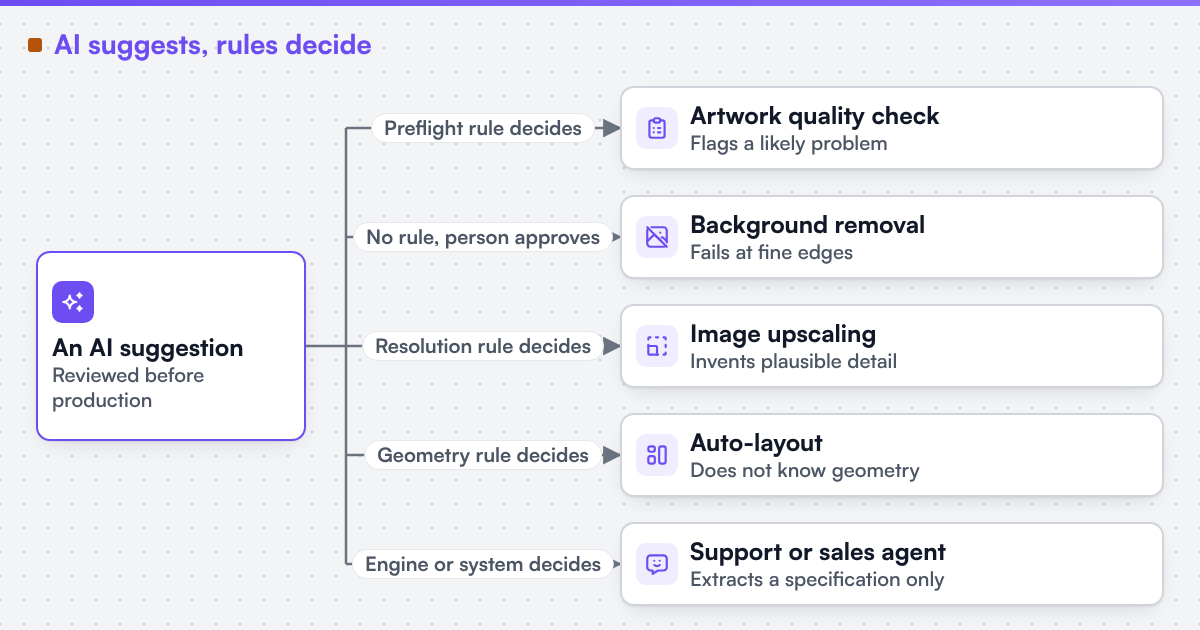 (opens the full-size diagram in a new tab)
A buyer uploads a phone photograph and orders a large canvas print. An AI step flags that the uploaded file is below the resolution the requested canvas size needs at normal viewing distance. A deterministic rule, not the model, has already calculated the minimum pixel dimensions for that size and viewing distance from the product's specification, and the file fails it. The storefront offers two outcomes: order a smaller size the file supports, or accept an upscaled version with a visible warning that fine detail will be approximated. If the buyer accepts the upscale, the upscaled file still has to pass the same deterministic resolution check before it reaches production, and a person reviews the specific result before the job is released, because the earlier sections' limits on upscaling apply to this file exactly as they would to any other.
No step in this example lets a model decide the final price, the production slot, or whether the file ships. The model's job was narrow: produce a candidate and flag a condition. The rule's job was to apply the printer's own threshold. The person's job was to approve the specific outcome.
A "no" to the first four, or a "yes" to the last one, is the honest sign that a claim should be qualified further before it is trusted.
Web2Print Solutions is the web-to-print engineering service of Netbase JSC. Delivery records cited on this site belong to Netbase JSC; where no delivered example of a capability is published, the page says so rather than implying a record. Netbase JSC, which operates Web2Print Solutions, has delivered 50+ web-to-print platforms; that group engineering practice, a named reviewer on every output, is the background to the limits described here. No accuracy figure for any AI feature is published on this site, and no feature described above is claimed as autonomous.
If a vendor or your own team is proposing an AI feature for your workflow, send a project brief naming the exact step, the deterministic check that should still run alongside it, and who the named reviewer would be. That is enough to tell whether the feature narrows a person's work or quietly tries to replace their decision.
No, for anything with an exact measurable threshold, such as resolution, bleed or embedded fonts. A model can flag a likely problem faster than a person scanning files, but the pass, warn or fail decision belongs to the deterministic rule.
For a simple product shot against a plain background, a reviewed automatic cut is usually fine. Hair, glass, fur and fine detail against a busy background are the cases that need a person to confirm the result before it reaches a template.
No. A price always comes from the pricing engine; the agent's job is to collect a complete specification and pass it to that engine, never to calculate or invent an amount itself.
Because a generic figure would not describe any specific feature's performance on any specific business's data. Where an accuracy figure is agreed for a built feature, it is measured on the client's own material during acceptance, not published as a general claim in advance.
Ready-made platform
A white-label print store with a built-in designer, print pricing rules and a production queue, set up and hosted by the Netbase team on a yearly plan.
Commissioned build
When the workflow needs rules, integrations or a configurator a standard edition does not cover, the Netbase engineering team scopes and builds it.
Tell us about one product you want to sell online. A senior engineer reads every brief and replies in writing.
Tell us what you need to build, migrate or connect.
Start a project brief