Ready-made platform
Run it on W2P Solution
A white-label print store with a built-in designer, print pricing rules and a production queue, set up and hosted by the Netbase team on a yearly plan.


A packaging design tool imports a dieline, maps each flat panel to a face of the folded box, and renders a 3D fold preview before the customer approves. Web2Print Solutions engineers that panel mapping, the substrate choice behind the fold rules, and a print-ready flat file that keeps the structural dieline as a separate, locked layer.
Start a project brief Try the live demoReviewed by CEO, Netbase JSC · Published 1 Oct 2026 · Updated 1 Oct 2026

A folding carton or a bag is not a flat rectangle printed and trimmed; it is a sheet designed to fold along specific lines into a three-dimensional object, and the artwork a customer places has to land correctly on faces that only exist once the sheet is folded. A flat preview hides this entirely - a logo placed on what looks like the front panel in a 2D editor can land on a glue flap, a side gusset or a panel hidden inside a fold, and nobody catches it until a physical sample arrives wrong. Getting this right means importing the structural shape as data, not a picture, mapping every flat region to the face it becomes, and showing the customer the folded result before the file goes to a press. This page is one of the print-specific product pages in the web-to-print by print product family. We can build custom product configurators and browser design tools that emit print-ready artwork to an agreed specification.
A dieline is the vector drawing that defines a carton's structure: cut lines where the material separates, crease lines where it folds, and often a distinct line style for a glue flap or a perforation. The editor imports this as a vector file, keeping cut, crease and perforation as distinct, named line types rather than collapsing them into one generic outline, because each line type drives a different downstream rule - a crease becomes a fold hinge in the 3D preview, a cut becomes the artwork's trim edge, and a glue flap is typically excluded from customer-editable artwork entirely, since it is hidden once the box is assembled. A shop with a fixed catalogue of carton styles can also offer a dieline library instead of requiring every customer to supply their own file, generated once per style and reused across orders at different sizes.
Once the dieline is loaded, every enclosed region between its crease and cut lines is a panel, and each panel needs an explicit mapping to the face it becomes once folded - front, back, left side, right side, top, bottom, or a flap that tucks inside and is never seen. This mapping is what lets the editor place a customer's logo "on the front panel" and have it land in the same place on the 3D preview and on the flat print file, rather than requiring the customer to find the right flat region by trial and error. A panel mapped incorrectly is the single most common packaging-editor defect: artwork that looks correctly centred in the 2D view but sits on a flap or a side seam once the box is formed.
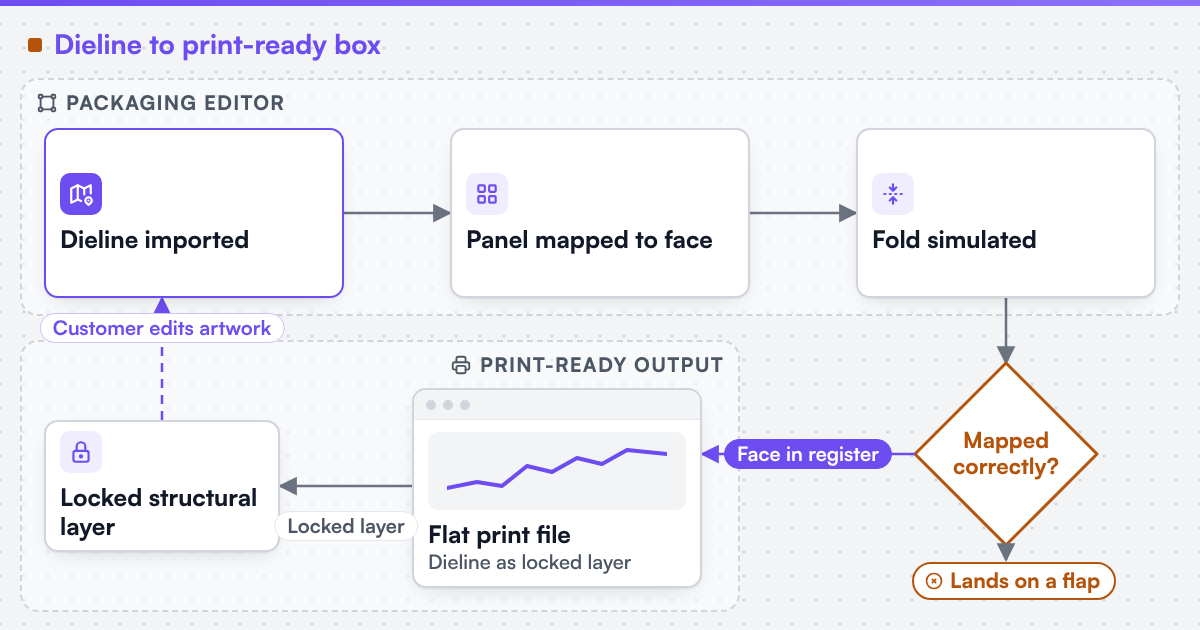 (opens the full-size diagram in a new tab)
With every panel mapped to a face, the editor can simulate the fold: each panel is treated as a flat, textured plane hinged to its neighbours along the dieline's crease lines, then rotated into its assembled position using the same 3D transform techniques a browser uses for any 3D object - CSS 3D transforms for a simpler box shape, or WebGL for a more complex structure with curved or compound folds. The simulation only needs the dieline's crease geometry and the artwork placed on each panel; it does not need a separate 3D model built by hand, which is what makes it practical to regenerate automatically every time a customer edits their artwork, rather than as a one-off render requested after the order is placed.
The substrate - corrugated board, folding boxboard, or a flexible material for a bag - sets the fold's physical behaviour and some of the dieline's own rules. A standard carton style on corrugated board is commonly identified by an industry code describing its construction, which a shop can use to drive the correct crease and flap rules automatically instead of redrawing them for every job. The editor should let substrate choice adjust fold defaults rather than applying one model to every material.
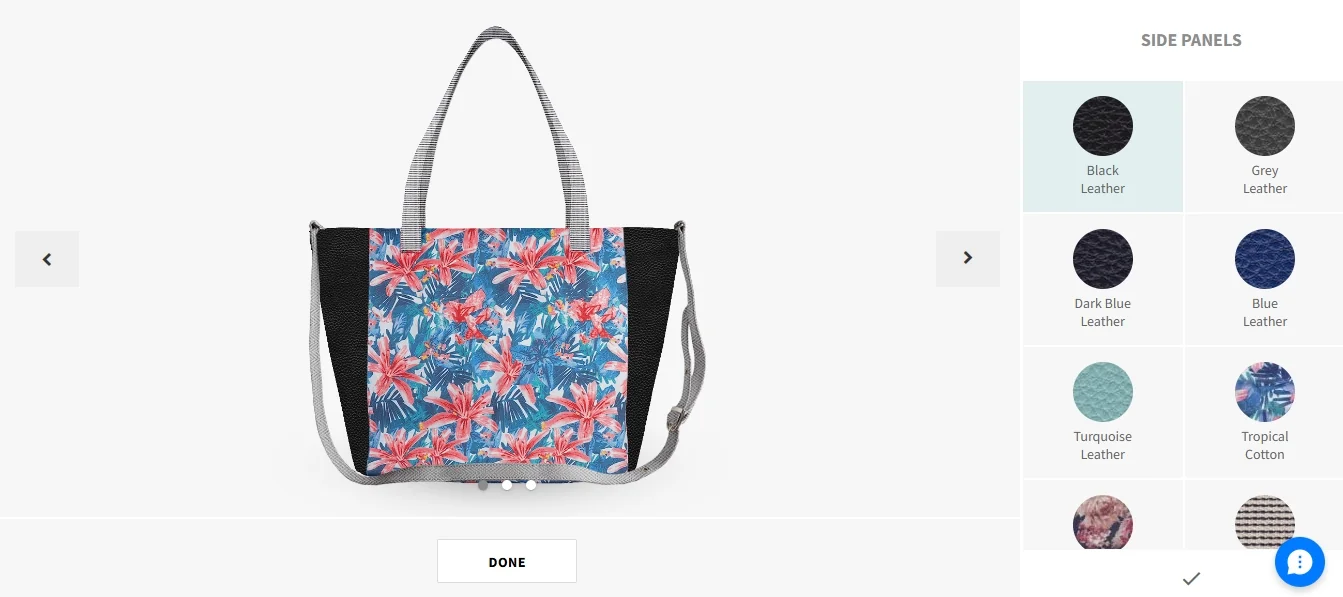
A rendered bag preview with a material picker for each panel, so the substrate choice is seen before the order is placed.
| Substrate | Fold behaviour in the preview | Crease allowance |
|---|---|---|
| Corrugated board | Rigid panel, hinges at a scored crease | Wider, to stop the panel cracking or bulging |
| Folding boxboard | Rigid panel, hinges at a creased score | Narrower than corrugated board |
| Flexible bag material | Gusset folds inward; the material drapes rather than hinges | No single crease line; a fold zone instead |
The output a converter or press can act on is a single flat file per carton, carrying the printed artwork in register with the dieline, but the dieline itself ships as a separate, locked, non-printing layer rather than merged into the visible artwork. We engineer print output: PDF generation to a client-specified standard, CMYK and spot colour handling, ICC profile selection, bleed and trim geometry, imposition and automated preflight. Where a technical output specification such as PDF/X is named, it describes the file target an engagement is built to produce, not a credential Web2Print Solutions holds. The pipeline that builds this output is print-ready PDF and prepress automation; the panel and substrate option logic in front of it is print product configurator engineering, and the segment workflow packaging sits inside is packaging and labels.
Among the live web-to-print store examples, PBPrint is a UK bags and packaging storefront that places artwork on a paper-bag dieline with millimetre rulers, and Printpress is a Belgian bags and packaging store with Dutch, English and French customise entry points. Live store using web-to-print components delivered by Netbase JSC, which operates Web2Print Solutions. Reusable group components include a photobook engine with spine and cover-wrap geometry, a canvas designer with wrap settings and 3D edge preview, a garment designer with print-area placement, and 2D/3D/360 product previews; an engagement may reuse them under their own licence terms. Netbase JSC, which operates Web2Print Solutions, has delivered 50+ web-to-print platforms.
Scope a packaging build in a project brief: the carton or bag styles you sell, the substrates you print on, and whether customers supply their own dielines or choose from your catalogue.
No. A shop with a fixed catalogue of carton or bag styles can offer a dieline library generated once per style and reused across sizes, while still accepting a customer-supplied dieline for a custom structure.
CSS 3D transforms handle simple hinged panels well; a structure with curved folds or compound creases usually needs WebGL, since it can simulate more complex geometry than flat, rigid panel rotation.
It is the panel that tucks inside or is covered once the box is assembled; it is excluded from customer-editable art because nothing printed there would ever be seen on the finished package.
A converter or press reads the dieline on its own to control the cutting and creasing tools; merging it into the visible artwork would either print the structural lines or force a second manual step to remove them.
Ready-made platform
A white-label print store with a built-in designer, print pricing rules and a production queue, set up and hosted by the Netbase team on a yearly plan.
Commissioned build
When the workflow needs rules, integrations or a configurator a standard edition does not cover, the Netbase engineering team scopes and builds it.
Tell us about one product you want to sell online. A senior engineer reads every brief and replies in writing.
Tell us what you need to build, migrate or connect.
Start a project brief