What is a variable data print pipeline, and what does it not include?
A variable data print pipeline turns a file of records into print-ready artwork, one correct file per recipient, without a person merging fields by hand. Our engineering focus is web-to-print: product configurators, print pricing logic, print-ready output pipelines and integration with print production systems, and this service is the record-to-print-file end of that focus. Most variable data projects are scoped around the template, as if a nicer design tool were the hard part. It is not: the hard part is the record a human would catch in a second, a missing field, a name that breaks a layout, a duplicate row, and whether the pipeline catches it too, before it reaches a press.
This is a capability, not a mailing service. The pipeline validates and composes records into print files; it does not source, cleanse or deduplicate a mailing list, check postal address formats, or place anything in the mail. List brokering, address hygiene and mail delivery stay out of scope and sit with the client's own list owner or mailing provider.

Key takeaways
- A record is validated against the template's required fields before composition, not after a press run has started.
- Template binding maps named record fields to artwork placeholders; a field the template does not expect is rejected rather than silently dropped.
- A sample proof is checked before the full batch imposes, so a mapping error shows up on one record, not thousands.
- Per-recipient output is produced as individual, imposition-ready files, not one document with a manual mail-merge step.
- List sourcing, address hygiene and mailing are explicitly out of scope; this service stops at the print file.
Who is this for, and when does another service fit better?
Good fit
- A print run where each piece carries different text, an image or a code tied to a record
- A business with its own record source that needs correct per-recipient print files
- A template that is stable enough to bind fields to, even if the records change often
Another route fits better
- A run where every piece is identical, which needs no variable data step at all
- A business that also needs its mailing list sourced, cleaned or deduplicated, which is a separate, unscoped service
- A template still being designed, where print-ready PDF and prepress automation and the design work come first
What happens to a record before it becomes a print file?
Records arrive as a file, commonly comma-separated values or a spreadsheet export, and each row is checked against the fields the template requires before anything is composed: are the required fields present, is a date a date, does a code match the expected pattern, is a row an exact duplicate of another. A row that fails validation is held out with the specific reason, rather than composed with a blank or a guessed value. Web2Print Solutions can build custom product configurators and browser design tools that emit print-ready artwork to an agreed specification; the same discipline of an agreed, checked specification applies to a record file as it does to a configurator's inputs.
How does a record become a per-recipient print file?
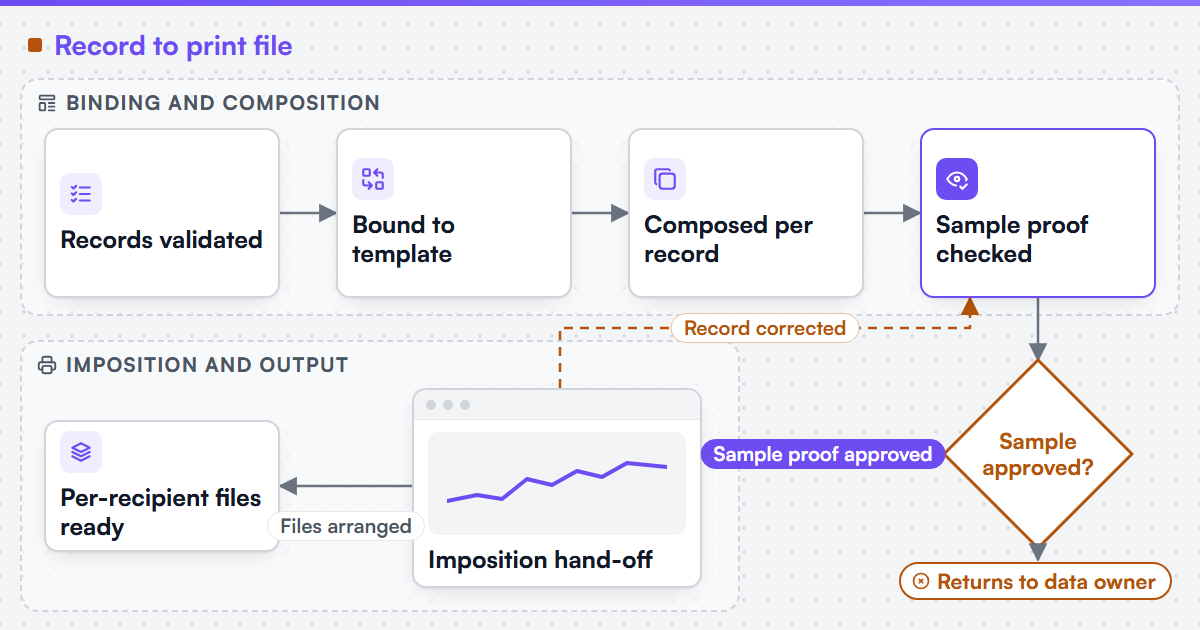
Once a batch of records passes validation, each one is bound to the template: named fields map to text, image or code placeholders the template defines, and a field the template does not expect fails the binding rather than being silently ignored. Composition then renders one artwork instance per record. Before a full batch runs, a small sample is composed and proofed, checked against both the template design and a handful of real records chosen to include the awkward cases, a long name, a missing optional field, a non-Latin character. Only once the sample proof is approved does the batch proceed to imposition, which arranges the per-recipient files for the press sheet, as JDF or XJDF where the receiving system accepts it. A record that cannot be bound or that the sample proof flags returns to the data owner rather than being composed by best guess.
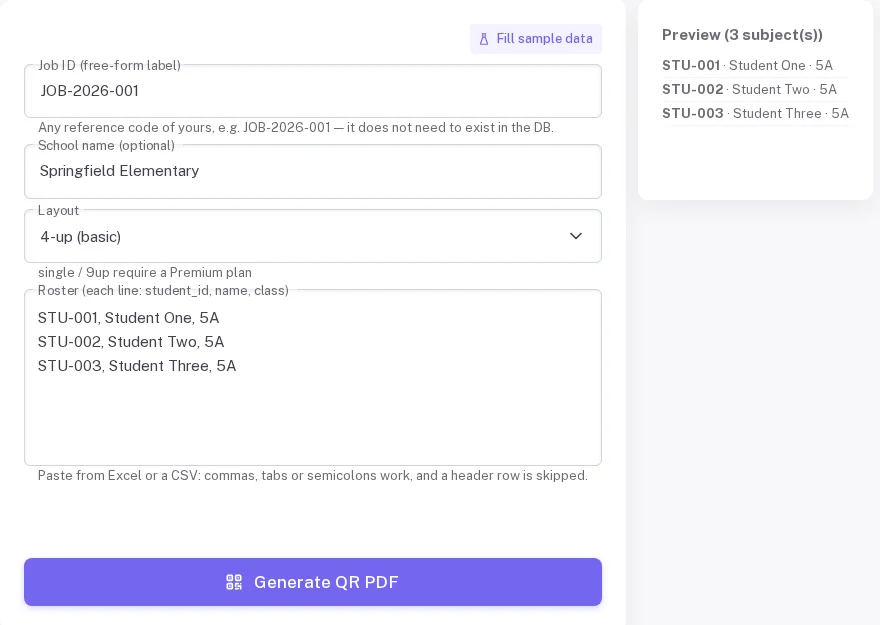
A pasted record list is parsed into a preview of individual records before any file is generated.

(opens the full-size diagram in a new tab)
What does a worked example look like?
A worked example on one real product: a membership renewal letter, personalised with a member's name, renewal date, tier and a unique barcode. Intake validates that every row has a name, a parseable renewal date and a barcode value matching the expected length; a row missing a tier is held out with that reason rather than composed with a blank tier. Template binding maps those four fields to the letter's placeholders. Composition produces one PDF per member. A sample of ten letters, chosen to include the longest name and a renewal date at the end of the month, is proofed and approved before the full run of several thousand composes and moves to imposition for the press.
-
Intake and validation
- Input
- Record file (CSV or spreadsheet export)
- Output
- Validated rows, and a rejection list with reasons
-
Template binding
- Input
- Validated rows and the template's field map
- Output
- Bound records ready for composition
-
Composition
- Input
- Bound records
- Output
- One artwork instance per record
-
Sample proofing
- Input
- A representative sample of composed records
- Output
- An approved sample or a flagged mapping issue
-
Imposition hand-off
- Input
- The approved batch
- Output
- Per-recipient, imposition-ready output files
What is included, and what is not?
Included
- Record intake, field validation and a rejection reason per failed row
- Template binding and per-record composition
- Sample proofing against representative records
- Per-recipient output files handed off to imposition
Not included
- Sourcing, brokering or buying a mailing list
- Postal address hygiene, standardisation or deliverability checks
- Mail delivery, postage or carrier handling
- Replacing the client's own template design process
We describe our services against named print segments, such as commercial, trade, wide-format and signage, packaging and labels, apparel and promotional, photo products, stationery and events, and direct mail, as the scope we work in; a variable data pipeline applies inside most of them wherever a print product carries per-recipient content.
How does the work run?
-
Specify
Record fields, validation rules and the template's binding map are agreed and written down
- Evidence you receive
- Signed field specification and a rejection-reason list
-
Build
Validation, binding, composition and the imposition hand-off are built against the specification
- Evidence you receive
- Pipeline passing a test batch, including deliberately broken rows
-
Accept and hand over
A real batch is run end to end, with a sample proof approved before full composition
- Evidence you receive
- Acceptance record, runbook and the rejection-handling procedure
The default engagement is fixed-scope with written acceptance criteria and priced change control. Managed operations is a separate, opt-in agreement.
What proof sits behind this service?
Web2Print Solutions is the web-to-print engineering service of Netbase JSC. Delivery records cited on this site belong to Netbase JSC; where no delivered example of a capability is published, the page says so rather than implying a record. No variable-data print pipeline delivered under the Web2Print Solutions name is published yet. Stores built by the group that are live today are listed on the live web-to-print stores evidence page; those are group records, not a published variable-data delivery under this name.
Scope this work with a project brief
Send a project brief with a sample of your record file (with any real personal data removed), the template it needs to bind to, the fields that must validate before a record composes, and one record you know breaks today. That is enough to draft the field specification and the rejection rules. If the question is media and marketing production more broadly, web-to-print for media and marketing production sets out where this pipeline fits in that wider workflow.
Frequently asked questions
No. List sourcing, brokering and address hygiene are not in scope. The pipeline validates and composes the records it is given; the list itself is the client's own responsibility or a separate provider's.
It is held out of the batch with the specific reason, such as a missing required field or an invalid date, rather than composed with a blank or a guessed value.
Yes, as a specified change to the field map and binding rules, tested against a sample batch before it runs on real records.
Not yet under the Web2Print Solutions name. This page describes the capability and how it is built; it does not claim a delivered variable-data record.
References (5)
- IETF RFC 4180, Common Format and MIME Type for Comma-Separated Values (CSV) Files, accessed 2026-10-04.
- CIP4, Job Definition Format (JDF), accessed 2026-10-04.
- CIP4, Exchange Job Definition Format (XJDF), accessed 2026-10-04.
- Ghent Workgroup, Specifications for PDF-based print file exchange, accessed 2026-10-04.
- AIIM, the association for intelligent information management (records and information governance), accessed 2026-10-04.