

CMYK and spot colour in a web-to-print pipeline
A browser-based design tool draws in RGB, but a press prints CMYK process colour, sometimes alongside named spot inks. A web-to-print pipeline must convert RGB to CMYK against an agreed ICC output intent, keep spot colours as named separations rather than converting them, and preserve overprint settings through to the final file.
Start a project brief Explore servicesReviewed by CEO, Netbase JSC · Published 30 Sep 2026 · Updated 30 Sep 2026 · 9 min read

Why does a design that looks right on screen print wrong?
A screen is an RGB device: it makes colour by adding red, green and blue light. A press is a CMYK device, and often a spot-ink device too: it makes colour by laying down cyan, magenta, yellow and black ink, or a pre-mixed named ink for a specific colour. RGB has a wider colour range than CMYK, particularly in saturated blues, greens and oranges, so some colours a screen can show simply cannot be printed as process colour at all. A pipeline that skips a real conversion step — or worse, lets the printer's RIP guess at conversion with no agreed profile — produces a printed result that does not match what the customer approved on screen, and that gap is one of the most common sources of a rejected or disputed print job.
Cyan, magenta and yellow inks mix subtractively, the way press colour is built.

How does RGB-to-CMYK conversion actually work?
Conversion is not a fixed formula; it is a lookup against a colour profile that describes how a specific combination of press, ink and paper reproduces colour. The International Color Consortium (ICC) format is the industry mechanism for that description: an ICC profile maps device-independent colour values to and from a specific device's colour space, so that "this RGB value" and "this CMYK value" can be reconciled through a common reference rather than converted by a generic assumption.
Two profiles matter in a print conversion: a source profile, which describes the RGB space the design was created in (commonly sRGB for web-native work), and a destination profile, which describes the specific press-and-substrate combination the job will run on. The destination profile is what a technical output specification means by an output intent — it is embedded in, or referenced by, the print-ready PDF, and it is what a RIP or proofing system uses to render the file's colour predictably rather than by default assumption.
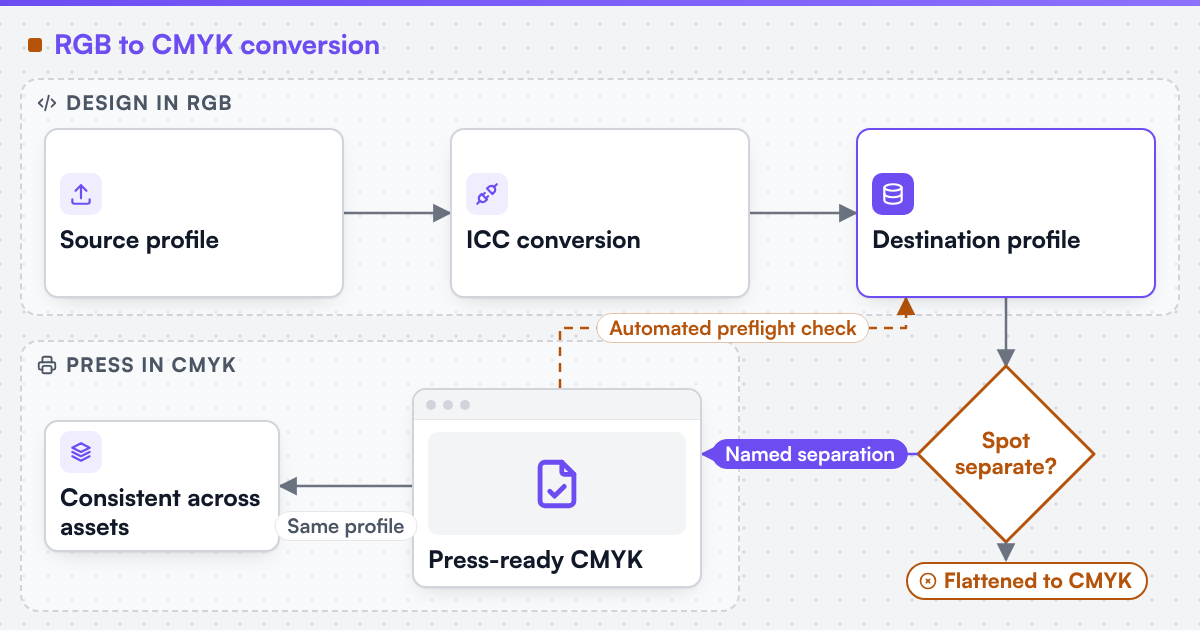 (opens the full-size diagram in a new tab)
What is a spot colour, and why does it need separate handling?
A spot colour is a pre-mixed, named ink — a Pantone-style colour system is a common example of this kind of named-colour reference — printed as its own plate rather than built by overlapping cyan, magenta, yellow and black. Two things follow from that. First, a spot colour is not "converted to CMYK" in the way a photograph is; if a design element is meant to print as a spot ink, the file needs to keep it as a named colour on its own separation, not flattened into process values, or the job prints a CMYK simulation of the ink instead of the ink itself. Second, where a spot colour and a CMYK image share a page, the file needs consistent overprint settings — whether the spot ink is meant to overprint the layer beneath it or knock it out — because getting that wrong produces a visible seam or an unintended colour mix at the press, not just a shade that is slightly off.
Naming conventions matter here too: a design tool that emits two swatches for what should be one spot colour, or that leaves a "convenience" process-colour swatch with the same name as a true spot ink, forces production to guess which one the file actually means.
What must an online editor preserve at export?
A browser draws everything in RGB by definition, so an online design tool cannot render final CMYK or spot-colour output client-side; it needs a server-side step that performs the conversion against agreed profiles and writes the result correctly into the exported PDF. Four things need to survive that step intact:
- An embedded or referenced ICC output intent, so any downstream RIP or proof knows which destination profile the CMYK values were converted against, rather than reinterpreting them blind.
- Spot colour names, kept as named separations rather than flattened to process values, for any product option that is defined as a spot ink.
- Overprint flags, set deliberately rather than left at a tool's default, wherever a spot colour and process colour share a page.
- Consistent conversion across every asset on the page — a photograph, a background fill and a logo should all be converted against the same destination profile, not three different defaults picked up from three different upload steps.
Why your design editor exports RGB, not CMYK covers the underlying architecture gap this points at: a client-side canvas produces a preview, and the conversion has to happen somewhere else, on the server, against a real profile.
Worked example: a two-colour print product with one spot ink
Take a print product specified as one CMYK photograph plus one spot-colour accent — a common pattern for stationery and packaging accents. At export, the photograph is converted to CMYK against the job's destination profile and embeds that profile as the output intent. The accent element keeps its spot-colour name on its own separation rather than being flattened into a CMYK approximation, and the file records whether that spot ink overprints the photograph where the two overlap or knocks out beneath it. An automated preflight check then confirms three things independently: the photograph is CMYK, not RGB; the spot separation still carries its named colour rather than having collapsed into process values somewhere in the export chain; and an output intent is present so the RIP is not left guessing.
Table: what changes and what must not
-
RGB photograph
- What conversion does to it
- Converted to CMYK against the destination profile
- What must stay unchanged
- The destination profile used, recorded as the output intent
-
Spot colour element
- What conversion does to it
- Not converted; kept on its own named separation
- What must stay unchanged
- The spot colour's name and its overprint setting
-
Vector fills and text in RGB
- What conversion does to it
- Converted to CMYK like a photograph
- What must stay unchanged
- Intentional near-black or rich-black builds, if the design specifies one
-
Output intent
- What conversion does to it
- Selected once for the job
- What must stay unchanged
- The same profile applied to every asset on the page, not a per-asset default
Does naming an output specification mean colour will match exactly?
No, and this is worth being direct about. Where a technical standard is named, it describes the output specification an engagement produces to, not a credential Web2Print Solutions holds. An ICC-managed conversion narrows the gap between screen and press predictably, but paper stock, ink batch and press condition still introduce some variation press to press; a specification describes the target the pipeline is built to hit, not a promise that every printed sheet is pixel-identical to the screen preview.
Turn this into a scoped brief
If your storefront's exported files are losing spot colours, printing muddy or arriving without a usable output intent, send a project brief with your product's colour specification (process, spot, or both), the destination profile your printer expects, and one exported file that shows the problem.
Discuss your web-to-print project
Frequently asked questions
It can approximate it through a soft-proof preview, but the actual conversion still has to happen server-side, against a real destination profile, at export.
Most do; it is what tells a RIP or proofing system which profile the CMYK values were converted against, and its absence forces the receiving system to guess.
Sometimes, for cost or press-availability reasons on a specific job, but that is a deliberate decision recorded for the job, not a default an export pipeline should apply silently.
No. Pantone is a widely used named-colour reference, but any printer-approved named-colour system works the same way: as a separation kept intact, not converted.
References (4)
- International Color Consortium, home page, accessed 2026-09-30.
- International Color Consortium, ICC specifications (ICC v4 and iccMAX), accessed 2026-09-30.
- ISO, ISO 12647-2:2013 - Graphic technology - Process control for the production of half-tone colour separations, proof and production prints - Part 2: Offset lithographic processes, accessed 2026-09-30.
- Ghent Workgroup, Spot Color Communication, accessed 2026-09-30.