

Photo calendar designer
A photo calendar designer generates a date grid for a chosen start month and length, places each locale's public holidays on the correct day, and pairs every month with a photo slot inside a binding-hole safe zone. Web2Print Solutions engineers the date-grid and locale rules and the print-ready month and cover output a bindery can run.
Start a project brief Explore servicesReviewed by CEO, Netbase JSC · Published 1 Oct 2026 · Updated 1 Oct 2026

What does a photo calendar designer have to do?
A photo calendar looks like a simple grid of boxes, but three things have to be correct before a single photo is placed: which day of the week each date falls on for the chosen month and year, which day the week itself starts on, and which dates in that market are public holidays. All three depend on locale, not just on the calendar year, so a calendar built for one market and reused unchanged for another will quietly show the wrong grid or miss the dates a buyer actually cares about. This page is one of the print-specific product pages in the web-to-print by print product family. It shares its page and spread geometry with the photobook editor and covers what is specific to a calendar: date-grid generation, locale rules and the binding-hole safe zone.
How does a start month and locale become a date grid?
A date grid is a straightforward calculation once two locale facts are known: which weekday a date falls on (a fixed calendar fact, not a locale choice) and which weekday a week is considered to start on, which is a locale convention. The Unicode Common Locale Data Repository documents this directly: its week-data rules define a firstDay per territory, so a calendar grid for the United Kingdom starts its weeks on Monday while the same month for the United States starts on Sunday, shifting every date into a different column even though the dates themselves have not changed. A designer that hard-codes one week-start convention will produce a technically correct but visually wrong grid for every other market, with dates appearing to fall in the wrong column compared to a wall calendar the buyer already owns.
| Locale | Typical week start | Effect on the grid |
|---|---|---|
| en-GB, most of Europe | Monday | Weekend (Sat–Sun) falls at the right edge |
| en-US | Sunday | Weekend falls split across both edges |
| Common Middle East convention | Saturday | Weekend falls at the left edge |
How are public holidays placed on the correct date?
Public holidays fall into two kinds: fixed-date holidays, which land on the same calendar date every year, and rule-based holidays, which are defined relative to a weekday or another date - the fourth Thursday of November, or the Monday following a fixed date when that date falls on a weekend. The iCalendar standard (RFC 5545) defines exactly this kind of recurrence rule, specifying a date's position by weekday-in-month rather than a fixed day number, which is the same mechanism a calendar designer needs to compute a rule-based holiday for any given year rather than maintaining a hand-typed list that goes stale every January. A designer should treat holiday data as a per-locale, per-year input - sourced and refreshed on a schedule the client controls - rather than a hard-coded table shipped once and never revisited, since holiday rules themselves change by legislation from time to time.
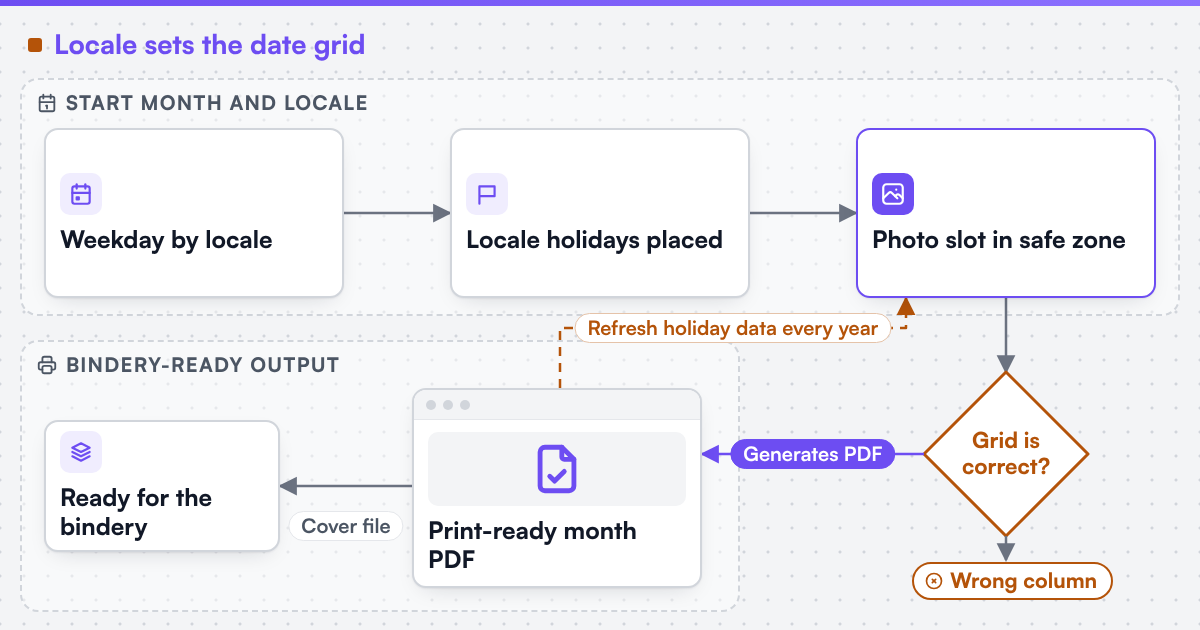 (opens the full-size diagram in a new tab)
What does a photo slot need from the grid around it?
Once the grid is correct, each month pairs it with a photo slot, and the two have to share the page without the grid crowding the image or the image crowding the grid. A practical layout reserves the date grid as a fixed-height band - typically along the bottom or one side of the page - and lets the photo slot fill the remaining area, rather than overlaying text on top of a photo, which fails as soon as a customer picks a busy or dark image where printed date numbers become hard to read. Multi-up layouts (two or three photos per month) need the same date-grid band logic, just with a subdivided image area above it.
Why does binding method set a safe zone the designer must respect?
A wall calendar is usually bound along its top edge - wire-o, saddle-stitch or a similar method - and that binding consumes a margin of the page near the spine that cannot carry text or a photo's focal point without risking it being obscured or punched through. The safe zone's depth depends on the binding method and the hole or wire spacing the bindery uses, so it is a bindery-specific input, not a fixed constant a designer can assume once and reuse across methods. A layout that places a date number or a face too close to that edge risks it landing in or next to a binding hole once the physical book is assembled, which a screen preview alone will not show unless the safe zone is drawn and enforced during layout, not just checked at the end.
What does print-ready output need to include?
We can build custom product configurators and browser design tools that emit print-ready artwork to an agreed specification. A calendar's output is one PDF per month plus a cover and binding file, each carrying the date grid, the locale's holiday placements already baked in, and the photo at full print resolution within the binding-hole safe zone - not a screen-resolution placeholder. We engineer print output including CMYK or spot colour handling and bleed and trim geometry appropriate to the bindery's own specification. The page and layout mechanics this designer shares with photobooks are the same print product configurator engineering this family describes, and the preflight and colour pipeline behind the exported files is print-ready PDF and prepress automation. Netbase JSC, which operates Web2Print Solutions, has delivered 50+ web-to-print platforms, and reusable page-layout and photobook engine components are available under their own licence terms.
Scope a calendar build in a project brief: the markets and locales you sell into, your bindery's binding method and safe-zone measurement, and how often your holiday data needs to be refreshed.
Key takeaways
- A date grid depends on two separate locale facts: the fixed weekday a date falls on, and the locale convention for which weekday a week starts on.
- Rule-based public holidays - the nth weekday of a month - need a recurrence calculation, not a fixed day number, and should be refreshed on a schedule rather than hard-coded once.
- A photo slot and the date grid should occupy separate, fixed regions of the page rather than overlaying text on an image.
- The binding-hole safe zone is set by the bindery's binding method and must be enforced during layout, not checked only at the end.
- Print-ready output is one PDF per month plus a cover and binding file, each at full print resolution with the locale's holidays already placed.
Discuss your web-to-print project
Frequently asked questions
Not unchanged. Week start and public holidays are both locale-specific, so a calendar built for one market needs its date grid and holiday data re-generated, not just relabelled, for another.
At least one full calendar year ahead of the print run, since calendars are typically produced before the year they cover begins, and rule-based holidays for that year need to be computed, not copied from the previous year.
The designer should warn before export, since a face, caption or focal point inside the safe zone risks being partly obscured by the binding once the calendar is assembled.
References (3)
- Unicode Consortium, Unicode Locale Data Markup Language (LDML): Dates (week data, first day of week by territory), accessed 2026-10-01.
- IETF, RFC 5545: Internet Calendaring and Scheduling Core Object Specification (iCalendar), recurrence rules, accessed 2026-10-01.
- IANA, Time Zone Database, accessed 2026-10-01.