Ready-made platform
Run it on W2P Solution
A white-label print store with a built-in designer, print pricing rules and a production queue, set up and hosted by the Netbase team on a yearly plan.


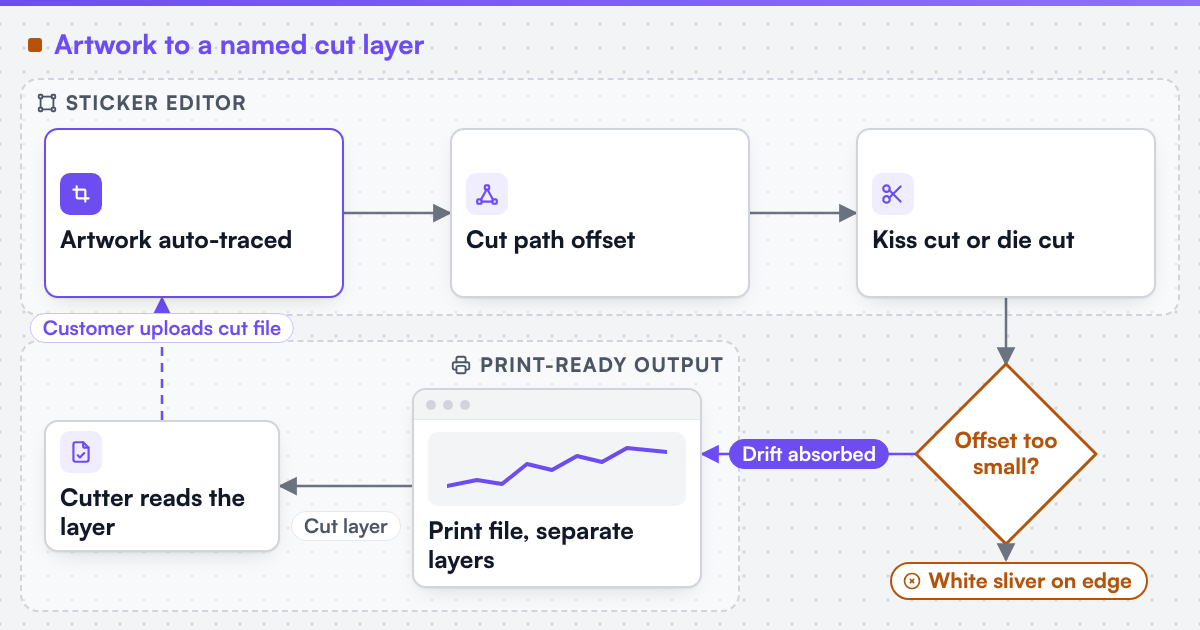
A sticker or label editor turns uploaded artwork or a shape template into a cut path offset from the artwork's edge. Web2Print Solutions engineers that auto-traced contour, the choice between kiss-cut and die-cut, roll or sheet layout, material and finish rules, and a print-ready file that carries a separate named cut layer.
Start a project brief Try the live demoReviewed by CEO, Netbase JSC · Published 1 Oct 2026 · Updated 1 Oct 2026

A sticker or label order looks simple from the customer's side: upload a logo, pick a shape, choose a quantity. Underneath, the editor must decide exactly where the material gets cut, as a path distinct from the printed ink, and hand that path to a cutter or press in a form the machine can act on. An editor that treats the cut line as an afterthought - inferred from a bounding box, or left for a production operator to trace by eye - is why a die-cut sticker ships with a visible white sliver on one edge and a clip into the artwork on another, and why an irregular shape turns into a rough rectangle instead of a path that follows the design. This page is one of the print-specific product pages in the web-to-print by print product family. We can build custom product configurators and browser design tools that emit print-ready artwork to an agreed specification.
Two entry points cover most orders. The first takes an uploaded artwork file and auto-traces its outline, producing a cut path that follows the visible edge of the design - the natural route for a die-cut shape that matches a logo or illustration. The second offers a library of parametric shapes, such as a circle, a rounded rectangle, a star or a custom polygon, which the customer resizes while the artwork is cropped or placed inside; this suits standard shapes that do not need an irregular outline. Some orders let a customer upload their own cut file, typically an SVG or a vector PDF, for a multi-piece cut or a shape auto-trace cannot resolve cleanly - text with thin serifs, or a logo with disconnected elements.
Whichever entry point produces the shape, the cut path is never the artwork's exact outline - it is that outline moved by a small, fixed offset, usually in millimetres:
Cut path = artwork outline ± offset
The size of the offset depends on the job. A positive offset, cutting slightly outside the artwork, leaves a thin border that absorbs small registration drift between the print head and the blade; too little offset on a mis-registered sheet shows as a white sliver on one side and a clipped edge on the other. A negative offset, cutting inside the artwork, suits a design needing the ink to bleed past the cut line with no border. Offset is a property of the cutter and material, not the artwork, so the editor should let production set a default per material rather than one value for every job.
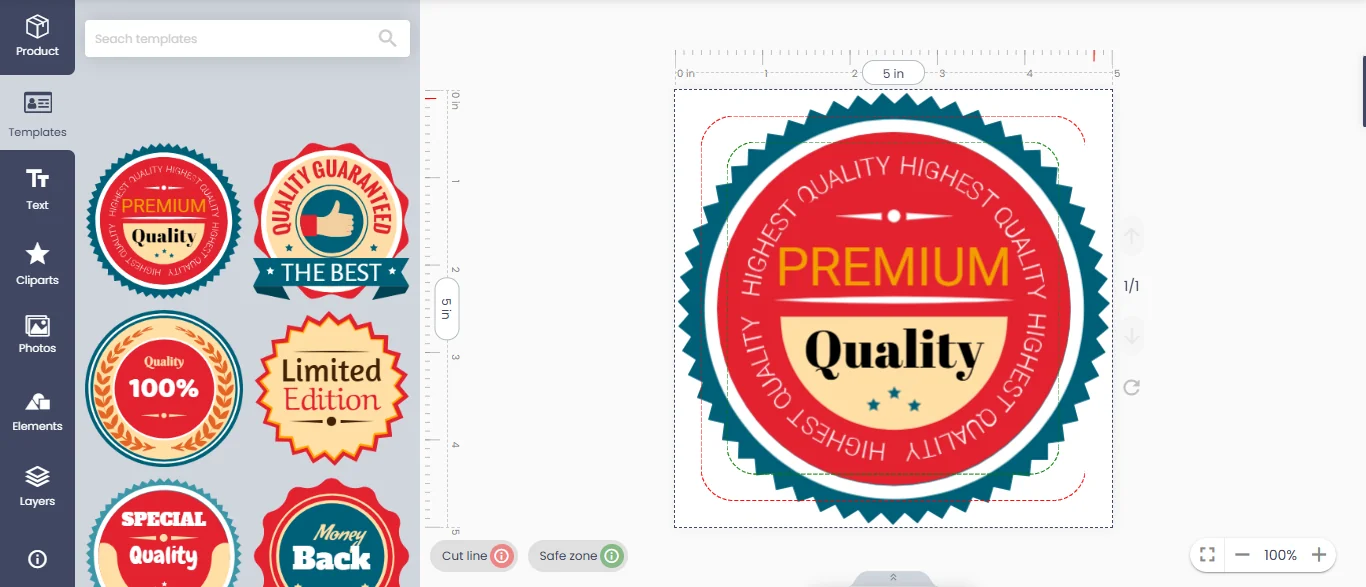
The canvas draws the cut line and the safe zone around the artwork, so the offset and margins are visible while the customer edits.
 (opens the full-size diagram in a new tab)
| Cut type | What is cut | What stays intact | Typical use |
|---|---|---|---|
| Kiss cut | Only the face stock (the sticker material) | The backing liner, so each sticker peels off in place | Individual stickers meant to be peeled one at a time from a sheet or roll |
| Die cut | Both the face stock and the backing liner | Nothing below the cut line; the piece separates completely | Labels or decals removed as a unit, or shapes that ship loose rather than on a backing |
The two differ only in cut depth, but that changes upstream decisions. A kiss-cut job needs the backing liner specified, so the auto-trace offset does not slice through it, and usually needs a weed border - excess material trimmed after cutting - sized into the layout. A die-cut job skips the liner question but needs its output oriented so loose pieces do not shift in transit. The editor should expose kiss cut versus die cut as an explicit per-product choice, not infer it from the shape.
| Format | Layout unit | What the editor must track | Typical order size |
|---|---|---|---|
| Sheet | A fixed sheet size, such as a press sheet | Nesting count per sheet, margins, whether designs share a sheet | Small to mid runs, mixed small-batch orders |
| Roll | A continuous web at a fixed width, cut to length | Repeat spacing (pitch) along the roll, roll width versus shape width | Larger runs intended for a label applicator or dispenser |
Roll output adds a constraint sheet layout does not have: a label needs a consistent pitch, the repeat distance from cut to cut, so an automatic applicator can index reliably, and the configurator must fit the chosen shape into that pitch without wasting material. Sheet layout instead optimises for nesting - how many copies fit on one sheet with the smallest gaps - similar to imposition on any flat sheet job.
Material and finish choices feed back into the same cut-path and colour rules. Vinyl, paper and polypropylene stocks behave differently under a blade, so offset and cut depth usually vary by material, not just by kiss versus die. An over-laminate layer, where offered, sits above the ink and changes the finished cut depth for a die-cut job, since it must be pierced along with the face stock. White-ink or spot-varnish layers, used under clear or metallic materials, need their own printing pass, distinct from the artwork and the cut layer.
The output a cutter can act on keeps the artwork and the cut instruction in separate layers, never merged into one flattened image. We engineer print output: PDF generation to a client-specified standard, CMYK and spot colour handling, ICC profile selection, bleed and trim geometry, imposition and automated preflight. The cut layer is typically a vector path kept in its own layer or saved under a reserved spot-colour name that prints nothing itself, so a cutter reads that layer without a print head firing ink into it. Where a technical output specification such as PDF/X is named, it describes the file target an engagement is built to produce, not a credential Web2Print Solutions holds. This pipeline is print-ready PDF and prepress automation; the option logic in front of it is print product configurator engineering, and the segment this sits inside is packaging and labels.
Among the live web-to-print store examples, StickyThings is a UK sticker, label and decal storefront taking custom width and height in millimetres, and MeerStickers is a Dutch sticker and label store offering upload-or-design-online. Live store using web-to-print components delivered by Netbase JSC, which operates Web2Print Solutions. Netbase JSC, which operates Web2Print Solutions, has delivered 50+ web-to-print platforms, and reusable configurator and prepress components from that work are available under their own licence terms.
Scope a sticker or label build in a project brief: the shapes and materials you sell, whether you need kiss cut, die cut or both, and roll or sheet.
Yes, usually as an SVG or vector PDF, for shapes auto-trace cannot resolve cleanly; the editor should still validate the uploaded path against a minimum feature size before accepting it.
The path geometry can be identical; what changes is the cut depth the cutter applies and whether the backing liner is included in the check, not the vector shape itself.
It does not. Pitch only matters once a design moves to a roll for an automatic applicator, so the editor should expose pitch settings only once roll is selected.
Ready-made platform
A white-label print store with a built-in designer, print pricing rules and a production queue, set up and hosted by the Netbase team on a yearly plan.
Commissioned build
When the workflow needs rules, integrations or a configurator a standard edition does not cover, the Netbase engineering team scopes and builds it.
Tell us about one product you want to sell online. A senior engineer reads every brief and replies in writing.
Tell us what you need to build, migrate or connect.
Start a project brief