Ready-made platform
Run it on W2P Solution
A white-label print store with a built-in designer, print pricing rules and a production queue, set up and hosted by the Netbase JSC team.


A print shop implements web-to-print on WooCommerce in six phases: audit the catalogue, model each product type, move pricing to server code, attach the online designer, map paid orders to production jobs, then test on a staging copy before launch. Each phase ends with a written acceptance test, so problems surface before customers order.
Start readingReviewed by CEO, Netbase JSC · Published 20 Nov 2026 · Updated 20 Nov 2026 · 12 min read

Implementing web-to-print on WooCommerce means turning a general online store into one that prices a print job correctly, captures the customer's artwork or design, and hands production a job it can run without retyping. WooCommerce supplies the catalogue, cart, checkout, payments and order records. Everything print-specific - size and finishing logic, the online designer, print-ready files and the link to the production system - is added on top and has to survive every WooCommerce, WordPress and plugin update afterwards.
This guide gives the order to do that work in, the decision each phase settles and the test that proves it. It is the how-to companion to the WooCommerce web-to-print integration page, which sets out the platform constraints (block checkout, High-Performance Order Storage, cart hooks) that this sequence is designed around. When the work is commissioned rather than done in-house, it is scoped as web-to-print ecommerce integration; a store built from scratch on another stack is a new web-to-print platform implementation instead.
Four decisions shape everything after them, and each is cheaper to settle on paper than to change once products are live.
Classify the catalogue. List every product and put it in one class: a fixed product with no options (a pack of stock envelopes), a configurable product with a bounded option set (business cards in three stocks and two finishes), an open-ended product whose price depends on entered values (a banner sized to the centimetre), or a designable product where the customer creates or edits artwork in the browser. Most print catalogues contain all four, and each class needs a different build.
Choose the checkout. WooCommerce offers a block-based Cart and Checkout and the older shortcode checkout. Pick one, record it, and test against it; print data that only reaches one of them is a common cause of orders arriving without their configuration.
Confirm order storage. WooCommerce documents that High-Performance Order Storage has been enabled by default for new installations since version 8.2 (October 2023), with a compatibility mode that keeps the older post tables in sync. Record which mode the store runs, because it decides how a migration and every custom order query are written.
Decide who maintains it. A WooCommerce print store is a stack the business owns: WordPress, WooCommerce, the theme, every plugin and the hosting. Name the person or supplier who applies updates and runs the test suite after each one. If nobody can, a hosted, integrated platform such as W2P Solution is the better route; the plugin stack versus hosted platform comparison sets out that trade-off.
The six phases run in order. Overlapping them is how print stores launch with correct product pages and broken order data.
Product classes, options, the printer's file specification
Attributes and variations for bounded options, cart item data for open-ended ones
One server-side calculation per product class
Upload, online design or both, and the file each one produces
Status map, job payload, retries and duplicates
Upgrade path, monitoring, rollback
Bounded choices fit WooCommerce's attributes and variations: stock, finish, sides, a short list of sizes. The limit is combinatorial. Three stocks, two finishes, two sides and five quantities already make sixty variations for one business card, and every new option multiplies the count. When a product passes a few dozen variations, or a value is typed rather than chosen, keep the options as cart item data instead, set by the product page and read by the pricing code.
Worked example: a business card with size 85 x 55 mm, 350 gsm silk stock, printed both sides, matt lamination and a quantity of 500. The configuration record attached to the cart line holds product_class: configurable, size_mm: 85x55, stock: silk-350, sides: 4/4, finish: matt-lam, quantity: 500, a design_id or uploaded file reference, and a price_rule_version. Every later phase reads this one record: pricing calculates from it, the designer writes design_id into it, and the production job is built from it. Changing a field name later breaks all three, so the record is written down in phase 2 and versioned.
On the server, every time. The product page may show a live estimate, but woocommerce_before_calculate_totals lets server code recalculate each line from its configuration record whenever totals are calculated, so a changed browser value cannot change what is charged. The calculation itself - sheet yield, run length, finishing steps, minimums - belongs in one pricing module per product class, not scattered across add-on surcharges. We can formalise a print pricing model into an engine the client owns, accepted against a regression suite of the client's own known-good quotes; the print pricing engine service covers that work. This site publishes no prices, rates, day rates or payment terms, so the test here is behavioural: a set of quotes the shop already trusts must reproduce through the cart unchanged.
Decide per product whether the customer uploads a finished file, designs in the browser, or may do either. An upload needs automated checks on arrival: page size against trim, bleed, resolution and colour space, using rules such as those in designing automated preflight rules. An online designer saves the design and returns an identifier that is written into the configuration record; after payment, the production PDF is generated from that identifier to the printer's specification. We engineer print output: PDF generation to a client-specified standard, CMYK and spot colour handling, ICC profile selection, bleed and trim geometry, imposition and automated preflight. Print-ready PDF and prepress automation is where that output contract is specified.
For the block checkout, the configuration and design identifier must also reach the Store API that the Cart and Checkout blocks use. WooCommerce's documentation describes extending Store API responses with ExtendSchema and registered endpoint data; a field that only exists in classic-checkout templates will not appear there.
Write the status map before writing the handoff. WooCommerce's documented order statuses are Draft (block checkout before submission), Pending payment, Processing (paid and awaiting fulfilment), On hold, Completed, Failed, Cancelled and Refunded.
The adapter listens for the change to Processing, builds a job payload from each line's configuration record and file, and submits it to the MIS, a prepress hot folder or a fulfilment partner. Events can arrive twice, so the job key is the order and line id and a repeat submission is ignored. Order fields are read and written through WooCommerce's order objects, never raw post meta, so the adapter keeps working whichever storage mode is active.
Where AI fits. Some shops want help reading free-text order notes into job fields, or a first pass over uploaded artwork. We can build AI-assisted steps into print workflows where a human reviews the result, with accuracy measured on the client's own data before acceptance. Such a step sits beside the handoff, never inside the price or the status map.
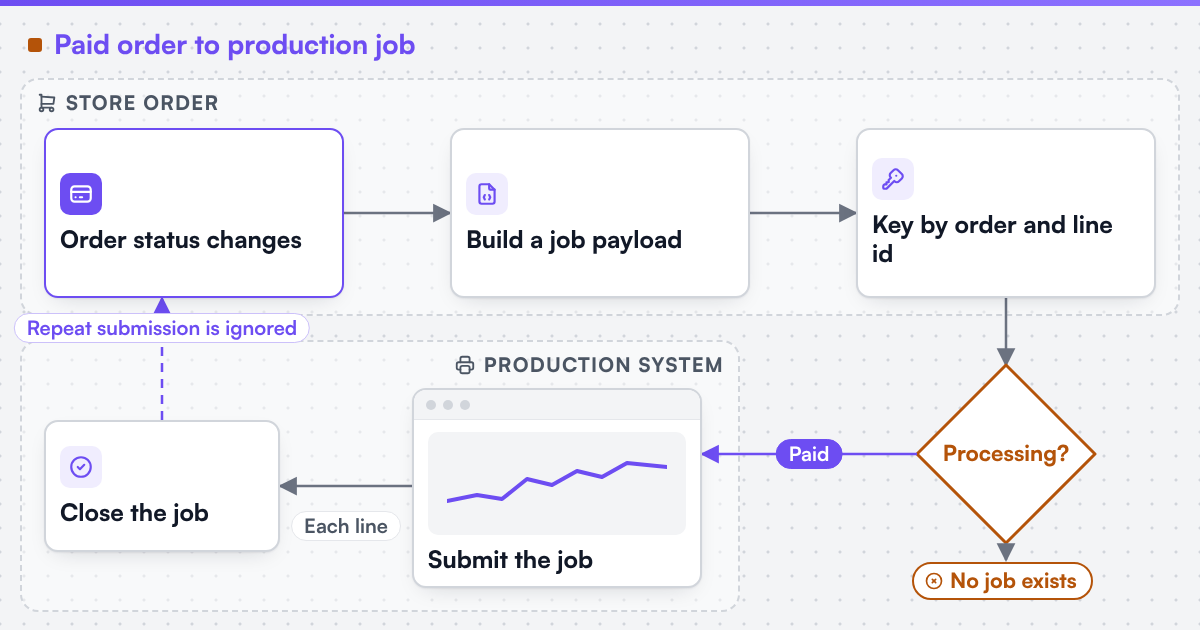 (opens the full-size diagram in a new tab)
Run the whole list on a staging copy of production, then run it again after the first plugin update:
Launch is the start of maintenance, not the end of the project. WooCommerce, WordPress and each plugin release on their own schedules, and any of them can change a hook or a template the print logic depends on. Keep the staging copy, run the test list before applying updates to production, and keep print logic in one plugin with its own automated tests rather than spread through theme files. A store that moves platform later carries saved designs, order history and URLs with it; that is scoped as a print platform migration with parity tests on real orders.
Netbase JSC, which operates Web2Print Solutions, has delivered 50+ web-to-print platforms. Netbase JSC maintains reusable web-to-print components - a browser-based online designer, rule-based print pricing templates, print-ready PDF output with CMYK conversion, bleed and trim, storefront connectors for WooCommerce, Shopify, Wix and custom stores, and a photobook and multi-page layout editor - which an engagement may reuse under their own licence terms. Stores built on WooCommerce and other platforms are listed, each with the date it was checked, under live web-to-print stores. Client-specific deliverables, access and handover are defined in the engagement contract. Pre-existing software, products, APIs and third-party components remain subject to their respective ownership and licence terms.
To scope a WooCommerce print store, read the WooCommerce web-to-print integration constraints first, then send a project brief with your WooCommerce version, checkout type, order storage mode, one configurable product with its full option list, and the system that should receive each job. More technical references are in the guides section.
This guide describes an implementation sequence and the WooCommerce documentation it relies on, read on 20 November 2026; it does not recommend a specific designer plugin, theme or host. Where a technical standard is named, it describes the output specification an engagement produces to, not a credential Web2Print Solutions holds. Web2Print Solutions is the web-to-print engineering service of Netbase JSC. Delivery records cited on this site belong to Netbase JSC; where no delivered example of a capability is published, the page says so rather than implying a record.
It depends on the catalogue audit: the number of product classes, open-ended products and production systems sets the scope. A written estimate follows the audit, not a template figure.
Yes, if the configuration record is fixed first. Adding pricing and the handoff later is routine when every product already writes the same fields; it becomes a rebuild when each plugin stored its own.
No. Either checkout works if the build is tested on the one the store uses. Supporting the Store API avoids a rewrite if the store moves to block checkout later.
The order line. One order often mixes products with different stocks, finishes and due dates, so each line becomes its own job, keyed so a repeated event cannot create a duplicate.
When nobody will maintain the WordPress stack, or when company accounts, approval chains and multiple storefronts are central. An integrated platform carries those without a plugin for each.
Ready-made platform
A white-label print store with a built-in designer, print pricing rules and a production queue, set up and hosted by the Netbase JSC team.
Commissioned build
When the workflow needs rules, integrations or a configurator a standard edition does not cover, the Netbase engineering team scopes and builds it.
 Industry
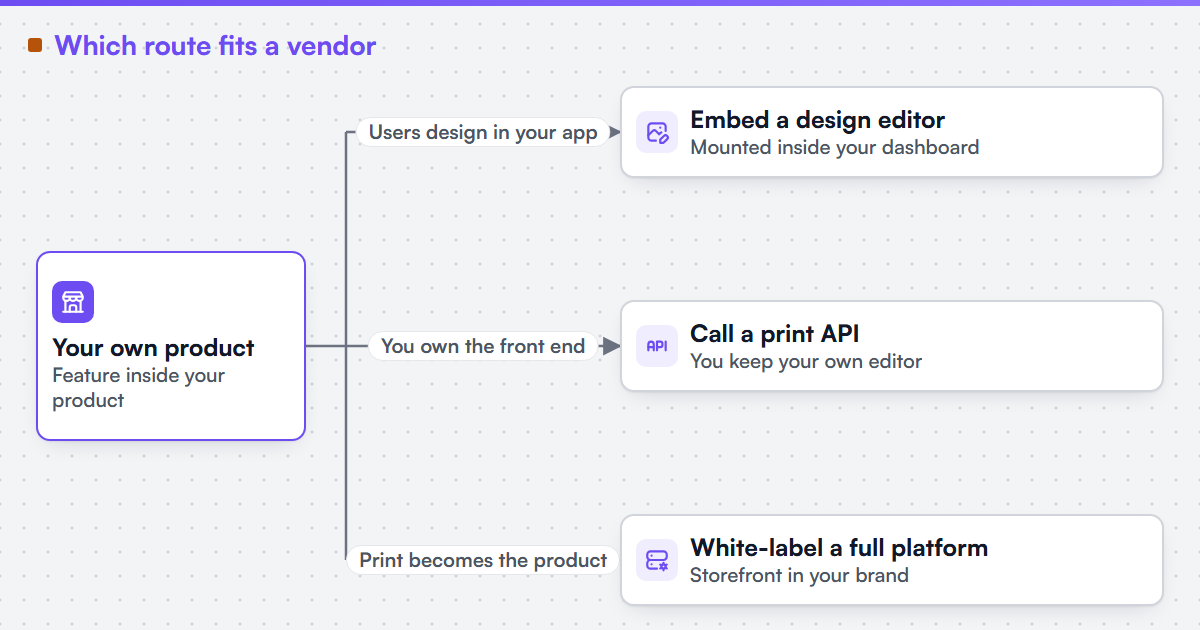
Web-to-print for print software vendors
 Guide
Design editor SDK vs hosted customizer: how to choose
 Integration
Web-to-print on BigCommerce
 Integration
Web-to-print on Magento and Adobe Commerce
 Integration
Web-to-print on Shopify
 Integration
Web-to-print on Wix
Tell us about one product you want to sell online. A senior engineer reads every brief and replies in writing.
I recently had the pleasure of receiving assistance from Selena regarding the … plugin, and I couldn't be more impressed with her exceptional service. From the moment I reached out, Selena was prompt, friendly, and incredibly knowledgeable. She took the time to understand my specific needs and guided me through the plugin's features with clarity and patience.
 Hong Kong
