Ready-made platform
Run it on W2P Solution
A white-label print store with a built-in designer, print pricing rules and a production queue, set up and hosted by the Netbase JSC team.


WooCommerce prices print by size, paper and finishing only when server code calculates each cart line from its configuration. The engine works out sheet yield from the size, multiplies the sheets by the chosen stock, adds each finishing step's setup and run charge, applies quantity breaks and the minimum, then rounds. Variations and add-on surcharges cannot express that chain.
Start readingReviewed by CEO, Netbase JSC · Published 21 Nov 2026 · Updated 21 Nov 2026 · 15 min read

A print pricing engine in a WooCommerce store is the server-side code that turns a configured print product - its size, paper, finishing and quantity - into the amount charged on the cart line. WooCommerce stores products, carts and orders well, but it has no idea that a larger card fits fewer times on a press sheet, that heavier stock costs more for every sheet used, or that lamination carries a setup charge whatever the run length. Those relationships have to be written as rules and run on every cart calculation.
This guide covers that one part of a WooCommerce print store: how size, paper and finishing become a price, in what order the calculation runs, and where it hooks into WooCommerce. The platform constraints it builds on - block checkout, order storage, cart item data - are set out on the WooCommerce web-to-print integration page. When the rules are commissioned rather than written in-house, the work is scoped as print pricing engine engineering.
Pricing is phase 3 of the WooCommerce web-to-print implementation guide; this page expands that phase and assumes the configuration record defined there in phase 2. Stores that would rather configure pricing rules than build them can compare the print price calculator in W2P Solution, covered near the end.
WooCommerce gives a store two built-in ways to vary price, and both store amounts rather than calculate them.
Variations. A variable product takes attributes such as size, stock and finish, and WooCommerce's "Generate variations" action creates every possible combination of their values, each with its own price. Three sizes, four stocks, three finishes and four quantity bands make 144 variations for one product, each priced by hand. Change the cost of one stock and every variation that uses it needs a new price.
Product Add-Ons. WooCommerce's Product Add-Ons extension documents three kinds of paid option: a flat fee charged once regardless of quantity, a quantity-based fee multiplied by the quantity, and a percentage of the product price. Lamination as a percentage is wrong for short runs, where setup dominates, and wrong for long runs, where it does not. None of the three can know how many sheets a job uses.
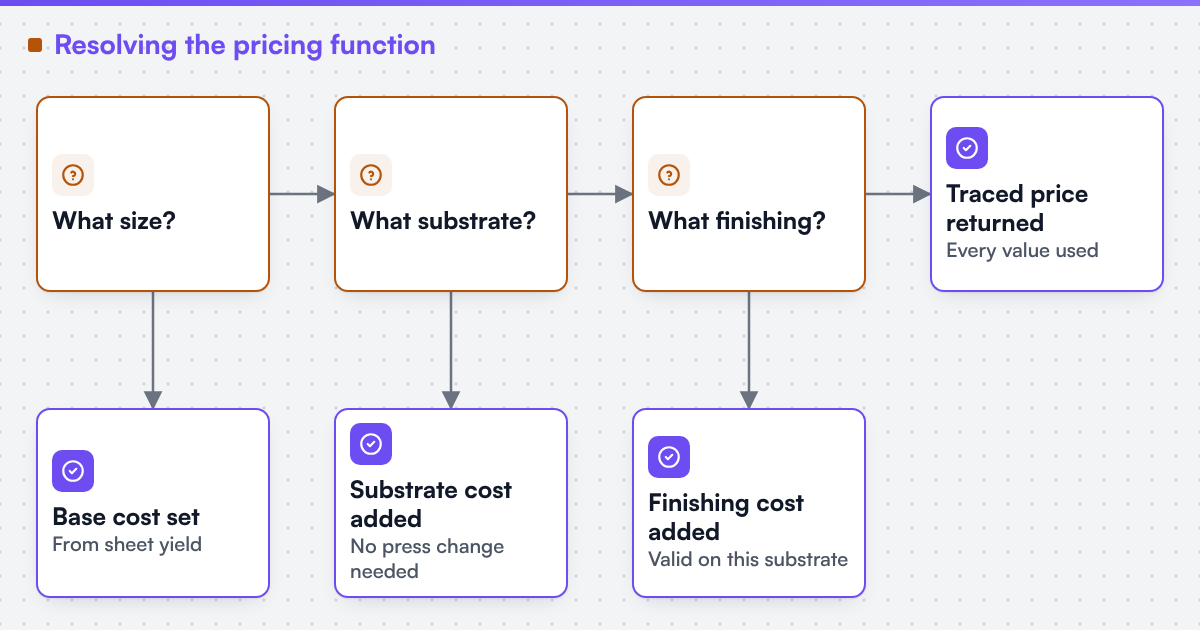
Both break on the same fact: a print price is a function of production inputs, not a list of stored amounts. Size changes the yield, the yield changes the sheet count, and the sheet count multiplies the paper and finishing costs. A stored price can only approximate that, and the approximation is wrong at the edges where print shops lose margin.
| Question | Variations | Add-on surcharges | Server-side pricing engine |
|---|---|---|---|
| What it stores | One fixed price for each combination | A flat, quantity or percentage amount | Rules, rates and the calculation order |
| Size handling | Only listed sizes | A surcharge, not a yield | Sheet yield, or area for a typed size |
| Paper change | Re-price every variation on that stock | A fixed uplift whatever the sheet count | Sheet count multiplied by the stock rate |
| Finishing setup | Hidden inside each fixed price | Flat fee, separate from the run charge | Setup and run charge, by sheet or piece |
| Rate change | Edit every affected variation | Edit every affected option | One rate; tests show which quotes move |
| Best fit | A short list of fixed products | Simple personalisation extras | Configurable print products |
A store can mix them: stock envelopes as simple products, a gift card with a flat add-on, and business cards, flyers and booklets through the engine.
The engine converts the finished size into the number of press sheets the job needs. That is where most of a print price comes from, and it is the step a stored price cannot do.
Take a business card with a finished size of 85 x 55 mm, 3 mm of bleed on each side, printed on an SRA3 sheet of 320 x 450 mm with a 10 mm gripper allowance on the long edge, leaving 320 x 440 mm usable.
The figures are geometry, not prices. A real rule set adds the shop's own gutters, gripper and cutting margins, and may gang several jobs on one sheet; imposition and ganging for online print orders covers that layout step. A size the customer types instead of chooses needs validation and an area or yield calculation at request time, which pricing a custom size online sets out.
Paper enters twice. The stock rate - the shop's cost and margin for one sheet of that paper at that size - is multiplied by the sheet count, so heavier or specialty stock raises the price in proportion to the sheets used, not the cards ordered. The stock also constrains everything after it:
Store the stock as a code in the configuration record (stock: silk-350), not as a label. Labels change for marketing reasons; the code is what the rule set and the production job both read.
Each finishing step has its own basis, and the engine needs to know which one before it can add a charge:
Two rules keep finishing honest. Setup is charged once for each job, whatever the quantity, which is why short runs cost more for each card. And invalid combinations are refused before checkout with a reason the customer can read, such as "matt lamination is not available on this uncoated stock", never silently ignored.
The engine always runs the same steps in the same order and records each value it produced. That record, the trace, is what lets an estimator explain a disputed price line by line.
Size, stock, sides, finishes, quantity from the configuration record
Normalised values and product limits
Bled size and the stock's sheet
Quantity, yield, make-ready allowance
Sheets and stock rate
Sheets, sides, press
Sheets or pieces, each step's basis
Quantity and the shop's quantity break bands
Subtotal and the product minimum
Amount and the rounding increment
Every step can still refuse: a finishing step that does not suit the stock, or a size with no yield on any sheet, stops the calculation with a refusal naming the rule, and no amount is shown.
Rounding is a written rule, not a side effect. PHP's round() documents several rounding modes, so the rule names one mode and one increment, and the tests pin both. Changing either moves prices, so it goes through the same review as a rate change.
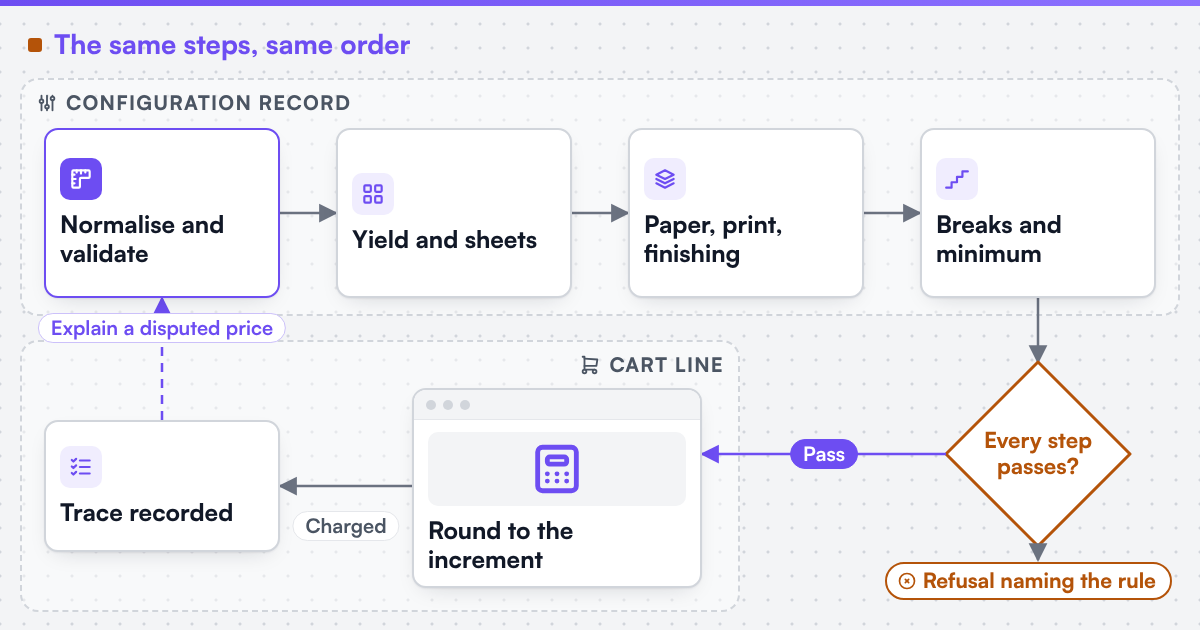 (opens the full-size diagram in a new tab)
This site publishes no prices, rates, day rates or payment terms, so the example uses symbols where a shop would put its own rates. For the 500 cards above, on silk 350 gsm, printed both sides, with matt lamination on both sides:
Change the size to an A6 flyer, 105 x 148 mm, and the yield, the sheet count and every line that depends on it change, while the rates stay the same. That is the behaviour a variation table cannot reproduce without re-pricing every row.
The calculation lives in one plugin, separate from the theme, and connects to WooCommerce at four points:
woocommerce_add_cart_item_data attaches the configuration record, including price_rule_version, to the cart line.woocommerce_before_calculate_totals recalculates each print line from its configuration and sets the line price with set_price() on the cart item's product object. The hook can run more than once in a request, so the calculation must be deterministic, and it may be cached by a hash of the configuration and rule version.A value changed in the browser cannot change the amount charged, because steps 3 and 4 never read a price from the request. That is the test to run first.
Pricing is accepted against cases the shop already trusts, run through the real cart:
AI can help the people who maintain the rules, not replace the rules. Useful steps include reading an old price spreadsheet into a draft rule table for an estimator to check, or comparing the engine's output with past quotes and flagging outliers for review. We can build AI-assisted steps into print workflows where a human reviews the result, with accuracy measured on the client's own data before acceptance. The amount on the cart line is always calculated by the rules, never by a model.
Netbase JSC, which operates Web2Print Solutions, has delivered 50+ web-to-print platforms. Netbase JSC maintains reusable web-to-print components - a browser-based online designer, rule-based print pricing templates, print-ready PDF output with CMYK conversion, bleed and trim, storefront connectors for WooCommerce, Shopify, Wix and custom stores, and a photobook and multi-page layout editor - which an engagement may reuse under their own licence terms. The pricing templates can seed a rule set where they match the shop's model; anything they cannot express is specified and built for that shop.
We can formalise a print pricing model into an engine the client owns, accepted against a regression suite of the client's own known-good quotes. We can scope and build web-to-print integrations for Shopify, WooCommerce, Magento / Adobe Commerce, BigCommerce, Wix and headless storefronts, and we state each platform's constraints before the work is priced. The store wiring around the engine is web-to-print ecommerce integration work. Client-specific deliverables, access and handover are defined in the engagement contract. Pre-existing software, products, APIs and third-party components remain subject to their respective ownership and licence terms.
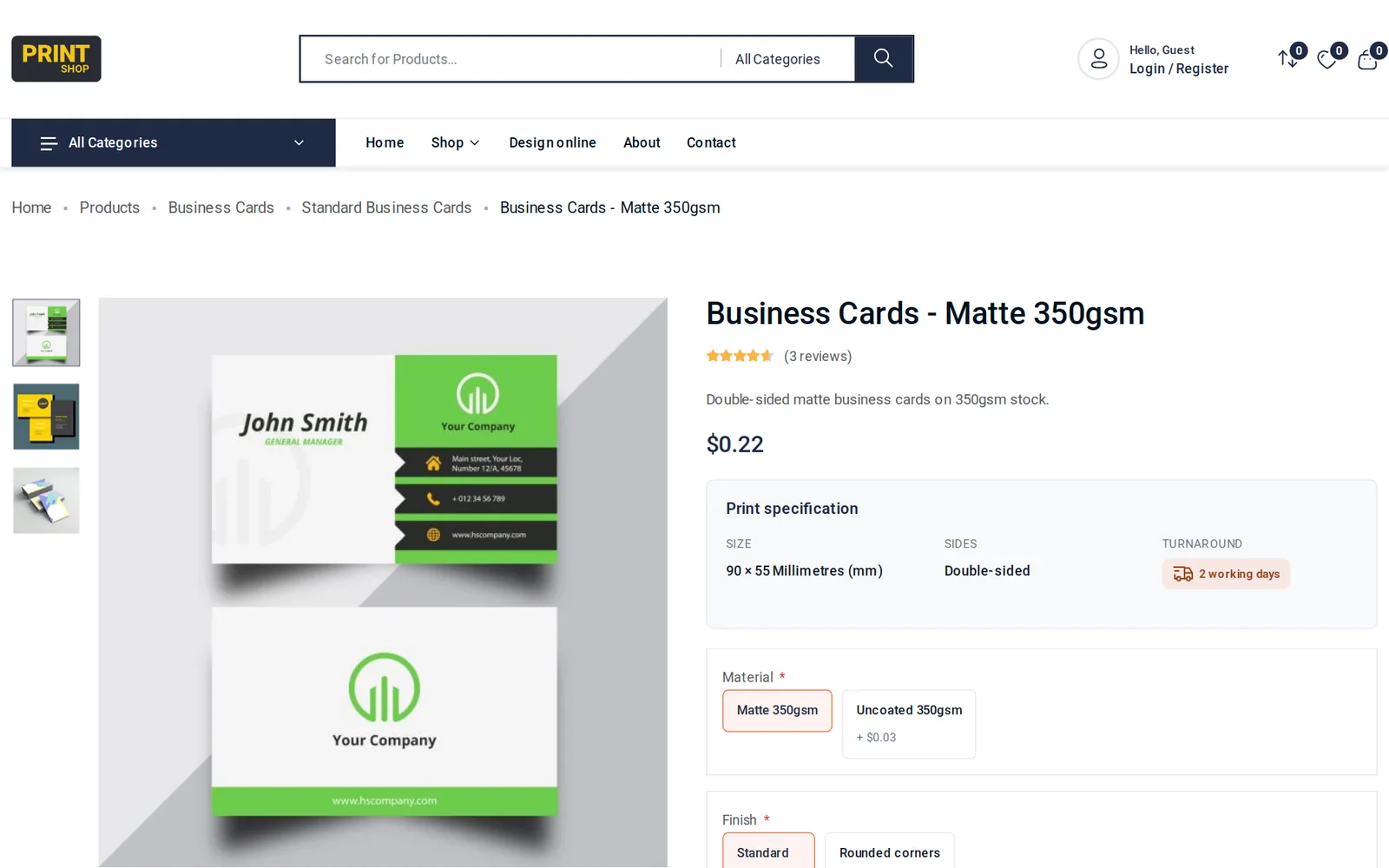
A shop that does not want to own a WooCommerce stack has another route. W2P Solution is a white-label web-to-print store platform from Netbase JSC in three editions (Retail, B2B Procurement, Marketplace), hosted and upgraded by Netbase JSC. W2P Solution prices print products from rules the merchant sets per product for options, quantities and sizes; the buyer sees the price update while choosing, and the order keeps the accepted price. The first release of W2P Solution supports flat print products such as cards, flyers and posters; further product types are planned and are not part of the current plans.
To price size, paper and finishing in a WooCommerce store, check the WooCommerce web-to-print integration constraints for your checkout and order storage, then see what print pricing engine engineering delivers and how it is accepted. Send a project brief with one product's full option list, the sheet sizes and stocks you print on, each finishing step with how you charge for it, and two known-good quotes with their inputs. More technical references are in the guides section.
This guide describes a calculation structure and the WooCommerce documentation it relies on, read on 21 November 2026; it uses no real rates and does not recommend a specific pricing plugin. Yield figures are illustrative and exclude the shop's own gutters and cutting margins. Where a technical standard is named, it describes the output specification an engagement produces to, not a credential Web2Print Solutions holds. Web2Print Solutions is the web-to-print engineering service of Netbase JSC. Delivery records cited on this site belong to Netbase JSC; where no delivered example of a capability is published, the page says so rather than implying a record. No delivered WooCommerce pricing engine is published on this site yet.
It can apply discounts and surcharges by quantity, role or cart contents. It cannot calculate sheet yield from a size or a finishing charge from a sheet count, so configurable print products still need a calculation step in server code.
When a rate change means editing more variations than one person can check, the product belongs in the engine. Every option added multiplies the count, so the limit arrives quickly on a configurable product.
The browser may show an estimate from the same engine through an endpoint. The amount charged is always recalculated on the server from the configuration record.
The engine validates the typed width and height against the product's limits, then calculates yield or area for that size at request time. A custom size can never use a stored variation price.
Nothing. Each order line keeps the rule version, the inputs and the trace that produced its price; only new cart calculations use the new rate.
Ready-made platform
A white-label print store with a built-in designer, print pricing rules and a production queue, set up and hosted by the Netbase JSC team.
Commissioned build
When the workflow needs rules, integrations or a configurator a standard edition does not cover, the Netbase engineering team scopes and builds it.
 Guide
Print pricing is a function, not a price list
 Guide
Quantity break and run-length pricing rules
 Service
Print pricing engine engineering
 Solution
You cannot price a custom size online
 W2P Solution
Print price calculator: option, quantity and size pricing in your store
 Project
A preflight rule set we own outright
Tell us about one product you want to sell online. A senior engineer reads every brief and replies in writing.
I recently had the pleasure of working with NETBASE for a customization project on my WordPress website. From start to finish, the experience was exceptional, and I am thrilled to share my positive review about their outstanding services.
 Jun
Customer ·
 United States
