Ready-made platform
Run it on W2P Solution
A white-label print store with a built-in designer, print pricing rules and a production queue, set up and hosted by the Netbase JSC team.


A packaged product designer plugin is the right choice for a WooCommerce print store with a small, flat catalogue and simple output needs. A custom-built designer earns its cost when print-ready PDF rules, server-side pricing, order data and upgrade control matter more than launch speed. A test order through each candidate settles most decisions.
Start readingReviewed by CEO, Netbase JSC · Published 22 Nov 2026 · Updated 22 Nov 2026 · 11 min read

A print shop that sells on WooCommerce and wants customers to personalise products in the browser has two realistic ways to get a product designer: install a packaged designer plugin sold for WordPress, or commission a custom-built designer, a WordPress plugin written for that shop around a browser canvas engine, whose code and output rules the shop controls. Both keep WooCommerce as the store. This page compares only that designer component; the store-wide platform constraints (block checkout, High-Performance Order Storage, cart hooks) are set out on the WooCommerce web-to-print integration page, and the order to build the whole store in is the WooCommerce web-to-print implementation guide, of which this page expands the designer phase.
Designer plugins are described here as a category, not by vendor. When the custom route is chosen, the work is usually scoped as web-to-print ecommerce integration, with the designer itself specified as a print product configurator.
Five criteria decide this choice, in this order of weight for a print business:
Editor features such as text effects and templates rarely decide the outcome; most plugins cover them.
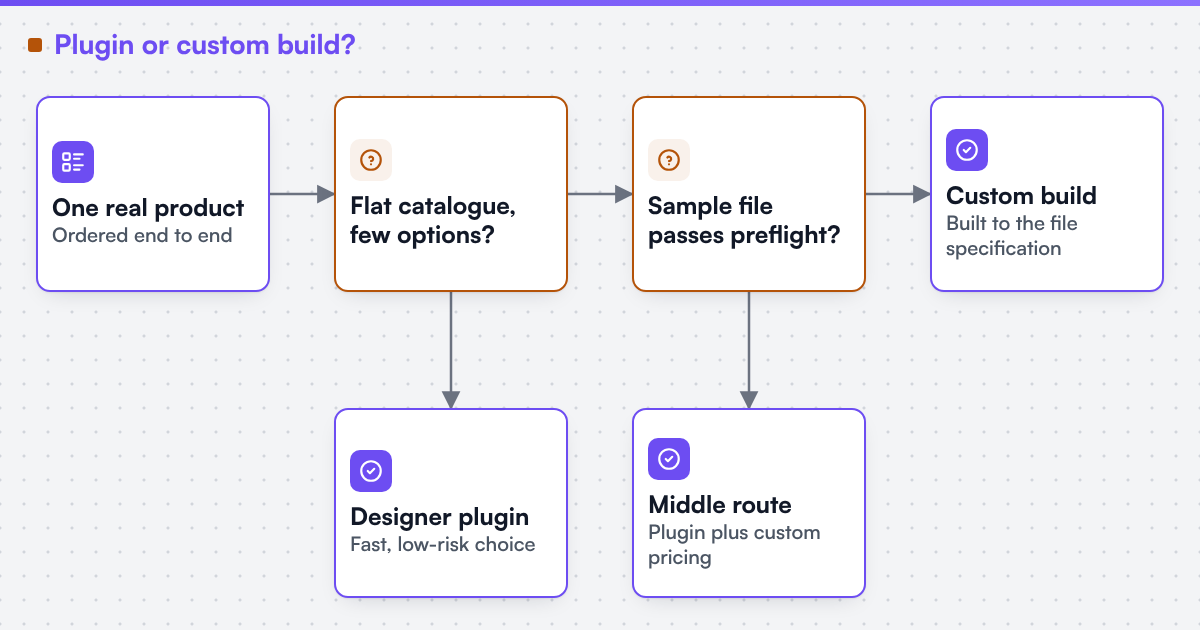 (opens the full-size diagram in a new tab)
The plugin column describes typical patterns across the category, not a named product; each entry is what to verify before buying.
| Criterion | Designer plugin option | Custom build option |
|---|---|---|
| Time to a first live product | Days: install, configure, style | Weeks: specification, build, acceptance tests |
| Print-ready output | Varies; order a sample file and preflight it | Built to the printer's written file specification |
| Pricing of designed products | Option surcharges or plugin rules | Server-side calculation from the configuration record |
| Order data and HPOS | Check the plugin's HPOS declaration | Written through order objects from the first line |
| Block checkout | Check the declared blocks compatibility | Tested on the checkout the store uses |
| Upgrades | The vendor's release schedule | The shop's own test suite on a staging copy |
| Roadmap control | The vendor's | The shop's |
| Up-front effort | Low | High; scoped from a specification |
| Best fit when | Flat catalogue, few options, one store | Calculated prices, strict output, a production system |
WooCommerce documents both compatibility declarations. An extension declares High-Performance Order Storage support through FeaturesUtil::declare_compatibility() with the feature id custom_order_tables, and WooCommerce warns a merchant who tries to enable that storage while an incompatible plugin is active. Cart and Checkout blocks compatibility is declared with the id cart_checkout_blocks, and WooCommerce checks it only for extensions that state a WC tested up to header.
A packaged plugin is the right call when most of these hold: the catalogue is flat (cards, flyers, posters, apparel with one print area), options are few and fixed, a person checks every file before it goes to press, and no MIS or production system has to receive the job automatically. The plugin category's genuine strengths are speed, a mature editor maintained by a vendor that sells it to many stores, and a low up-front commitment that lets a shop learn what its customers actually design. Plugins listed in the WordPress.org directory must also be licensed under the GNU General Public License or a compatible licence, under guideline 1 of WordPress's plugin guidelines, which gives the shop the right to keep running and modifying the code it installed.
A custom build earns its cost once the designer has to do print work that a general-purpose plugin was not written for. Typical triggers are prices that depend on size, sheet yield or finishing; a printer's file specification that sample files from shortlisted plugins fail; products with unusual geometry such as wraps, dielines or multi-page layouts; a production system that must receive each job without retyping; or repeated breaks after updates that cost more to absorb than a maintained build would.
A custom designer is usually a WordPress plugin around a browser canvas engine; the browser's Canvas API provides drawing through JavaScript and the HTML canvas element, and an engagement may build on an open-source canvas library or a commercial editor component. Where that editor runs and who operates it is its own decision, compared in design editor SDK versus a hosted customizer. We can build custom product configurators and browser design tools that emit print-ready artwork to an agreed specification. We engineer print output: PDF generation to a client-specified standard, CMYK and spot colour handling, ICC profile selection, bleed and trim geometry, imposition and automated preflight; the contract itself is specified in print-ready PDF and prepress automation.
Some shops also want a first automated pass over customer artwork inside the designer. We can build AI-assisted steps into print workflows where a human reviews the result, with accuracy measured on the client's own data before acceptance. That step flags issues for a person; it never approves a file on its own.
Often, yes, and it is frequently the best value. A shop keeps a packaged plugin for the editing experience and adds custom code at the two points where print fails most: a server-side price recalculated through woocommerce_before_calculate_totals, as set out in WooCommerce print pricing by size, paper and finishing, and a server-side output step that turns the saved design into the production PDF to the printer's specification. The risk is coupling: the custom code depends on the plugin's data format, so read its changelog before every update.
Run the same worked example through every candidate, plugin or prototype. Take one real product, for example a two-sided business card at 85 x 55 mm with 3 mm bleed on each edge, a customer photo and two lines of text, then:
Where a technical standard is named, it describes the output specification an engagement produces to, not a credential Web2Print Solutions holds. A plugin that passes all five steps for the shop's hardest product is usually the right answer, whatever a custom build could add.
Our engineering focus is web-to-print: product configurators, print pricing logic, print-ready output pipelines and integration with print production systems. Netbase JSC, which operates Web2Print Solutions, has delivered 50+ web-to-print platforms. Netbase JSC maintains reusable web-to-print components - a browser-based online designer, rule-based print pricing templates, print-ready PDF output with CMYK conversion, bleed and trim, storefront connectors for WooCommerce, Shopify, Wix and custom stores, and a photobook and multi-page layout editor - which an engagement may reuse under their own licence terms. Client-specific deliverables, access and handover are defined in the engagement contract. Pre-existing software, products, APIs and third-party components remain subject to their respective ownership and licence terms. Stores built with group components, each with the date it was checked, are listed under live web-to-print stores.
A shop that would rather not run WordPress at all can compare a different route: W2P Solution by Netbase JSC includes a built-in online product designer, where a buyer personalises a product in the store, the design is saved with the cart line, and the order carries that design to production. Its first release supports flat print products such as cards, flyers and posters. Keeping WooCommerce versus moving to one maintained product is compared in W2P Solution vs a plugin stack.
Read the WooCommerce web-to-print integration constraints, then send a project brief with your WooCommerce version and checkout type, the designer plugin you use or are shortlisting, your hardest product with its full option list, the printer's file specification and the system that should receive each job. Other approach comparisons are in the comparisons section.
This page compares a category of packaged designer plugins with a custom build; it names no plugin and states no price, licence fee or rate for either route. This site publishes no prices, rates, day rates or payment terms. WooCommerce and WordPress facts were read in their documentation on 22 November 2026. Web2Print Solutions is the web-to-print engineering service of Netbase JSC. Delivery records cited on this site belong to Netbase JSC; where no delivered example of a capability is published, the page says so rather than implying a record.
For a flat catalogue with few options and a person checking each file, often yes. It stops being enough when prices depend on size or finishing, when sample files fail the printer's specification, or when a production system must receive each job automatically.
A WordPress plugin around a browser canvas editor, a configuration record written to the cart line, server-side pricing, a server-side output step that produces the production PDF, and automated tests run on a staging copy before every update.
Yes, if the fields each product writes to the cart line are fixed first and saved designs can be exported. Migrating designs between editors is the hardest part, so check the plugin's design export before committing.
Client-specific deliverables and handover are defined in the engagement contract; any reused component or third-party library stays under its own licence terms.
Ready-made platform
A white-label print store with a built-in designer, print pricing rules and a production queue, set up and hosted by the Netbase JSC team.
Commissioned build
When the workflow needs rules, integrations or a configurator a standard edition does not cover, the Netbase engineering team scopes and builds it.
 Project
U-Print, Israel: a Hebrew print store on Wix with a built-in editor
 WooCommerce Web-to-Print: Implementation Guide for Print Shops
 Industry
Web-to-print for print software vendors
 Guide
Design editor SDK vs hosted customizer: how to choose
 Integration
Web-to-print on BigCommerce
 Integration
Web-to-print on Magento and Adobe Commerce
Tell us about one product you want to sell online. A senior engineer reads every brief and replies in writing.
The Customer Support Personnel was very helpful, efficient and professional, going over and above to help, even reaching back to ask if the solutions provided worked and if I needed any more assistance. Her name is Perla Nguyen. I commend her highly and appreciate her efforts at resolving all my problems with the plug-in. Very satisfied customer. 5 Stars
 Philippines
